

Account Overview
To create and use paid instances on the platform, your platform account needs sufficient balance. You can top up the account with cash or by activating a coupon.
Log in to the instance console and choose Billing > Account Overview. The page gives you a quick read on your account.
Account status
Account balance composition
Your MO Intelligence account balance has two parts: cash and coupons. Coupons are activated through activation codes only. Online payment and bank transfers are not yet open, so cash top-ups must be arranged with our support team offline.
Account spending rules
Charges for instances on the platform consume coupons first. When several coupons are valid at the same time, the one closest to its expiration date is consumed first; if expiration dates tie, the smaller-balance coupon goes first. Billing and deduction run hourly.
Monthly bill summary
The monthly bill summary shows your spend by month in a table. You can filter by billing period (range up to one year).
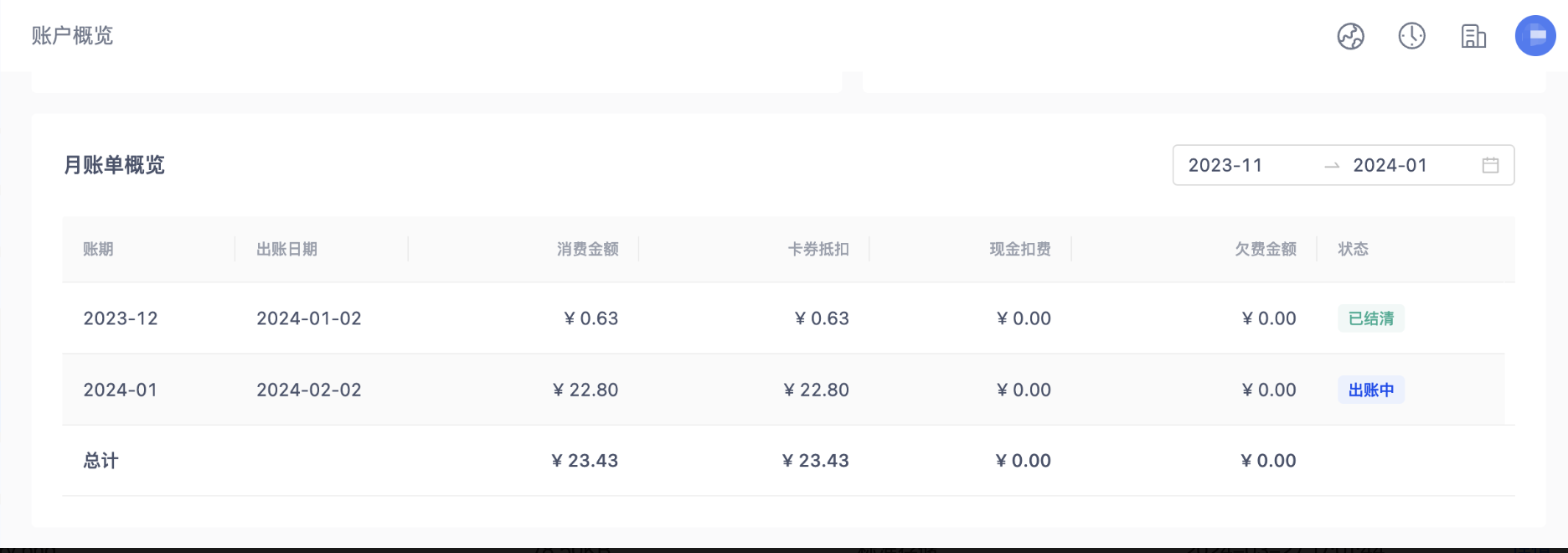
Billing period: the month the bill belongs to.
Bill issuance date: the first day of the following month.
Spend: the amount already spent that month.
Status:
In progress: real-time spend for the current month.
Outstanding: the bill is issued but unpaid.
Settled: the bill is issued and fully paid.
Spending trend
The spending trend analyzes your spend across three dimensions: instance type, billing item, and top instances. By default it shows the last 6 months; you can change the range as long as it stays within one year. Top instances surface your three highest-spending instances. Watching the trend helps you understand each instance’s spend so you can analyze it more deliberately.