

MatrixOrigin MatrixOrigin Docs
Product docs
MatrixOne Intelligence Current product MatrixOne
Get Started Overview GenAI Workspace Database Instance Help Release Notes
/
Contents Menu Expand Light mode Dark mode Auto light/dark, in light mode Auto light/dark, in dark mode Skip to content
MatrixOne Intelligence Docs

MatrixOne Intelligence

  • Home
  • Get Started
    • Quickstart: Create a MatrixOne Intelligence Instance
    • Quickstart: GenAI Workspace
  • Overview
    • MatrixOne Intelligence: an AI-Native Multi-Modal Data Platform
  • GenAI Workspace
    • Overview
    • Workspace Management
    • Data Integration
      • Connectors
      • Data Loading
      • Data Export
    • Data Processing
      • Workflow Templates
        • Workflow Template Overview
        • Multimodal Document RAG Data Preparation
        • Resume Information Extraction
        • Legal Knowledge Fine-Tuning Data Generation
      • Workflow
      • Operation
    • Data Exploration
      • Data Center
      • Data Exploration
    • Alerts
    • User Permissions
      • User Management
      • Role Management
    • Application Development
      • MCP Usage Instructions
      • Deerflow Integration with MOI RAG Service Usage Instructions
    • API
      • Workflow API Documentation
        • API Key
        • Data Integration
        • Data Processing
        • Data Exploration
        • Metrics
      • Quick Start API Documentation
        • Structured Extraction
  • Database Instance
    • MySQL Compatibility
    • Instance Management
      • Create an Instance
        • Create an Instance
        • Create an instance
      • Connect to MatrixOne instance
      • Log in to the database management platform for instance
      • Terminate and restore instances
    • Data Sharing
    • Data Migration and Import
      • Import TPC-H sample data
      • Import object storage data
      • Import local data
      • Write MySQL data to MatrixOne Intelligence using NineData
    • Export data using modump
    • Data Exploration
      • SQL Editor
      • Workbook management
      • Query Analysis
        • SQL Query History
        • Query Analysis
    • Application Development
      • Connect to a Database Instance
        • Client Tools Connection
        • Connect to a MatrixOne instance using a web page
        • Connect using JDBC
        • Connect using Java ORMs
        • Connect with Python
        • Connect using Golang
        • C# Connection
      • Database Schema Design
        • Database Pattern Design Overview
        • Create a database
        • Create a table
        • Create a view
        • Create a temporary table
        • Create secondary index
        • Constraints
          • Constraint Overview
          • NOT NULL Non-empty constraints
          • UNIQUE KEY Unique constraint
          • PRIMARY KEY Primary Key Constraint
          • FOREIGN KEY Constraint
          • AUTO INCREMENT Self-increasing constraint
      • Data Writing
        • INSERT Insert
        • Streaming import
        • Bulk Insert
          • Batch import overview
          • Insert csv file
          • Insert jsonlines file
          • Importing Files from Object Storage
          • Source Insert
        • Update data
        • Delete data
        • Preprocessing
      • Data Reading
        • Single table query
        • Multi-table join query
        • Subquery
        • View
        • Public table expression (CTE)
      • Application Development Examples
        • Java Basic Example
        • Python Basic Example
        • SpringBoot and JPA basic examples
        • SpringBoot and MyBatis basic examples
        • SQLAlchemy Basic Example
        • Django Basic Example
        • Golang Basic Example
        • gorm basic example
        • C# Basic Example
      • Transactions
        • Transaction General Concepts
        • MatrixOne Intelligence Transactions
          • MatrixOne Intelligence transaction overview
          • Explicit transactions
          • Implicit transactions
          • Pessimistic affairs
          • Optimistic Affairs
          • Isolation level
          • MVCC
          • Transaction usage guide
          • Application scenarios
    • Snapshot backup recovery
    • Security
      • Security and Permissions Overview
      • Set IP whitelist
      • Data transmission encryption
      • PrivateLink
      • Role-Based Access Control (RBAC)
    • Monitoring
      • Monitoring indicators
      • Monitor data
    • Alerts
      • Alert
      • Alarm
    • event
    • Reference Manual
      • System Variables
        • System Variables Overview
        • System Variable Parameters
          • SQL Mode
          • Query Result Saving Support
          • Timezone Support
          • Case Sensitivity Support
          • Foreign Key Check Support
          • Query Result Column Name Consistency
          • Illegal Login Restrictions
          • Password Complexity Check
          • Connection Whitelist
        • Custom Variables
      • SQL Structure and Syntax
        • Keywords
        • Comments
      • Data Types
        • Data Types Overview
        • Data Type Conversion
        • Date and Time Types
          • TIMESTAMP and DATETIME Auto-Initialization and Update
          • YEAR Type
        • JSON Data Type
        • BLOB and TEXT Data Types
        • DATALINK Data Type
        • ENUM Type
        • UUID Data Type
        • Fixed-Point Numeric Types (DECIMAL)
        • Vector Data Type
      • SQL Catalog
        • SQL Statement Categories
        • Data Definition Language (DDL)
          • CREATE DATABASE
          • CREATE INDEX
          • CREATE INDEX...USING IVFFLAT
          • CREATE TABLE
          • CREATE TABLE AS SELECT
          • CREATE EXTERNAL TABLE
          • CREATE PITR
          • CREATE PUBLICATION
          • CREATE SEQUENCE
          • CREATE STAGE
          • CREATE...FROM...PUBLICATION...
          • CREATE VIEW
          • CREATE FUNCTION...LANGUAGE SQL AS
          • CREATE SOURCE
          • CREATE DYNAMIC TABLE
          • CREATE SNAPSHOT
          • ALTER TABLE
          • ALTER TABLE ... ALTER REINDEX
          • ALTER PITR
          • ALTER PUBLICATION
          • ALTER SEQUENCE
          • ALTER STAGE
          • ALTER VIEW
          • DROP DATABASE
          • DROP INDEX
          • DROP TABLE
          • DROP PITR
          • DROP PUBLICATION
          • DROP SEQUENCE
          • DROP STAGE
          • DROP SNAPSHOT
          • DROP VIEW
          • DROP FUNCTION
          • TRUNCATE TABLE
          • RENAME TABLE
          • RESTORE PITR
          • RESTORE ACCOUNT
          • RESTORE SNAPSHOT
          • PARTITION
        • Data Manipulation Language (DML)
          • INSERT
          • INSERT INTO SELECT
          • DELETE
          • UPDATE
          • LOAD DATA INFILE
          • LOAD DATA INLINE
          • UPSERT
            • UPSERT Overview
            • INSERT ON DUPLICATE KEY UPDATE
            • INSERT IGNORE
            • REPLACE
          • Information Functions
            • LAST_QUERY_ID()
            • LAST_INSERT_ID()
        • Data Query Language (DQL)
          • SELECT
          • SUBQUERY
            • SUBQUERY Overview
            • Derived Tables
            • Subqueries with Comparison Operators
            • SUBQUERY with ANY or SOME
            • SUBQUERY with ALL
            • SUBQUERY with EXISTS
            • SUBQUERY with IN
          • JOIN
            • JOIN Overview
            • INNER JOIN
            • LEFT JOIN
            • RIGHT JOIN
            • FULL JOIN
            • OUTER JOIN
            • NATURAL JOIN
          • With CTE
          • Union Queries
            • UNION
            • INTERSECT
            • MINUS
            • UNION / INTERSECT / MINUS Overview
        • Data Control Language (DCL)
          • CREATE ROLE
          • CREATE USER
          • ALTER USER
          • DROP USER
          • DROP ROLE
          • GRANT
          • REVOKE
        • Others
          • SHOW
            • SHOW ACCOUNTS
            • SHOW DATABASES
            • SHOW CREATE TABLE
            • SHOW CREATE VIEW
            • SHOW CREATE PUBLICATION
            • SHOW TABLES
            • SHOW INDEX
            • SHOW COLLATION
            • SHOW COLUMNS
            • SHOW FUNCTION STATUS
            • SHOW GRANT
            • SHOW PROCESSLIST
            • SHOW PUBLICATIONS
            • SHOW PITR
            • SHOW ROLES
            • SHOW SEQUENCES
            • SHOW SNAPSHOTS
            • SHOW STAGES
            • SHOW SUBSCRIPTIONS
            • SHOW VARIABLES
          • SET
            • SET ROLE
          • USE
            • USE DATABASE
          • KILL
          • Prepared
            • PREPARE
            • EXECUTE
            • DEALLOCATE
          • Explain
            • Explain
            • Explain 输出格式
            • Explain Analyze
          • Partition
            • MO Partition Support
      • Operators
        • INTERVAL
        • Operators
          • Operators Overview
          • Operator Precedence
          • Arithmetic Operators
            • Arithmetic Operators Overview
            • %,MOD
            • *
            • +
            • -
            • -
            • /
            • DIV
          • Assignment Operators
            • Assignment Operators Overview
            • =
          • Bitwise Operators
            • Bitwise Operators Overview
            • &
            • >>
            • <<
            • ^
            • |
            • ~
          • Cast Functions and Operators
            • Cast Functions and Operators Overview
            • BINARY
            • CAST
            • CONVERT
            • DECODE
            • ENCODE
            • SERIAL
            • SERIAL_FULL
          • Comparison Functions and Operators
            • Comparison Functions and Operators Overview
            • >
            • >=
            • <
            • <>,!=
            • <=
            • =
            • BETWEEN ... AND ...
            • IN
            • IS
            • IS NOT
            • IS NOT NULL
            • IS NULL
            • ISNULL
            • ILIKE
            • LIKE
            • NOT BETWEEN ... AND ...
            • NOT IN
            • NOT LIKE
            • COALESCE
          • Control Flow Functions
            • Control Flow Functions Overview
            • CASE WHEN
            • IF
            • IFNULL
            • NULLIF
          • Logical Operators
            • Logical Operators Overview
            • AND,&&
            • NOT,!
            • OR
            • XOR
      • Functions
        • Function List
        • Aggregate Functions
          • ANY_VALUE
          • AVG
          • BITMAP
          • BIT_AND
          • BIT_OR
          • BIT_XOR
          • COUNT
          • GROUP_CONCAT
          • MAX
          • MEDIAN
          • MIN
          • STDDEV_POP
          • SUM
          • VARIANCE
          • VAR_POP
        • Date and Time Functions
          • CONVERT_TZ()
          • CURDATE()
          • CURRENT_TIMESTAMP()
          • DATE()
          • DATE_ADD()
          • DATE_FORMAT()
          • DATE_SUB()
          • DATEDIFF()
          • DAY()
          • DAYOFYEAR()
          • EXTRACT()
          • HOUR()
          • FROM_UNIXTIME
          • MINUTE()
          • MONTH()
          • NOW()
          • SECOND()
          • STR_TO_DATE()
          • SYSDATE()
          • TIME()
          • TIMEDIFF()
          • TIMESTAMP()
          • TIMESTAMPDIFF()
          • TO_DATE()
          • TO_DAYS()
          • TO_SECONDS()
          • UNIX_TIMESTAMP
          • UTC_TIMESTAMP()
          • WEEK()
          • WEEKDAY()
          • YEAR()
        • Mathematical Functions
          • ABS()
          • ACOS()
          • ATAN()
          • CEIL()
          • CEILING()
          • COS()
          • COT()
          • EXP()
          • FLOOR()
          • LN()
          • LOG()
          • LOG2()
          • LOG10()
          • PI()
          • POWER()
          • ROUND()
          • RAND()
          • SIN()
          • SINH()
          • TAN()
        • String Functions
          • BIN()
          • BIT_LENGTH()
          • CHAR_LENGTH()
          • CONCAT()
          • CONCAT_WS()
          • EMPTY()
          • ENDSWITH()
          • FIELD()
          • FIND_IN_SET()
          • FORMAT()
          • FROM_BASE64()
          • HEX()
          • INSTR()
          • LCASE()
          • LEFT()
          • LENGTH()
          • LOCATE()
          • LOWER()
          • LPAD()
          • LTRIM()
          • MD5()
          • OCT()
          • REPEAT()
          • REVERSE()
          • RPAD()
          • RTRIM()
          • SHA1()/SHA()
          • SHA2()
          • SPACE()
          • SPLIT_PART()
          • STARTSWITH()
          • SUBSTRING()
          • SUBSTRING_INDEX()
          • TO_BASE64()
          • TRIM()
          • UCASE()
          • UNHEX()
          • UPPER()
          • Regular Expression Overview
            • 正则表达式概述
            • NOT REGEXP
            • REGEXP_INSTR()
            • REGEXP_LIKE()
            • REGEXP_REPLACE()
            • REGEXP_SUBSTR()
        • Vector Functions
          • Basic Operators
          • Mathematical Calculations
          • CLUSTER_CENTERS()
          • COSINE_SIMILARITY()
          • COSINE_DISTANCE()
          • INNER_PRODUCT()
          • L1_NORM()
          • L2_NORM()
          • L2_DISTANCE()
          • NORMALIZE_L2()
          • SUBVECTOR()
          • VECTOR_DIMS()
        • Table Functions
          • GENERATE_SERIES()
          • UNNEST()
        • Window Functions
          • DENSE_RANK()
          • RANK()
          • ROW_NUMBER()
        • JSON Functions
          • JQ()
          • JSON_EXTRACT()
          • JSON_EXTRACT_FLOAT64()
          • JSON_EXTRACT_STRING()
          • JSON_QUOTE()
          • JSON_ROW()
          • JSON_UNQUOTE()
          • TRY_JQ()
        • Other Functions
          • LOAD_FILE
          • SAVE_FILE
          • SAMPLE
          • SERIAL_EXTRACT
          • SLEEP
          • STAGE_LIST
          • UUID()
        • System Operations Functions
          • CURRENT_ROLE_NAME()
          • CURRENT_ROLE()
          • CURRENT_USER_NAME()
          • CURRENT_USER()
          • VERSION()
          • PURGE_LOG()
      • System Tables Catalog
      • Permission Categories List
      • Usage Limitations
        • MatrixOne JDBC Feature Support List
        • MatrixOne DDL Statement Partition Support
        • MatrixOne Load Data Support
    • Glossary
    • Billing
      • Top up
      • Account Overview
      • Coupons Management
      • Revenue and expenditure details
      • Bill details
      • Price Details
        • Pricing: Serverless production instances
        • Pricing: Standard instances
      • Renewing an instance
      • Cash overdraft
      • Configuration change
      • Cancellation policy
  • Help
    • FAQs
      • MatrixOne Intelligence FAQs
      • SQL FAQs
    • Related Agreements
      • Privacy Policy
      • Terms of Service
      • Service Level Agreement
    • Technical Support
  • Release Notes
    • 2026
    • 2025
    • 2024
    • 2023
Back to top

PrivateLink

introduce

Alibaba Cloud’s PrivateLink is a private network connection service that allows applications to communicate securely and privately with cloud services through private IP addresses. PrivateLink allows you to connect applications to MatrixOne Intelligence instances located in the same region of Alibaba Cloud, which not only saves public network traffic, but also increases connection bandwidth, enabling more efficient and stable network access.

Note

For higher network stability and minimum latency, it is recommended that you deploy your applications in the same Availability Zone as your MatrixOne Intelligence instance.

The architecture of MatrixOne Intelligence is as follows:
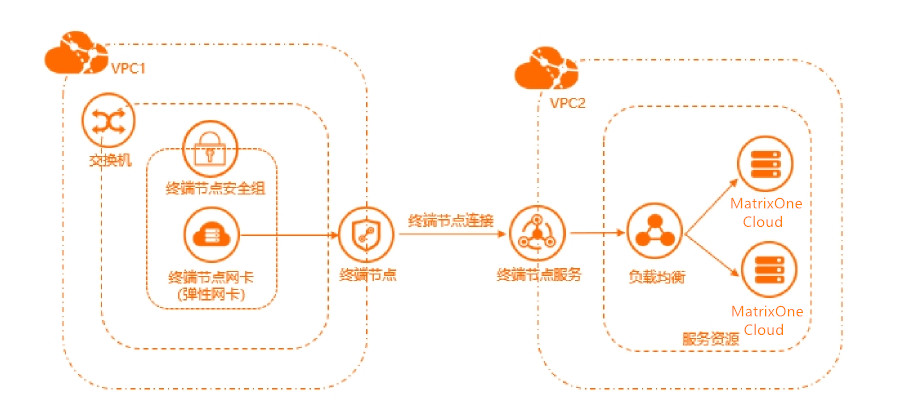
For more detailed information on the concept of Alibaba Cloud Private Network Connection (PrivateLink), please refer to the following documentation:

  • What is a private network connection

  • Aliyun Private Network Connection Overview

How to use private network links

Step 1: Obtain private network connection related information on the MatrixOne Intelligence instance management platform

In the instance list of MatrixOne Intelligence instance management platform, find the MatrixOne instance you need to access, clickConnection > Connect through third-party tools > Private network connection. You can obtain the service name, Availability Zone ID, and Region ID.
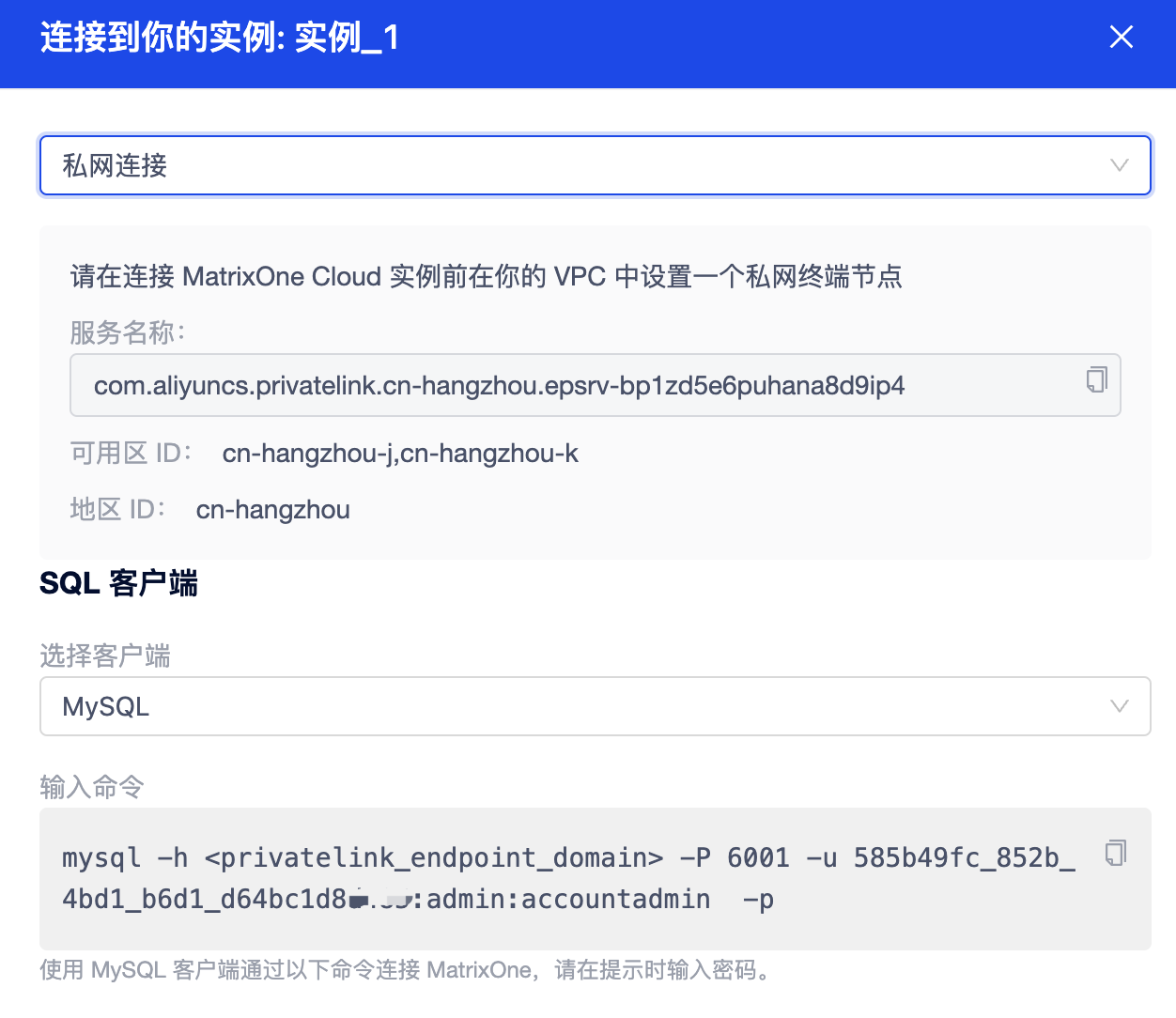
Step 2: Configure the terminal node in Alibaba Cloud Console

Use Alibaba Cloud Management Console to create an endpoint, follow these steps:

  1. Log in to Alibaba Cloud Console [Ali Cloud Console] (https://home.console.aliyun.com/home), and open Alibaba Cloud VPC Console [Proprietary Network] (https://vpc.console.aliyun.com/).

  2. Select the region where your VPC is located from the Region drop-down list. Click the endpoint in the left navigation bar, and click theCreate endpoint in the upper left corner on the right page to enter theCreate endpoint** page.
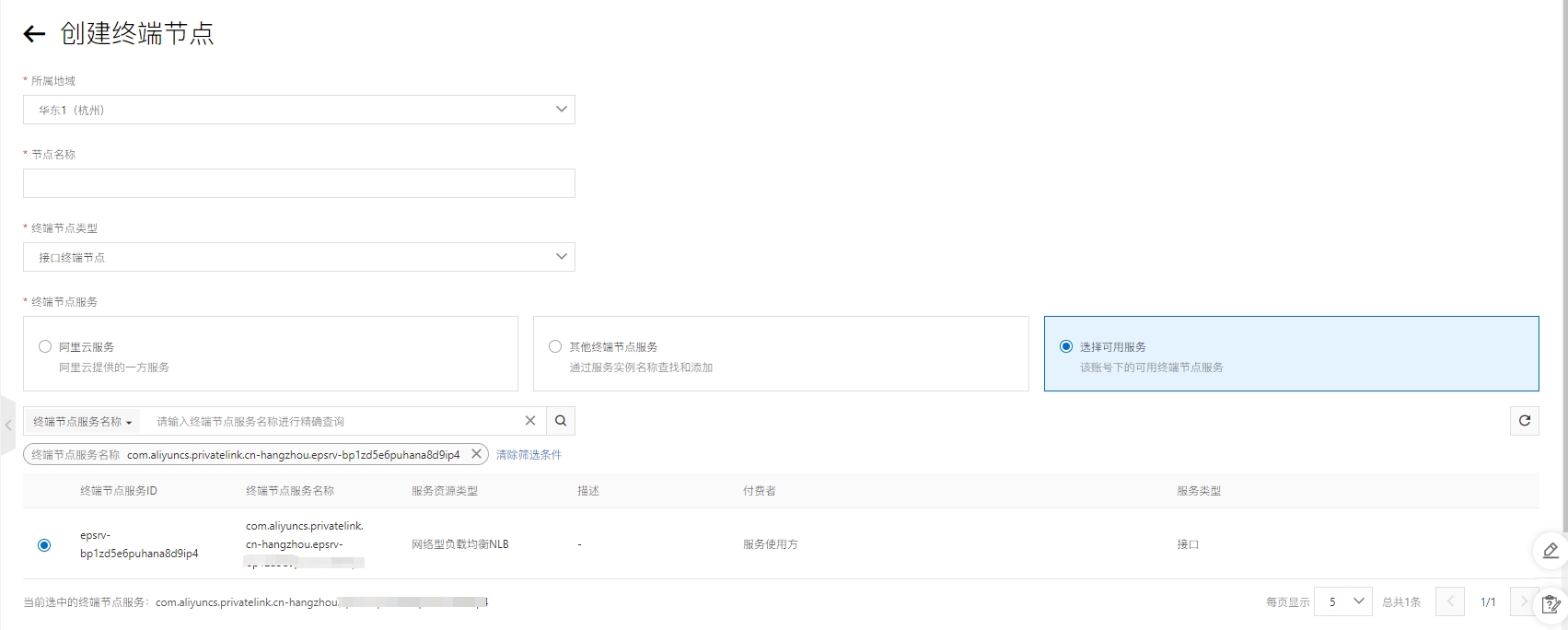
    Create endpoint

  3. Select theInterface Terminal Node.

  4. Search for theservice name in step 1 in the search box, and you can see the available services here and select the available services.

  5. Select the vpc where the business service is located. After adding the proprietary network, the following two options will appear.
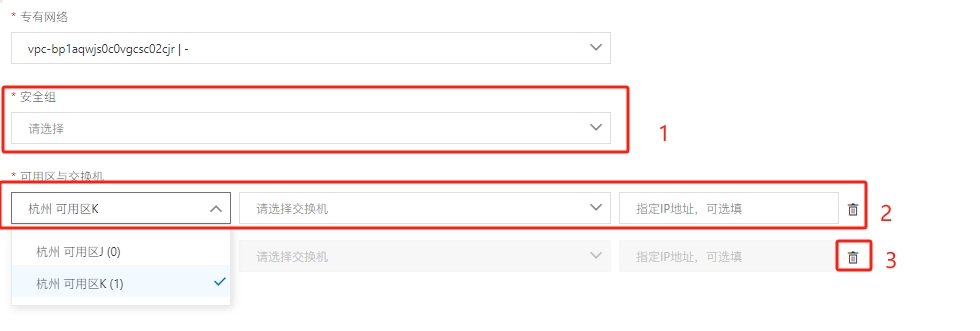
    Set security group  network switch

  6. Select an existing security group or create one.

  7. If the Availability Zone switch exists, you want to select the Availability Zone where the endpoint service is located, and if it does not exist, please create one; here two must be filled in by default. These switches are used in different Availability Zones to achieve high availability and fault tolerance.

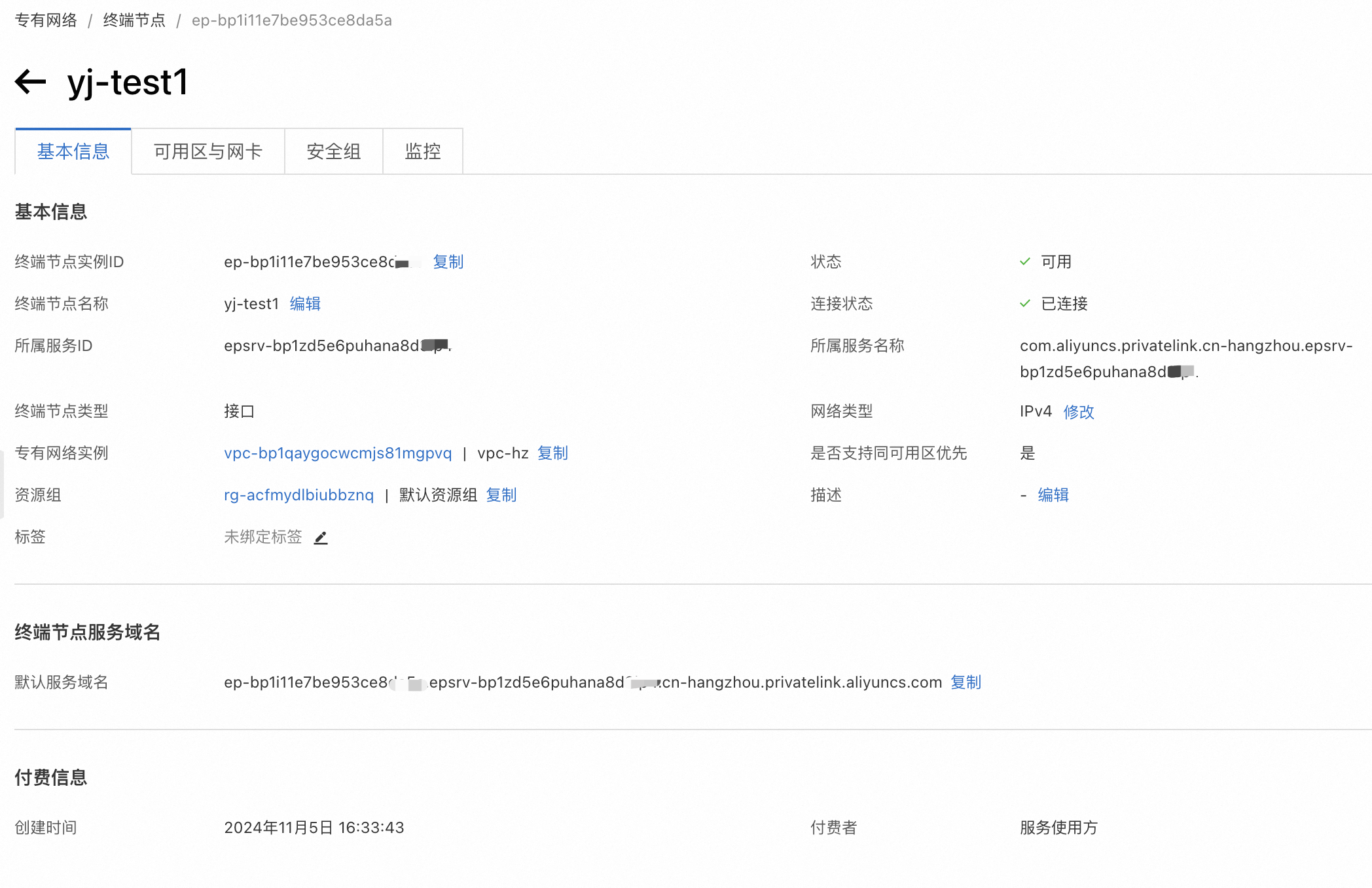
  8. Click Create Endpoint. Wait for the creation to be successful, and on the terminal node details page you will get theterminal node service domain name.
Step 3: Connect the MatrixOne Intelligence service on your ECS host

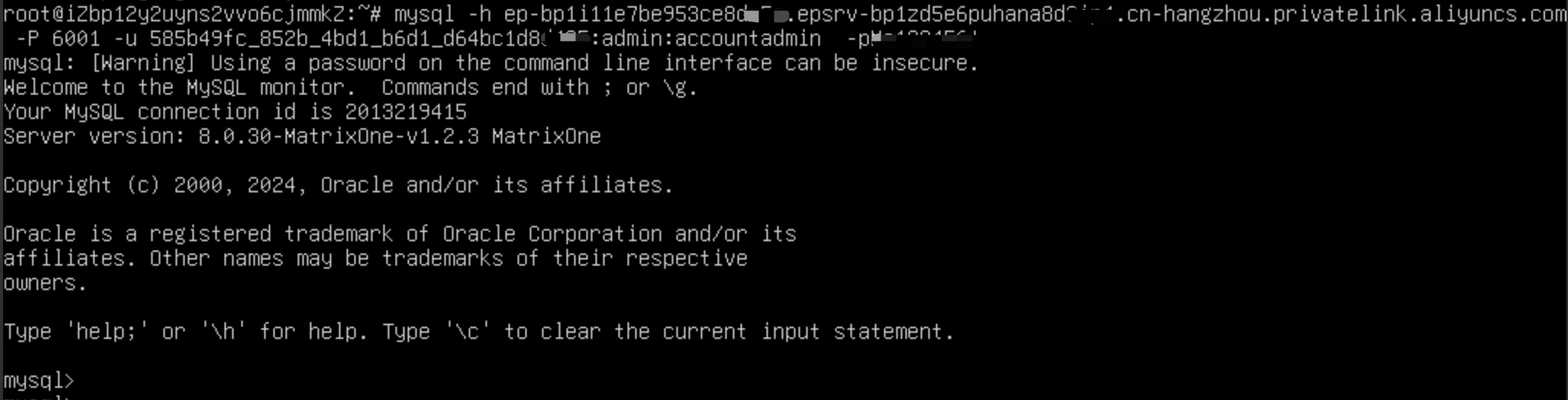
  1. Make sure your ECS host has the Mysql Client client installed.

  2. When connecting to the MatrixOne Intelligence service using MySQL client, you need to sethost to the domain name of the endpoint service.

mysql -h <privatelink_endpoint_domain> -P 6001 -u xxx:admin:accountadmin -p
Next
Role-Based Access Control (RBAC)
Previous
Data transmission encryption
Copyright © 2026, MatrixOrigin
Made with Sphinx and @pradyunsg's Furo
On this page
  • PrivateLink
    • introduce
    • How to use private network links
      • Step 1: Obtain private network connection related information on the MatrixOne Intelligence instance management platform
      • Step 2: Configure the terminal node in Alibaba Cloud Console
      • Step 3: Connect the MatrixOne Intelligence service on your ECS host