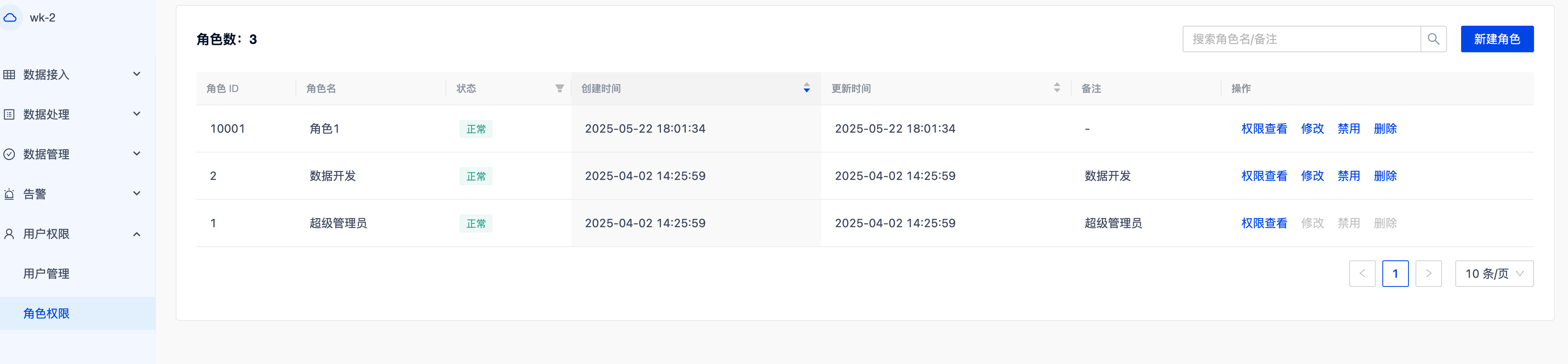
Role Permission Configuration
RBAC (Role-Based Access Control) is a permission management model. This model implements unified permission allocation and centralized management through a three-tier structure of “User - Role - Permission”: users do not directly possess permissions but indirectly obtain them by binding roles. It supports centralized configuration and reuse of permissions, achieving abstraction, standardization, and scalability in permission management.
After the workspace is created, the system automatically generates two default roles:
Super Administrator: Has full permissions for all resources and operations in the workspace. This role cannot be modified, disabled, or deleted, ensuring the core management capabilities of the system.
Data Developer: Also has full permissions but can be modified, disabled, or deleted based on actual requirements, supporting flexible configuration and role inheritance.
After entering the workspace, navigate to User Permissions -> Role Permissions -> Create Role, fill in the role name, and configure the permissions for the role:
Module |
Permission Configuration |
|---|---|
Connector |
|
Load Task |
|
Workflow |
|
Data Volume |
|
Alert |
|
User |
|
Role |
|