

Quickstart: Vectors
This page introduces vector data in MatrixOne Intelligence and how to apply it, as a starter-level best-practice guide.
What is a vector?
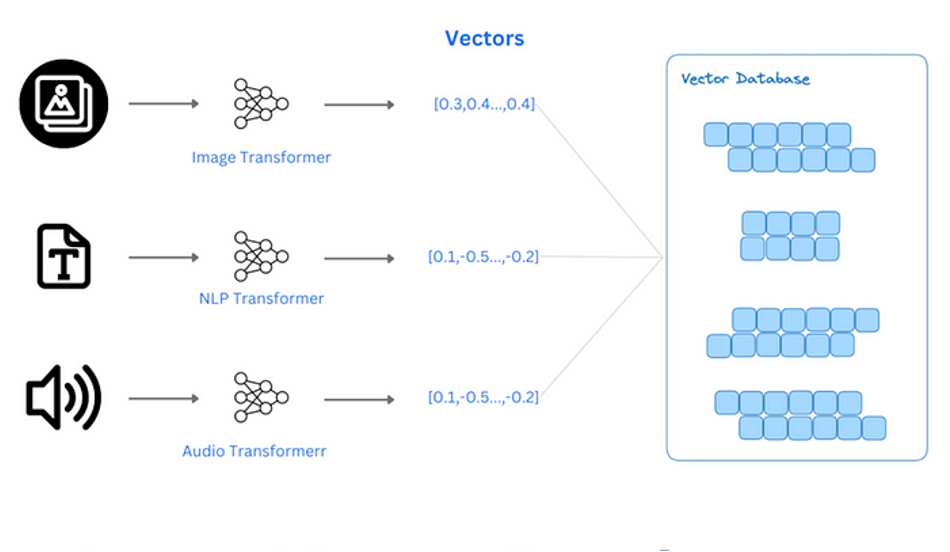
In a database, a vector is usually represented as a one-dimensional array or list whose elements are floating-point numbers or integers. A vector can represent many kinds of data — text, images, audio, and so on — by turning that data into a vector through feature extraction.
Use cases
Natural language processing: in a text database, a vector representation can capture the semantics of text or words. Through word-embedding techniques, every word or document is represented as a vector, and the database can run efficient semantic search or classification on those vectors.
Recommender systems: vectors represent users and items. By computing the similarity between a user vector and an item vector, the system generates a personalized recommendation list.
Clustering and classification: vectors are also used for clustering and classification tasks. The database groups or classifies data automatically based on similarity between vectors, surfacing latent patterns and relationships.
Multi-modal data: vector representations are also widely used for multi-modal data — combining images, text, audio, and other types. Vectorization lets data of different modalities be compared and computed in the same space.
Related concepts
Vector type: in a database, a vector type is the dedicated data type used to represent and store vectors.
Vector search: vector search retrieves data by comparing similarity between vectors. It uses a distance metric to find the vectors most similar to a given query vector. Common metrics include Euclidean (L2) distance, cosine similarity, and inner product. Unlike scalar search in a traditional database — which performs precise queries over structured data — vector search runs similarity queries over the vectorized form of unstructured data and returns approximate best matches.
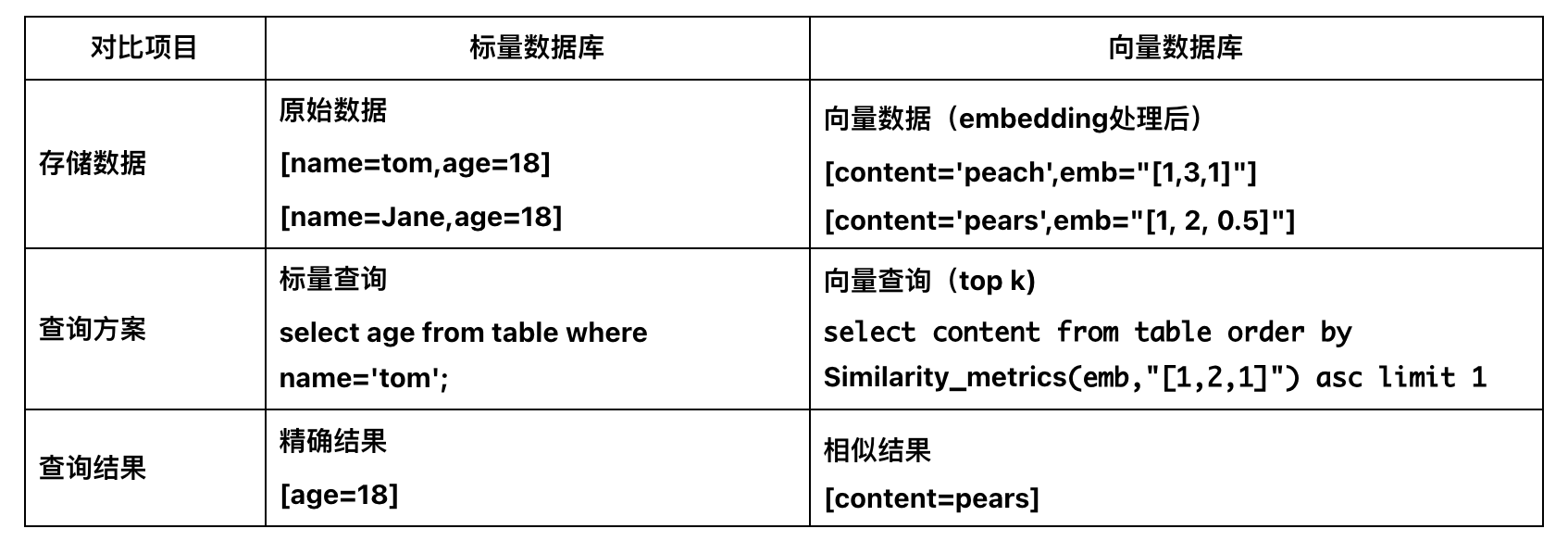
A scalar database stores raw data. User data, for example, may be a table with columns like name and age. Queries return exact matches —
name = 'tom'returns the precise age.A vector database stores processed vector data (typically embedding vectors). These vectors represent the data’s position in a high-dimensional space and are used for similarity search. The query returns the records most similar to a given vector, usually as the top-K most-similar results — similar matches, not exact ones. Comparing the rows in a table against
[1,2,1], for example, might return the closest entry,[content=pears].
Vector index: a vector index is an indexing technique purpose-built for vector data. It speeds up retrieval over high-dimensional vectors and lets the database quickly find the nearest neighbors of a query vector at scale.
Vector type
In MatrixOne Intelligence, a vector is a special one-dimensional data type, similar to an array in a programming language. It currently supports two numeric types — float32 and float64, written as vecf32 and vecf64. When you create a vector column, you specify its dimension; for example vecf32(3) defines a 3-dimensional vector. The maximum supported dimension is 65,535. String and integer element types are not supported.
create table t1(a int, b vecf32(3), c vecf64(3))
insert into t1 values(1, "[1,2,3]", "[4,5,6]");
mysql> select * from t1;
+------+-----------+-----------+
| a    | b         | c         |
+------+-----------+-----------+
|    1 | [1, 2, 3] | [4, 5, 6] |
+------+-----------+-----------+
1 row in set (0.01 sec)
Vector search
MatrixOne Intelligence supports several vector similarity functions, including cosine similarity, Euclidean (L2) distance, and inner product.
create table vec_table(a int, b vecf32(3), c vecf64(3));
insert into vec_table values(1, "[1,2,3]", "[4,5,6]");

-- 1. Similarity search using cosine similarity
mysql> select cosine_similarity(b,"[1,5,6]") from vec_table;
+-------------------------------+
| cosine_similarity(b, [1,5,6]) |
+-------------------------------+
|            0.9843241382880896 |
+-------------------------------+
1 row in set (0.00 sec)

-- 2. Similarity search using Euclidean distance
mysql> select l2_distance(b,"[1,5,6]") from vec_table;
+-------------------------+
| l2_distance(b, [1,5,6]) |
+-------------------------+
|       4.242640687119285 |
+-------------------------+
1 row in set (0.01 sec)

-- 3. Similarity search using inner product
mysql> select inner_product(b,"[1,5,6]") from vec_table;
+---------------------------+
| inner_product(b, [1,5,6]) |
+---------------------------+
|                        29 |
+---------------------------+
1 row in set (0.00 sec)
Vector index
A vector index lets you find similar vectors efficiently in a large dataset. MatrixOne Intelligence currently supports the IVFFLAT vector index with the Euclidean (L2) distance metric.
create table vec_table(a int, b vecf32(3), c vecf64(3));
insert into vec_table values(1, "[1,2,3]", "[4,5,6]");

#Set experimental_ivf_index to 1 (default 0) to enable vector indexes; reconnect for it to take effect.
SET GLOBAL experimental_ivf_index = 1;

#Create a vector index on the vector column with 1 partition, using the Euclidean (L2) metric.
create index ivf_idx1 using ivfflat on vec_table(b)  lists=1 op_type "vector_l2_ops";
Application example: build a RAG app
RAG — Retrieval-Augmented Generation — combines information retrieval with text generation to improve the accuracy and relevance of text generated by large language models (LLMs). Because of the limits of their training data, LLMs may not have access to the latest information.
A typical RAG flow has three steps:
Retrieve: pull the most relevant pieces of information for the current query from a large dataset or knowledge base.
Augment: combine the retrieved data with the LLM to boost the accuracy of its output.
Generate: use the LLM, grounded by the retrieved context, to produce new text or a response.
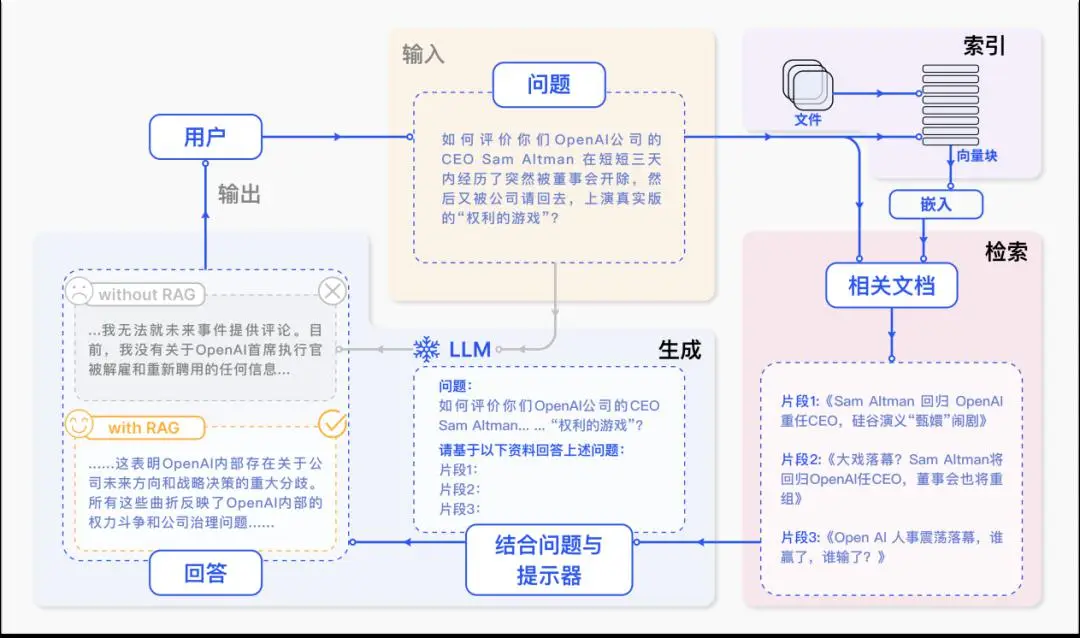
As a hyper-converged database, MatrixOne ships with built-in vector capabilities, which play a key role in RAG applications. Below we use MatrixOne Intelligence’s vector capabilities to build a native RAG app quickly.
Prerequisites
Python 3.8 (or later) installed
MySQL client installed
The
pymysqlpackage installed:
pip install pymysql
An API key from Neolink.ai — Neolink.AI is a platform that connects compute, data, knowledge, models, and enterprise applications.
Steps
Step 1: create a table and enable the vector index.
Connect to MatrixOne Intelligence, create a table called rag_tab to store text and the corresponding vectors, and turn on the vector index.
create table rag_tab(content text,embedding vecf32(1024));
#Reconnect for the change to take effect.
SET GLOBAL experimental_ivf_index = 1;
Step 2: build the app.
Create a Python file rag_example.py with the following content. The script uses the mxbai-embed-large embedding model to vectorize text and store it in a MatrixOne Intelligence table. It then vectorizes the question, uses MatrixOne Intelligence’s vector search to find the most similar text chunks, and finally combines them with the llama2 LLM to produce an answer.
vi ./rag_example.py
import time
import requests
import pymysql

conn = pymysql.connect(
        host = 'freetier-01.cn-hangzhou.cluster.matrixonecloud.cn',
        port = 6001,
        user = '585b49fc_852b_4bd1_b6d1_d64bc1d8xxxx:admin:accountadmin',
        password = "xxx",
        db = 'db1',
        autocommit = True
        )

cursor = conn.cursor()

api_key='0e972228-0b50-442d-b74c-73f43314xxxx' # Replace with your own API key
api_url_llm = "https://neolink-ai.com/model/api/v1/chat/completions"
api_url_emb="https://neolink-ai.com/model/api/v1/embeddings"
# Use Neolink.ai's online LLM and embedding models

headers = {
    "Authorization": f"Bearer {api_key}",
    "Content-Type": "application/json"
}

documents = [
"MatrixOne is a hyper-converged cloud & edge native distributed database with a structure that separates storage, computation, and transactions to form a consolidated HSTAP data engine. This engine enables a single database system to accommodate diverse business loads such as OLTP, OLAP, and stream computing. It also supports deployment and utilization across public, private, and edge clouds, ensuring compatibility with diverse infrastructures.",
"MatrixOne touts significant features, including real-time HTAP, multi-tenancy, stream computation, extreme scalability, cost-effectiveness, enterprise-grade availability, and extensive MySQL compatibility. MatrixOne unifies tasks traditionally performed by multiple databases into one system by offering a comprehensive ultra-hybrid data solution. This consolidation simplifies development and operations, minimizes data fragmentation, and boosts development agility.",
"MatrixOne is optimally suited for scenarios requiring real-time data input, large data scales, frequent load fluctuations, and a mix of procedural and analytical business operations. It caters to use cases such as mobile internet apps, IoT data applications, real-time data warehouses, SaaS platforms, and more.",
"Matrix is a collection of complex or real numbers arranged in a rectangular array.",
]

# Chunk the text, vectorize each chunk, and store in MatrixOne
for i,d in enumerate(documents):
    emb_data = {
        "input": d,
        "model": "BAAI/bge-m3"
    }
    response = requests.post(api_url_emb, headers=headers, json=emb_data)
    embedding = response.json().get('data')[0].get('embedding')
    insert_sql = "insert into rag_tab(content,embedding) values (%s, %s)"
    data_to_insert = (d, str(embedding))
    cursor.execute(insert_sql, data_to_insert)

# Create the index
create_sql = 'create index idx_rag using ivfflat on rag_tab(embedding) lists=%s op_type "vector_l2_ops"'
cursor.execute(create_sql, 1)

# Question
prompt = "What is MatrixOne?"

# Vectorize the question and run a similarity search against the database
emb_data = {
        "input": prompt,
        "model": "BAAI/bge-m3"
    }
response_emb = requests.post(api_url_emb, headers=headers, json=emb_data)

query_embedding= response.json().get('data')[0].get('embedding')
query_sql = "select content from rag_tab order by l2_distance(embedding,%s) asc limit 3"
data_to_query = str(query_embedding)
cursor.execute(query_sql, data_to_query)
data = cursor.fetchall()

# Combine the retrieved context with the LLM to produce the answer
llm_data = {
    "model": "meta-llama/Meta-Llama-3.1-405B-Instruct-FP8",
    "messages": [
        {
            "role": "system",
            "content": str(data)
        },
        {
            "role": "user",
            "content": prompt
        }
    ]
}

response_llm = requests.post(api_url_llm, headers=headers, json=llm_data)

response_data = response_llm.json()
answer = response_data['choices'][0]['message']['content']

print(answer)
Run the script
python ./rag_example_2.py
MatrixOne is a hyper-converged cloud & edge native distributed database. It has a structure that separates storage, computation, and transactions to form a consolidated HSTAP (Hybrid Transactional/Analytical Processing) data engine. This engine enables a single database system to accommodate diverse business loads such as OLTP (Online Transactional Processing), OLAP (Online Analytical Processing), and stream computing.