

Improve knowledge base query accuracy with semantic configuration
MOI’s semantic layer sits between the database schema and natural-language Q&A, providing a business abstraction that can be governed and reused. It leaves the original table structure unchanged and organizes technical fields, business names, metric formulas, internal business codes, and query constraints into an executable semantic contract that informs SQL planning and execution. A general-purpose model may recognize common SAP fields such as NETWR, VBELN, and GBSTA, but the schema alone cannot tell it the company’s internal performance assessment rules, region codes, or the currencies that the knowledge base is allowed to query.
The sales order table in this tutorial contains three internal rules that cannot be inferred from the schema alone: assessed sales are calculated as 90% of NETWR for completed orders; VKORG = 1000/2000/3000 represents North China, East China, and South China, respectively; and sales analysis must use only CNY orders, because USD records must not be added directly to CNY records. You will first record the results without semantic configuration, then supply these three pieces of information through metrics, business rules, and mandatory constraints. Omitting any of these categories can produce incorrect calculations, incorrect region assignments, or results outside the permitted data scope.
What You Will Do
Import a sales order CSV into Catalog and add it to a knowledge base.
Configure metrics, business rules, and mandatory constraints.
Ask the same sales analysis question before and after configuration to compare order statistics, region names, and currency scope.
Before You Start
Prepare an MOI account and open the target workspace.
Download the sample file semantic-sales-data.csv.
The screenshots show the Chinese interface. This tutorial uses English region names in the prompts and business rule: North China corresponds to 华北, East China to 华东, and South China to 华南 in the screenshots. Keep the CSV’s original field names and codes unchanged.
Steps
1. Import the Sales Order CSV
In the left navigation, go to Data > Import Tasks and click New Import Task.
Select Structured and Local Upload, then upload
semantic-sales-data.csv.Select New Table and enter the following target location:
tutorial_data / semantic_demo / sales_orders
Confirm that the first row contains column names, and check that
ERDATisDATE,KWMENGisINT, andNETWRisDECIMAL(15,2). Keep the default settings for the other fields. In SAP,NETWRtypically corresponds to the currency field typeCURR(15,2).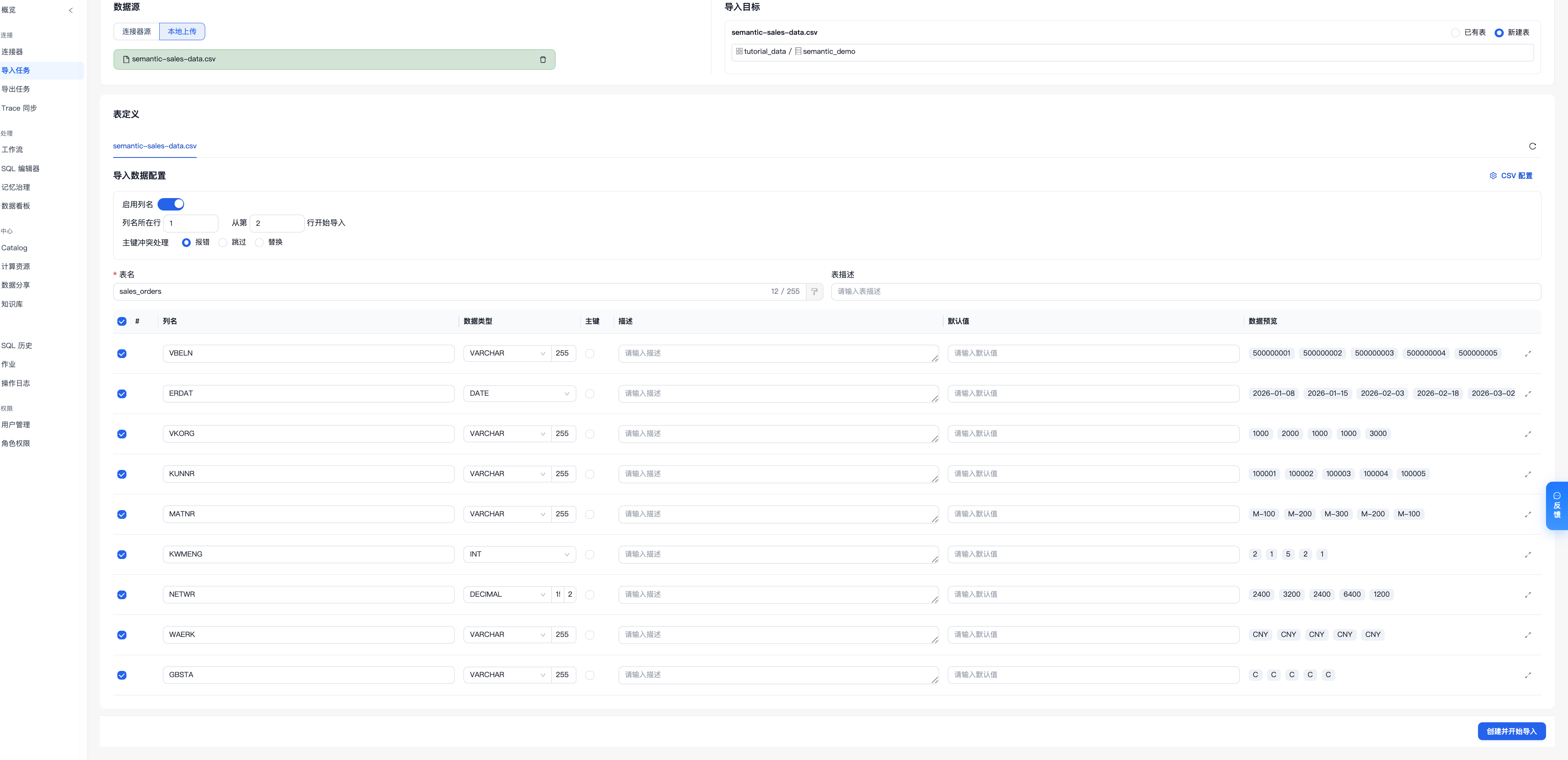
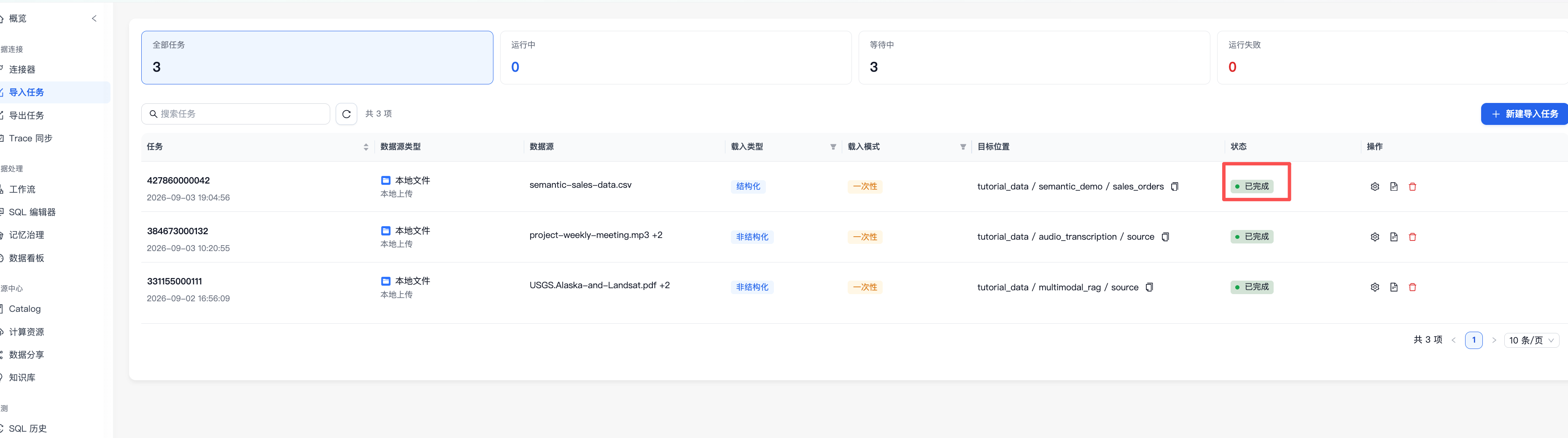
Click Create and Start Import and wait until the task status changes to Completed.
2. Create a Knowledge Base and Add the Table
Go to Resource Center > Knowledge Base and click Create Knowledge Base.
Enter the name
sales_semantic_knowledgeand the purpose: “Query sales performance data using the company’s management assessment rules.”Open the knowledge base details, click Add Data, and select
tutorial_data / semantic_demo / sales_orders.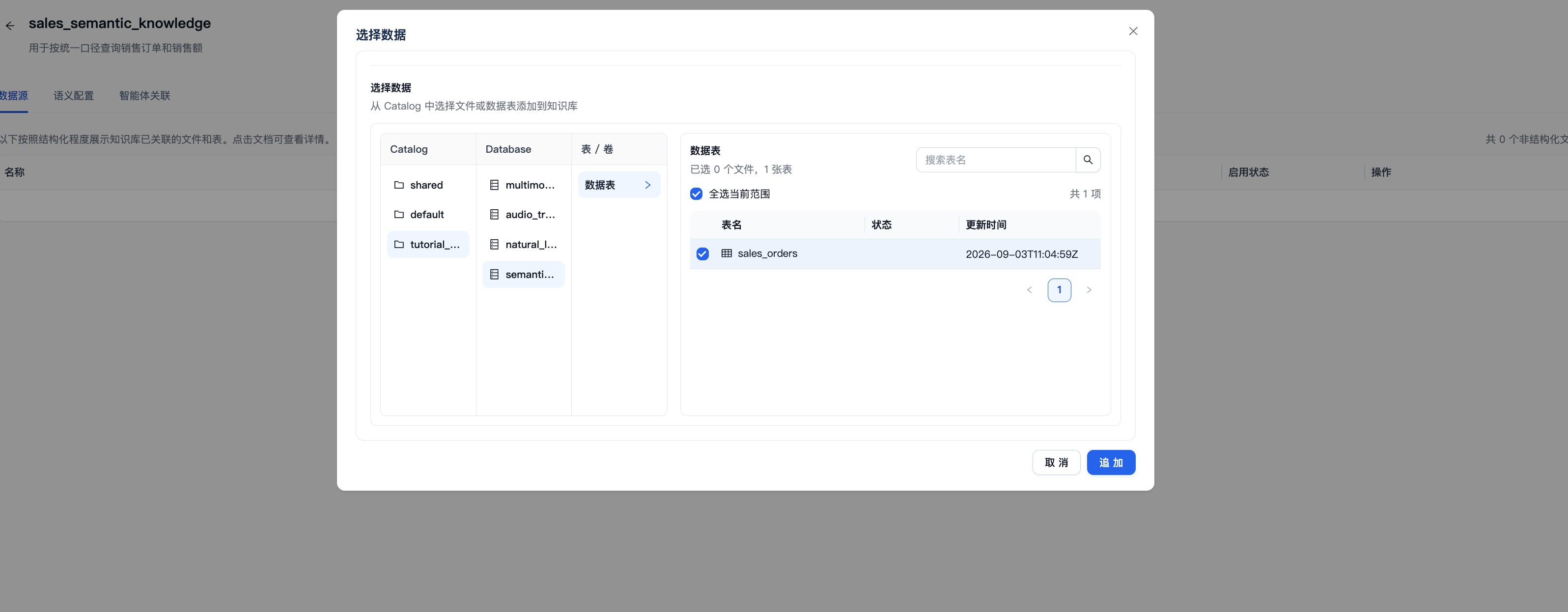
Wait for data source processing to finish, then open Advanced Configuration > Semantic Configuration.
3. Record a Baseline Without Semantic Configuration
Leave semantic configuration empty for now. Open Chat for the knowledge base and send:
Calculate assessed sales, valid order count, and average assessed order value for the East China, South China, and North China business regions in the first quarter of 2026. Sort by assessed sales in descending order and display the business region names in the results.
Record the answer and generated SQL:
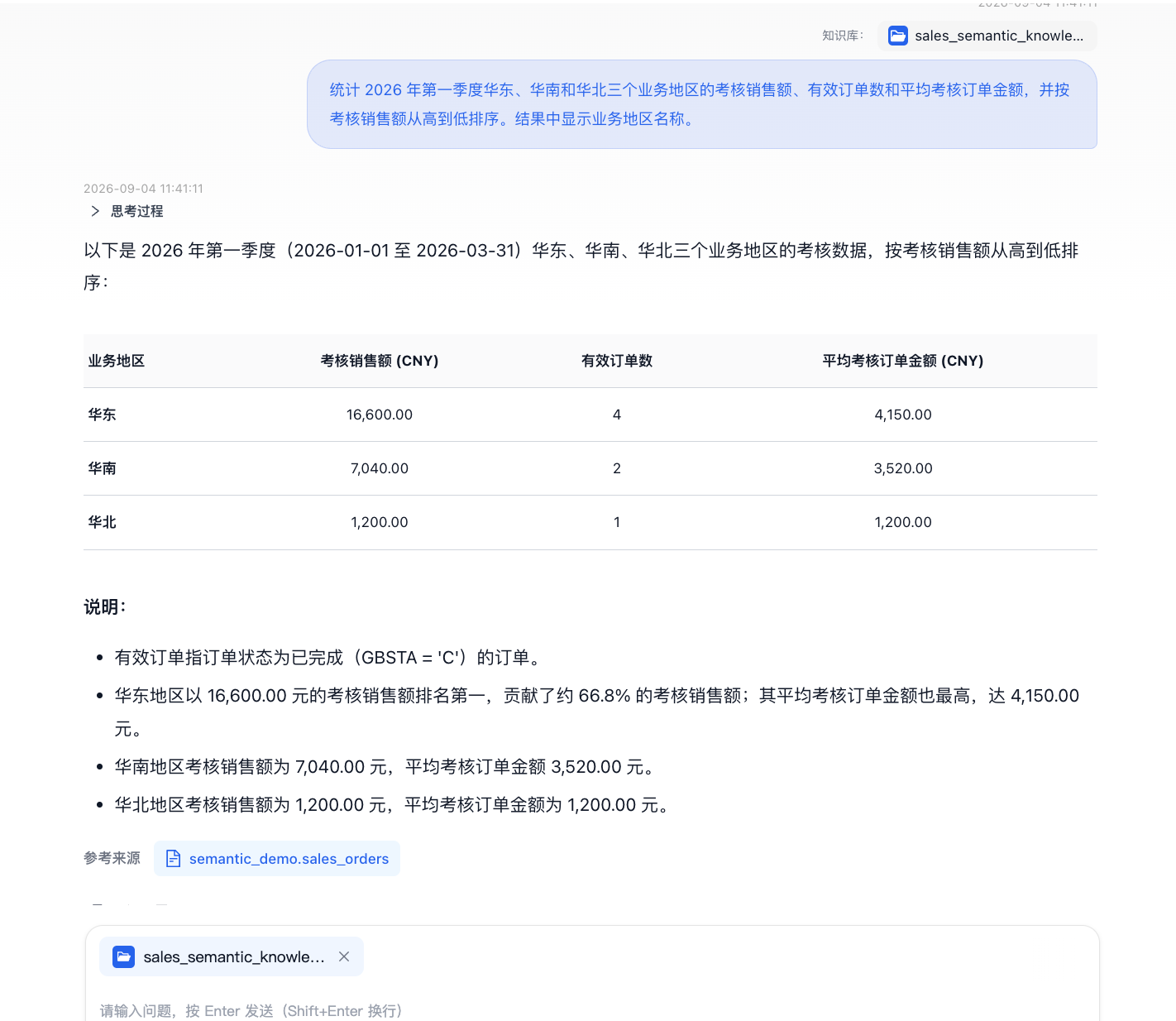
Without semantic configuration, the system can only infer the business definitions from field names and common SAP knowledge. Pay particular attention to these three areas:
Assessment metrics: The schema does not record the 90% assessment factor or specify that “valid orders” include only
GBSTA = 'C'. The system may simply sumNETWR.Business regions: The schema does not record the company’s mapping of
1000 = North China,2000 = East China, and3000 = South China. The system may incorrectly infer the regions from the code order.Currency scope: The table contains both CNY and USD. Summing
NETWRdirectly adds different currencies together, producing a net sales value with no business meaning.
Field types cannot resolve these issues. Use this result only as a baseline for comparison, not as a business conclusion.
4. Configure Metrics, Business Rules, and Mandatory Constraints
Return to Advanced Configuration > Semantic Configuration. Click New to the right of the relevant category and save one semantic entry at a time. Unless otherwise specified, select sales_orders as the associated table.
Metrics
Click Metrics > New Metric and use the form to create the following three basic metrics. For each metric, enter the basic information, complete Basic Metric Calculation, and click Create.
Setting |
Assessed Sales |
Valid Order Count |
Average Assessed Order Value |
|---|---|---|---|
Metric Identifier |
|
|
|
Name |
Assessed Sales |
Valid Order Count |
Average Assessed Order Value |
Metric Description |
Count 90% of |
Count completed sales orders |
Apply a 90% factor to the average |
Synonyms |
Performance sales, management-assessed sales |
Completed order count, valid order volume |
Average assessed transaction value, mean assessed order amount |
Metric Type |
Basic Metric |
Basic Metric |
Basic Metric |
Source Table |
|
|
|
Aggregation Function |
|
|
|
Aggregation Field |
|
|
|
Multiplier |
|
|
|
Fixed Filter |
Field |
Field |
Field |
Each row in the sample table represents one order, and VBELN values are unique, so the form’s count function can be used directly to count orders. All three metrics use a fixed filter to include only completed orders with GBSTA = 'C'. The 90% factor is the company’s management assessment factor after reserving 10% for channel rebates. It is absent from the database schema, so the correct assessed amounts cannot be obtained without configuring the metrics.
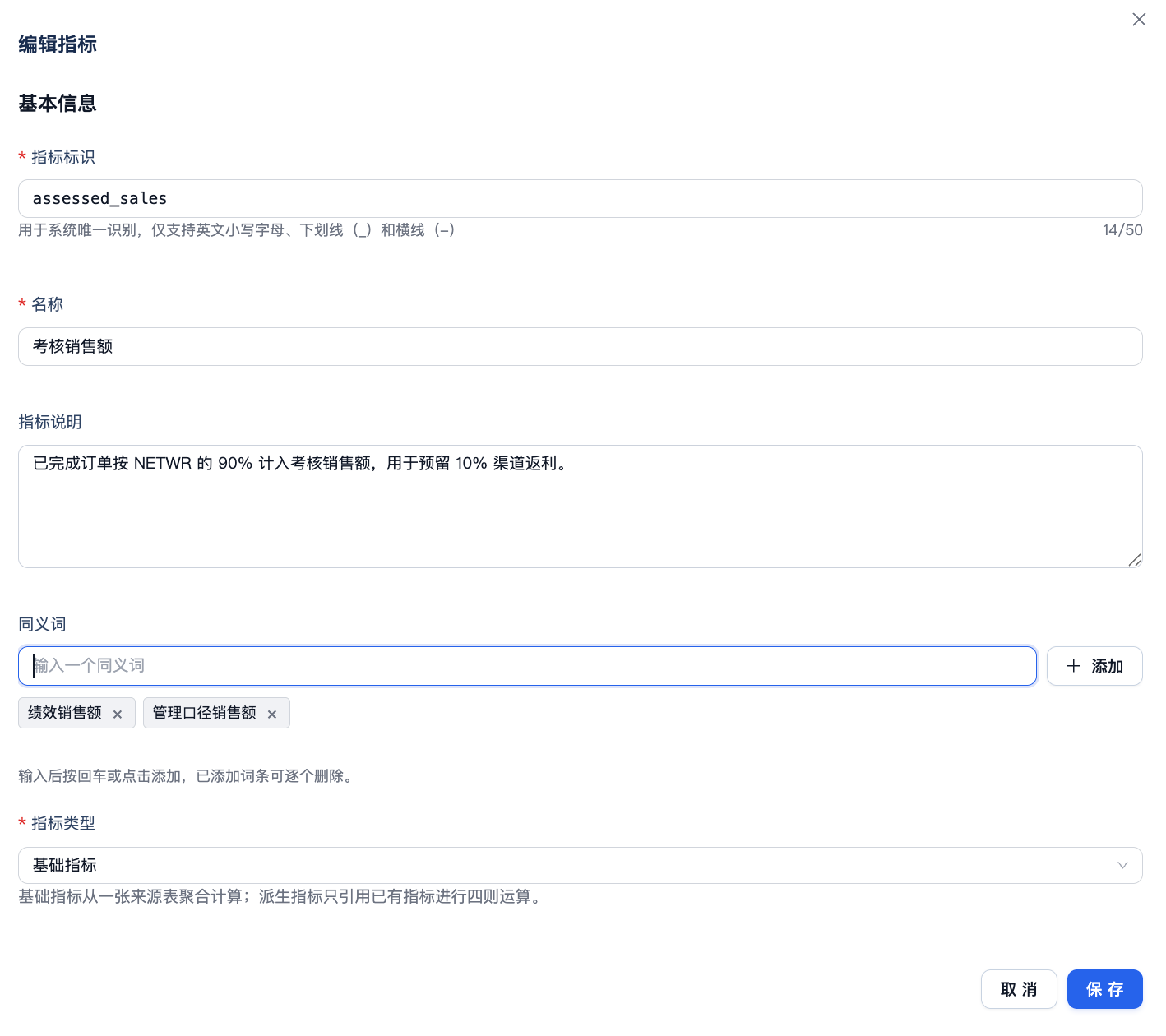
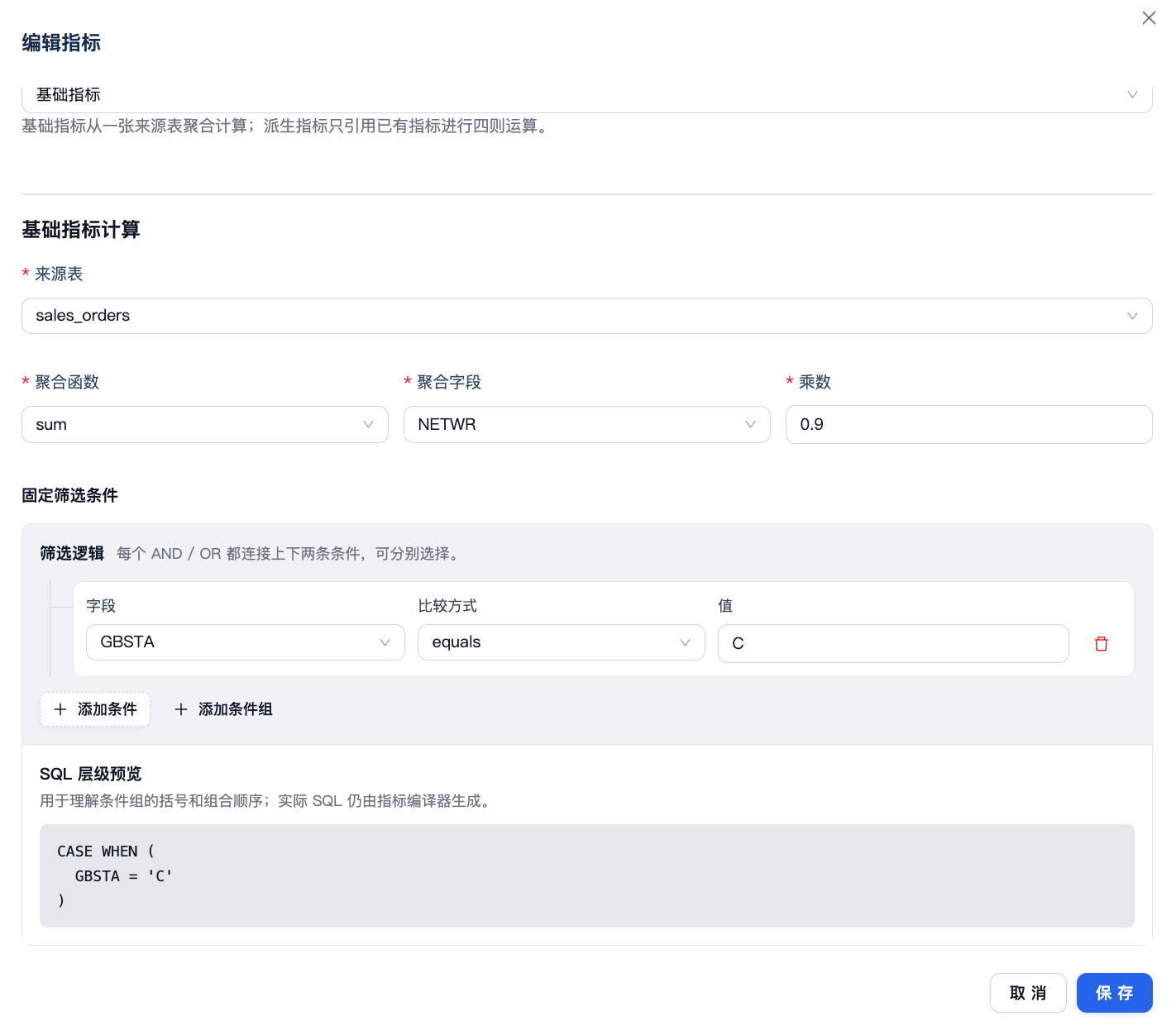
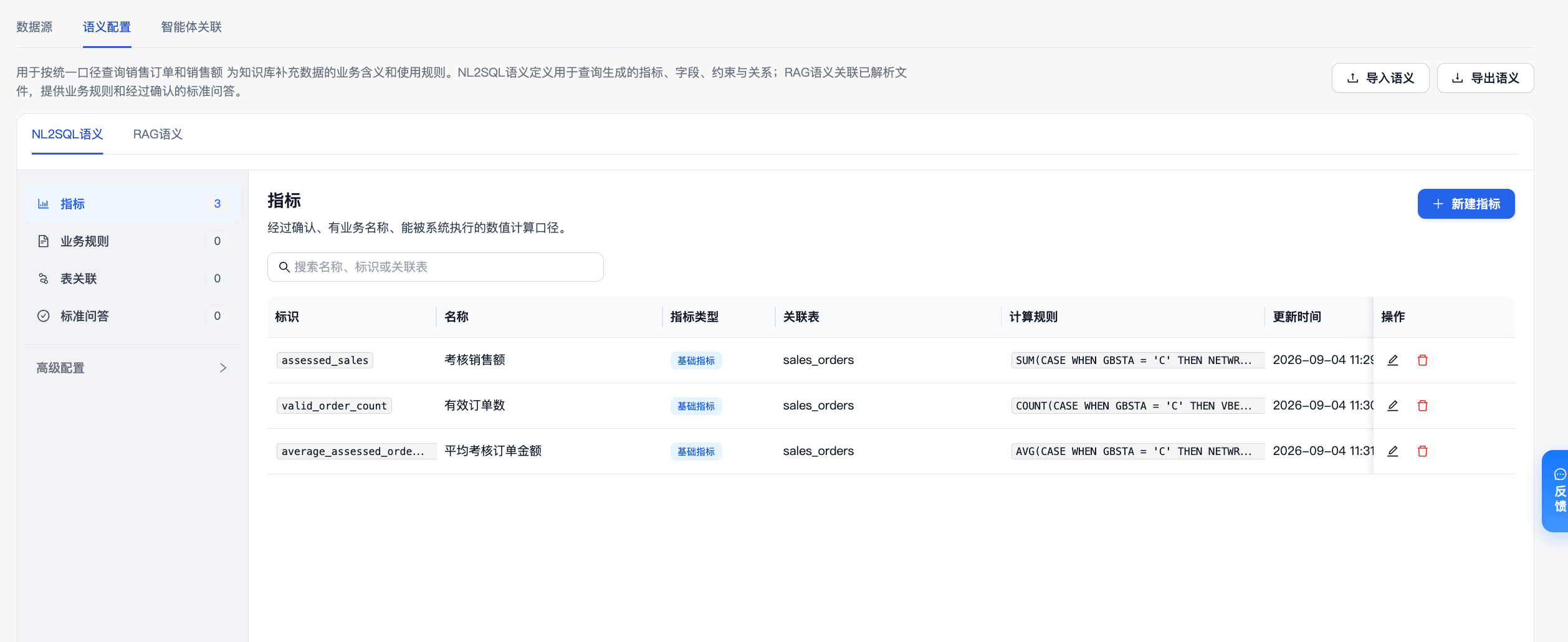
After creating the other two metrics using the table, return to the metric list and confirm that it displays assessed_sales, valid_order_count, and average_assessed_order_value.
Business Rules
Click Business Rules > New Business Rule, fill in the following values, and create the rule:
Setting |
Value |
|---|---|
Business Rule Identifier |
|
Associated Table |
|
Rule Content |
The company’s sales organizations map to business regions as follows: |
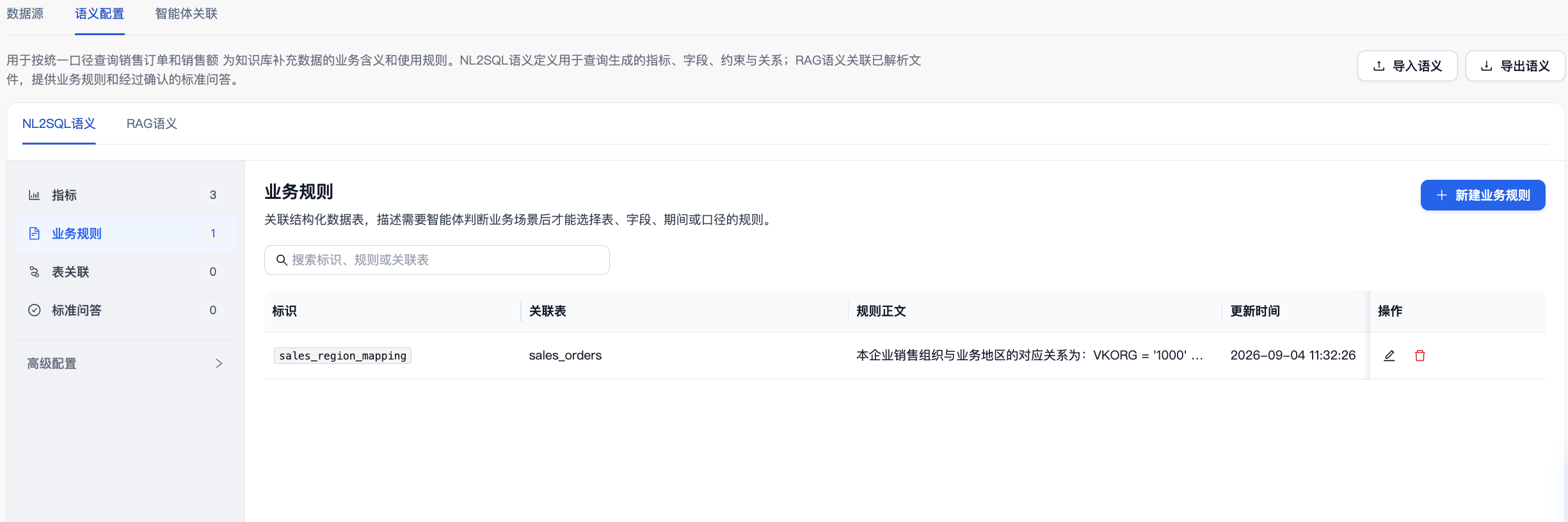
Business rules explain internal business codes that the schema does not describe. This example deliberately uses a region mapping that cannot be inferred from the numeric order of the codes. Without this rule, the system may assign the wrong region even if it outputs region names in Chinese, as shown in the screenshots.
Mandatory Constraints
Click Advanced Configuration > Mandatory Constraints > New Mandatory Constraint, fill in the following values, and create the constraint:
Setting |
Value |
|---|---|
Mandatory Constraint Identifier |
|
Associated Table |
|
Constraint Condition |
Field |
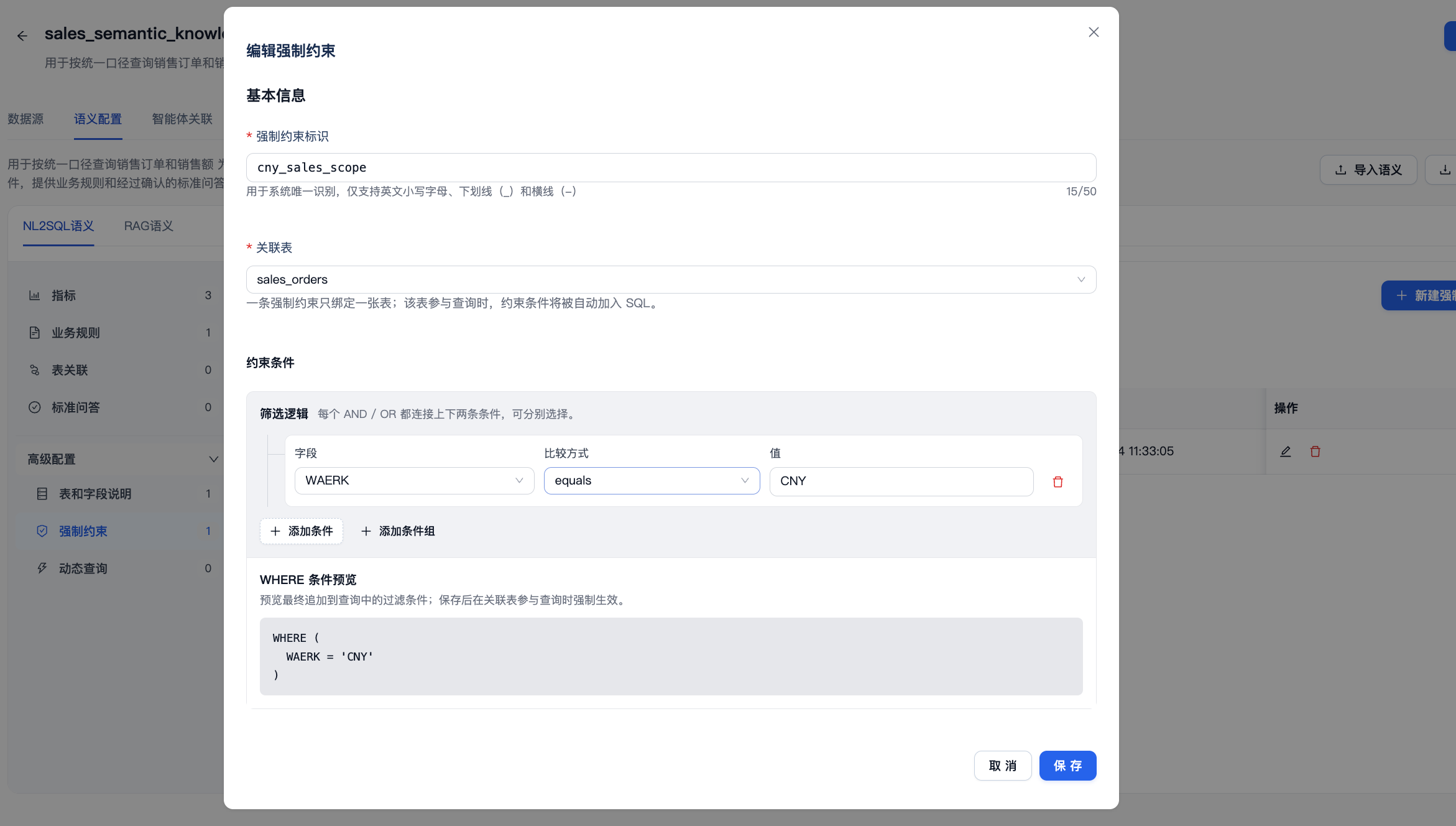
The sample table contains USD orders. This constraint is added automatically whenever sales_orders participates in a query, preventing the direct addition of USD and CNY NETWR amounts. It defines the data scope that the knowledge base can query, serving a different purpose from metric formulas and the business rule’s region mapping.
After saving, run Validate in semantic configuration and confirm that every entry passes.
5. Verify the Metrics, Business Rules, and Mandatory Constraints
Return to the knowledge base Chat and send the question from Step 3 again.
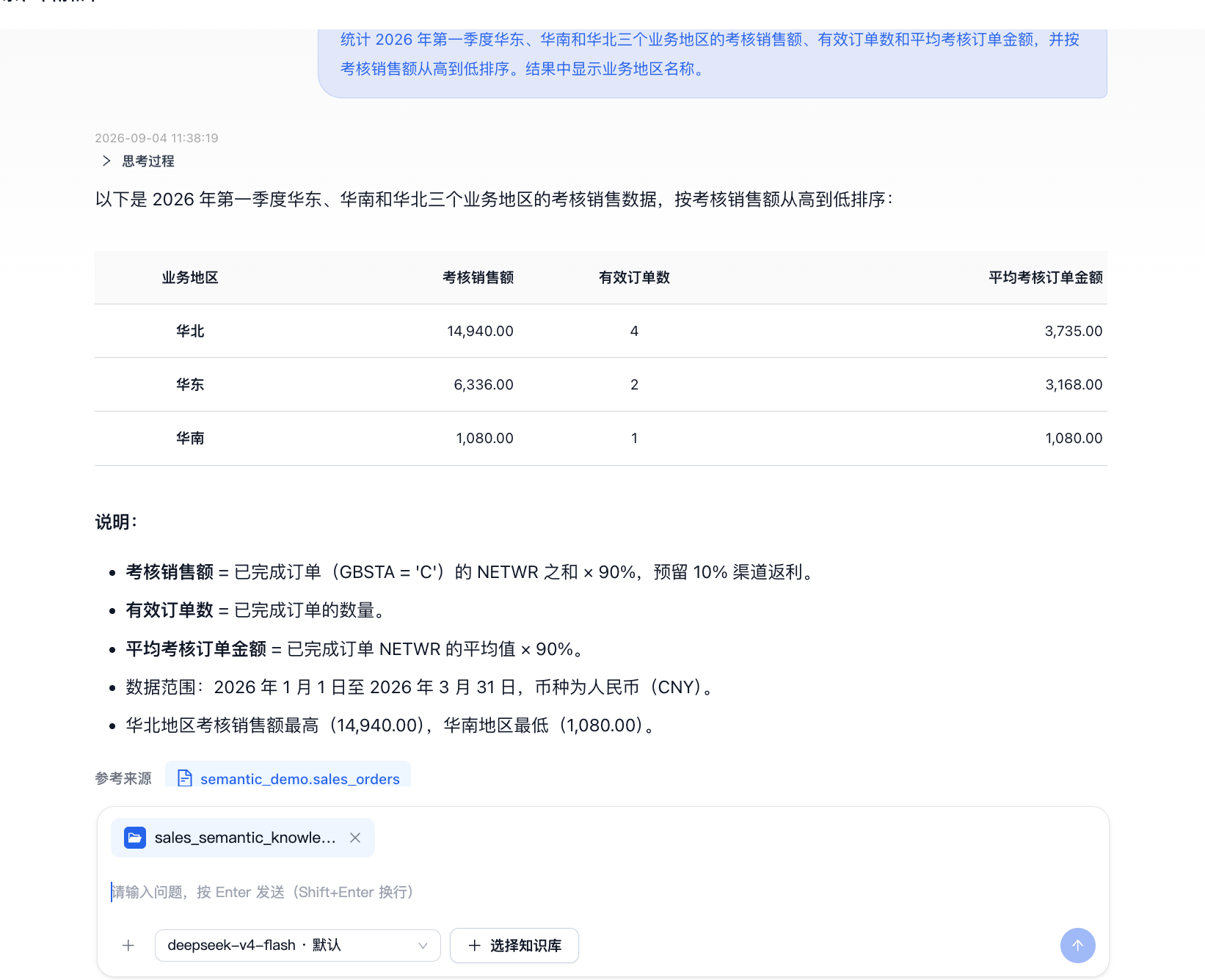
Check the answer and expand the reasoning details to inspect the SQL. After configuration, you should see:
The definitions of
assessed_sales,valid_order_count, andaverage_assessed_order_valueare used.Assessed sales uses
sum(NETWR)with a multiplier of0.9; valid order count usescount(VBELN); and average assessed order value usesavg(NETWR)with a multiplier of0.9.The query includes
GBSTA = 'C'.The query groups by
VKORGand displays1000,2000, and3000as North China, East China, and South China, respectively.The mandatory constraint automatically adds
WAERK = 'CNY'.In descending order of assessed sales, the regions are North China, East China, and South China, with assessed sales of CNY 14,940, 6,336, and 1,080, respectively. Their valid order counts are 4, 2, and 1, and their average assessed order values are CNY 3,735, 3,168, and 1,080.
The metrics supply the 90% assessment factor, completed-order filter, and aggregation methods. The business rule provides the internal mapping from sales organizations to business regions. The mandatory constraint excludes USD data and limits the scope to CNY. Removing or omitting any one of these prevents the complete result above.
Missing Configuration |
Observable Error |
|---|---|
Metrics |
The system may sum |
Business rule |
The system may guess that |
Mandatory constraint |
USD orders enter the totals. Even with the 90% assessment factor, North China’s assessed sales increases from the correct 14,940 to 15,840. |
If the result still does not match expectations, check the semantic entries’ source tables, identifiers, metric fields, and filters, then validate again and repeat the question.
Tutorial Complete
Using a single CSV, you have completed the process from data import and knowledge base modeling to a comparison of Q&A results. This example shows that an SAP schema provides the technical structure, while metrics, business rules, and mandatory constraints supply the complete business context needed for natural-language data Q&A results that can be explained and verified.