

Write TiDB data to MatrixOne using Flink
This chapter describes how to write TiDB data to MatrixOne using Flink.
Pre-preparation
This practice requires the installation and deployment of the following software environments:
Complete standalone MatrixOne deployment.
Download and install lntelliJ IDEA (2022.2.1 or later version).
Select the JDK 8+ version version to download and install depending on your system environment.
TiDB standalone deployment completed.
Download and install Flink with a minimum supported version of 1.11.
Download and install MySQL, the recommended version is 8.0.33.
Download Flink CDC connector
Operational steps
Copy the jar package
Copy the Flink CDC connector and the corresponding Jar packages for flink-connector-jdbc_2.12-1.13.6.jar and mysql-connector-j-8.0.33.jar to flink-1.13.6/lib/.
If flink is already started, you need to restart flink and load the effective jar package.
Create a table in TiDB and insert data
create table EMPQ_cdc
(
    empno    bigint not null,
    ename    VARCHAR(10),
    job      VARCHAR(9),
    mgr      int,
    hiredate  DATE,
    sal      decimal(7,2),
    comm   decimal(7,2),
    deptno   int(2),
    primary key (empno)
)ENGINE=InnoDB DEFAULT CHARSET=utf8mb4;

INSERT  into empq VALUES (1,"张三","sale",1,'2024-01-01',1000,NULL,1);
INSERT  into empq VALUES (2,"李四","develop",2,'2024-03-05',5000,NULL,2);
INSERT  into empq VALUES (3,"王五","hr",3,'2024-03-18',2000,NULL,2);
INSERT  into empq VALUES (4,"赵六","pm",4,'2024-03-11',2000,NULL,3);
Creating a Target Table in MatrixOne
create table EMPQ
(
    empno    bigint not null,
    ename    VARCHAR(10),
    job      VARCHAR(9),
    mgr      int,
    hiredate  DATE,
    sal      decimal(7,2),
    comm   decimal(7,2),
    deptno   int(2),
    primary key (empno)
);
Switch to the flink directory and start the cluster
./bin/start-cluster.sh
Start Flink SQL CLI
./bin/sql-client.sh
Turn on checkpoint
SET execution.checkpointing.interval = 3s;
Create source and sink tables using flink ddl
The build table statement is in smt/result/flink-create.all.sql.
-- Creating Test Libraries
CREATE DATABASE IF NOT EXISTS `default_catalog`.`test`;

-- Create source table
CREATE TABLE IF NOT EXISTS `default_catalog`.`test`.`EMPQ_src` (
`empno` BIGINT NOT NULL,
`ename` STRING NULL,
`job` STRING NULL,
`mgr` INT NULL,
`hiredate` DATE NULL,
`sal` DECIMAL(7, 2) NULL,
`comm` DECIMAL(7, 2) NULL,
`deptno` INT NULL,
PRIMARY KEY(`empno`) NOT ENFORCED
) with (
    'connector' = 'tidb-cdc',
    'database-name' = 'test',
    'table-name' = 'EMPQ_cdc',
    'pd-addresses' = 'xx.xx.xx.xx:2379'
);

-- Creating a sink table
CREATE TABLE IF NOT EXISTS `default_catalog`.`test`.`EMPQ_sink` (
`empno` BIGINT NOT NULL,
`ename` STRING NULL,
`job` STRING NULL,
`mgr` INT NULL,
`hiredate` DATE NULL,
`sal` DECIMAL(7, 2) NULL,
`comm` DECIMAL(7, 2) NULL,
`deptno` INT NULL,
PRIMARY KEY(`empno`) NOT ENFORCED
) with (
'connector' = 'jdbc',
'url' = 'jdbc:mysql://xx.xx.xx.xx:6001/test',
'driver' = 'com.mysql.cj.jdbc.Driver',
'username' = 'root',
'password' = '111',
'table-name' = 'empq'
);
Importing TiDB data into MatrixOne
INSERT INTO `default_catalog`.`test`.`EMPQ_sink` SELECT * FROM `default_catalog`.`test`.`EMPQ_src`;
Query correspondence table data in Matrixone
select * from EMPQ;

Data can be found to have been imported
Delete a piece of data in TiDB
delete from EMPQ_cdc where empno=1;
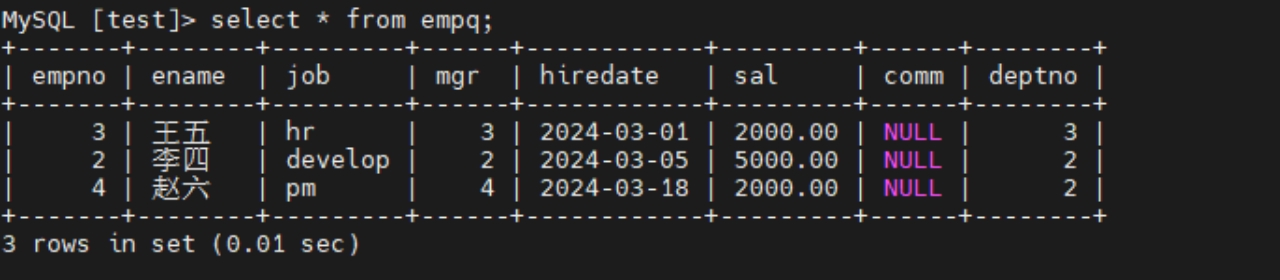
Query table data in MatrixOne, this row has been deleted synchronously.