

Pessimistic Transactions in MatrixOne
Pessimistic Transactions principle
When a transaction starts, conflict detection or lock operation must be performed. When no conflict or lock is detected, a column in the data to be written will be regarded as the primary key column, the column will be locked, and a timestamp will be created. Writes to related rows after this timestamp are judged as write conflicts.
Cache the current relevant data to the corresponding memory area, and add, delete, and modify the data. If there is a lock on the current table, it will enter the waiting state. When the waiting timeout occurs, the waiting transaction will be canceled.
After the modification is completed, enter the commit phase, write data, record the timestamp at this time, and unlock the lock.
Pessimistic transaction model
MatrixOne defaults to a pessimistic transaction.
Pessimistic concurrent transactions are typically used in environments with high data contention. When you read a row using pessimistic concurrency, the row is not locked. When you want to update a row, the application must determine whether another user has locked the row.
In the pessimistic concurrency model, if you receive a value from the database, another user will encounter a lock and enter a waiting state before you try to modify the value. After exceeding the transaction waiting time (5 minutes) set by MatrixOne, Waiting transactions will be forcibly canceled.
Deadlock
In a pessimistic transaction, there may be a situation where two or more transactions lock the resources needed by each other, making it impossible for each transaction to proceed. This situation is called dead. Only through human intervention in one of the transactions, for example, by manually Kill the session, can the deadlock be ended immediately; otherwise, the transaction can only wait for the maximum waiting time.
An example of a deadlock is shown in the following figure:
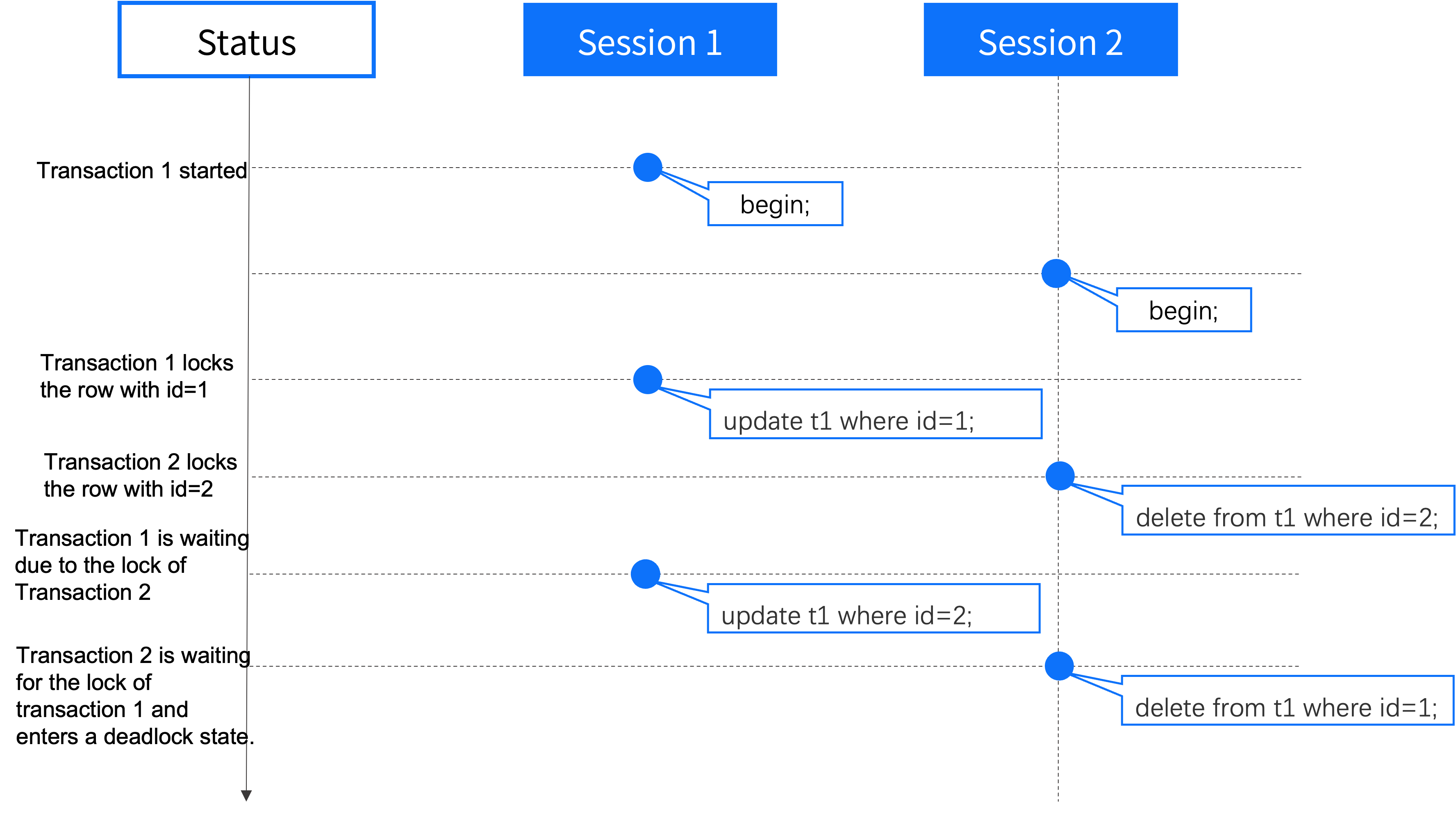
Example
The following is an example of pessimistic concurrency, showing how MatrixOne resolves concurrency conflicts.
At 1:00 PM, User 1 reads a row from the database with the following value:
CustID LastName FirstName
101 Smith Bob
Column name
Original value
Current value
Value in database
CustID
101
101
101
LastName
Smith
Smith
Smith
FirstName
Bob
Bob
Bob
At 1:01 PM, User 2 reads the same row from the database.
At 1:03 PM, User 2 changes the FirstName row from “Bob” to “Robert” and updates the database and the uncommitted state at this time.
Column name
Original value
Current value
Value in database
CustID
101
101
101
LastName
Smith
Smith
Smith
FirstName
Bob
Robert
Bob
At 1:05 PM, User 1 changes the FirstName column from “Bob” to “James” and attempts to update it.
Column name
Original value
Current value
Value in database
CustID
101
101
101
LastName
Smith
Smith
Smith
FirstName
Bob
James
Bob
At this point, user 1 encounters a pessimistic concurrency conflict because the row where the value “Robert” in the database has been locked and needs to wait for user 2’s next operation.
At 1:06 PM, User 1 commits to the transaction. At this time, user 2 releases the waiting state and starts the transaction, but because the corresponding FirstName cannot be matched, the transaction update of user 2 fails.
LOCK TABLES within Transactions
MatrixOne supports the use of LOCK TABLES and UNLOCK TABLES statements within a transaction context. This allows you to acquire read or write locks on tables while a transaction is active:
LOCK TABLES ... READwithin a transaction acquires a read lock on the specified table.LOCK TABLES ... WRITEwithin a transaction acquires a write lock on the specified table.UNLOCK TABLESreleases all table locks held by the current session.All locks are automatically released on
COMMITorROLLBACK.
Example:
DROP DATABASE IF EXISTS issue_23129;
CREATE DATABASE issue_23129;
USE issue_23129;

CREATE TABLE txn_lock_table (id INT PRIMARY KEY, note VARCHAR(20));
INSERT INTO txn_lock_table VALUES (1, 'read');

-- Read lock within a transaction
START TRANSACTION;
LOCK TABLES txn_lock_table READ;
SELECT * FROM txn_lock_table ORDER BY id;
UNLOCK TABLES;
COMMIT;

-- Write lock within a transaction
START TRANSACTION;
LOCK TABLES txn_lock_table WRITE;
INSERT INTO txn_lock_table VALUES (2, 'write');
SELECT * FROM txn_lock_table ORDER BY id;
UNLOCK TABLES;
COMMIT;

SELECT * FROM txn_lock_table ORDER BY id;

-- Locks released on rollback
START TRANSACTION;
INSERT INTO txn_lock_table VALUES (3, 'before_lock');
LOCK TABLES txn_lock_table WRITE;
ROLLBACK;
SELECT * FROM txn_lock_table ORDER BY id;

DROP DATABASE issue_23129;