

What you just did
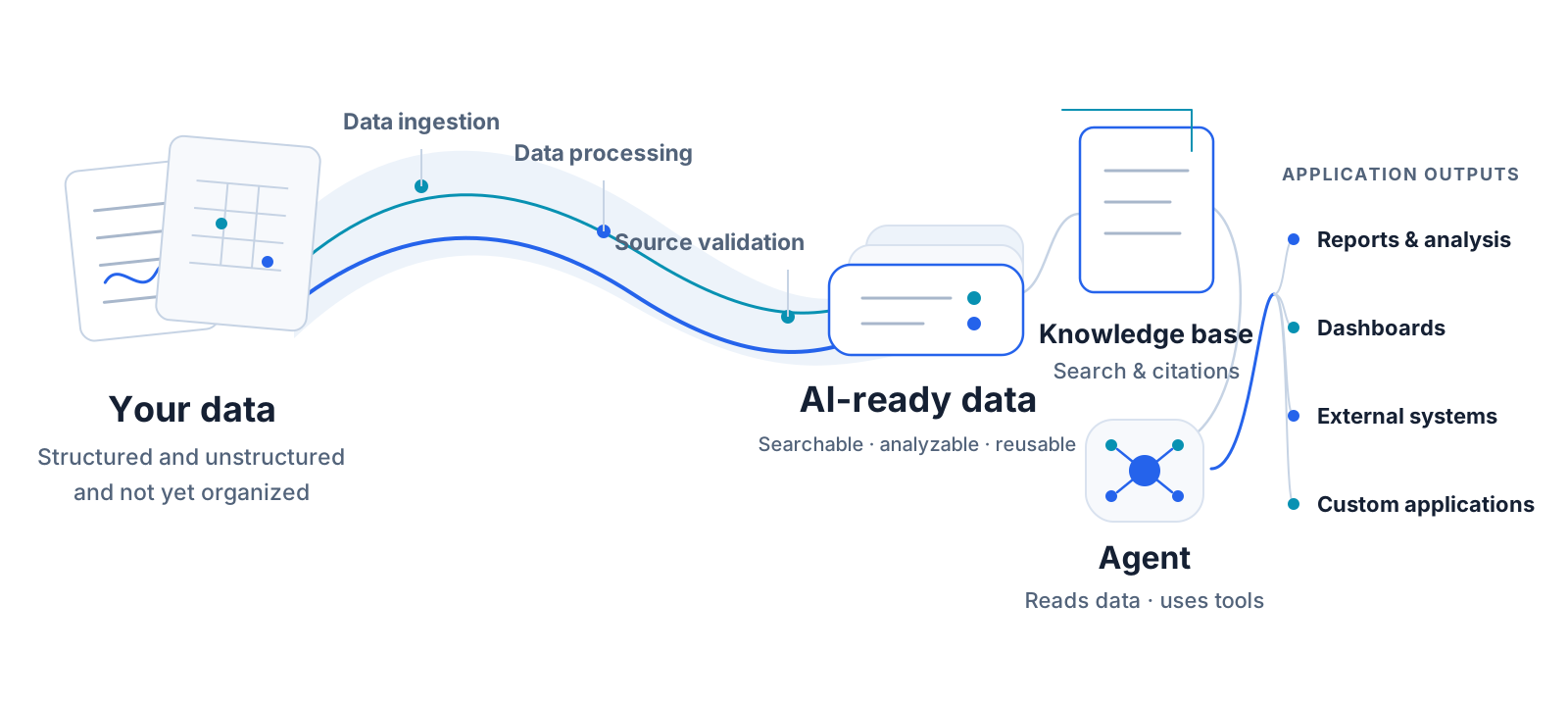
You did more than upload files and ask a question. You turned a set of raw files into a reusable data-to-application pipeline—one you can run again, verify against its sources, and use to produce new results.
The value is not in the number of screens you moved through. It is in what those steps left behind: managed data assets in Catalog, a workflow definition and its run history, a knowledge base with a basic retrieval check, and a deliverable produced by an agent.
Data preparation became a reusable capability
At the start of the tutorial, you had two unorganized files. By the end, that data had a stable location, a repeatable preparation process, a retrieval layer you could inspect, and a concrete output.
The data now has a stable address. The original files live in a data volume and are registered in Catalog. The workflow, knowledge base, and agent all refer to the same managed data instead of requiring separate uploads at each stage.
The preparation logic is saved. The workflow records how to parse, split, index, and write the data. Its run history records whether each processing attempt completed. When the next batch of similar data arrives, the same process can run again without rebuilding every step.
The result has evidence behind it. Source citations in the knowledge base response show that an answer can be traced back to the original material. The Q&A step was not the finish line; it was a checkpoint before putting the data in the hands of an agent.
The same data can keep moving into applications
Step 10 did not prepare another copy of the data for the agent. You bound the knowledge base you had just checked, and the agent used it to complete a task and place a file in the artifact area.
This is the larger payoff: ingestion, preparation, and verification become shared capabilities instead of setup work that every application must rebuild. The same prepared data can support retrieval and Q&A, reports and analysis, dashboards, or tasks that connect to external systems.
The tutorial leaves a set of capabilities you can continue to use:
What remains in the workspace |
What it enables next |
|---|---|
Data assets in Catalog |
A consistent location that downstream work can continue to find |
Workflow and run history |
Repeatable data preparation with inspectable run status |
Knowledge base and source citations |
Searchable data with conclusions that can be traced to their sources |
Agent artifact |
Application-ready deliverables produced from reliable data |
You now know how the objects in this path fit together. To change the data source, adjust the workflow, or build your own agent, use Where to go next to find the relevant guide.
Two ways to work
This tutorial used the interface so you could see the objects and states along the pipeline. MOI also lets you ask its built-in AI to perform the same kinds of operations in natural language. Both approaches use the same data, workflows, knowledge bases, and agent capabilities.