

Dataset Generation
Generate training, evaluation, or fine-tuning samples from source material and generation rules, then save them in a defined structure.
Prepare your resources
Prepare verifiable source material, a sample purpose, an output schema, and a destination. Decide whether samples serve training, evaluation, or fine-tuning before defining fields.
Use the template
On the workflow creation page, start from a template, search for Dataset Generation, and load it onto the canvas.
Complete the required fields in the parameter form.
Setting |
Purpose |
|---|---|
Source material |
Existing documents, business examples, requirements, or folders |
Parsing tier |
Controls parsing speed, quality, and cost |
Dataset goal |
Intended use of the dataset |
Sample format |
Type of sample to generate |
Generation rules |
Scope, quality requirements, difficulty distribution, and rules samples must follow |
Output structure |
JSON Schema for the generated dataset |
Save location |
Catalog location for the generated dataset |
Save the parameters, then start a manual run. The system saves the current workflow before submitting execution.
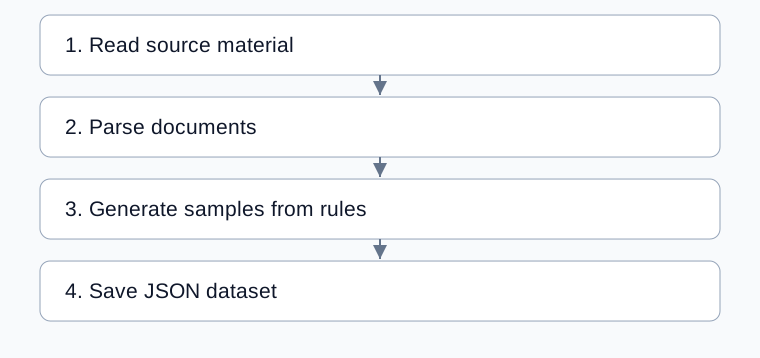
Complete processing flow
Arrows show execution order; configured bindings supply each step’s input.
Configure generation
Setting |
Default and use |
|---|---|
Parsing tier |
Standard; verify complete source text first |
Dataset goal |
|
Sample format |
|
Sample count |
20 requested samples; actual output may differ |
Generation rules |
Define scope, source constraints, missing content handling, and difficulty |
Output schema |
JSON Schema consistent with the format and instructions |
Generation mode |
|
The default structure contains samples with instruction, input, output, source, and tags fields. When selecting question-answer pairs, still check the schema’s field design; selecting a format does not validate that design for you.
The saving step binds the single result. Switching to per-document n_to_n also requires handling multiple results and errors in saving. See Information Extraction.
Example: evaluation questions from product documentation
Select a product document, choose evaluation as the goal, and choose question-answer samples.
Specify chapter coverage, answers grounded only in the source, and source descriptions.
Define an array with question, answer, and source fields in the schema. Request a small sample set.
Keep combined generation, choose an output volume, and run.
Verify that each question is answerable, the answer is correct, and the source supports it. Count accepted samples afterward.
Inspect saved results
Reading, parsing, generation, and saving run sequentially. The generation result is saved as generated-dataset.json. This template has no separate knowledge base indexing step.
Check actual counts, duplicates, structure, and sources. A nonempty generated source field is not proof of grounding; compare it with the original.
Common problems
Symptom |
Check and action |
|---|---|
Too few samples |
Compare the result with source scope before adjusting the request |
Answers add unsupported facts |
Constrain sources in instructions and review samples |
Unexpected fields |
Align schema and instructions |
Per-document output is incompletely saved |
Check multiple-result bindings; the default saves one result |
Data is needed for training |
Review content, structure, duplicates, and sources, then convert for the training system |