

Video Transcription Q&A
Transcribe speech in videos and build a knowledge base index for retrieving training or explanatory video content.
Prepare your resources
Prepare a training video, a knowledge base, and an output volume. Use familiar content to check names, numbers, and key statements.
This template prepares searchable transcripts; Q&A takes place afterward. It processes speech, not individual video frames, and does not infer content from silent scenes.
Use the template
On the workflow creation page, start from a template, search for Video Transcription Q&A, and load it onto the canvas.
Complete the required fields in the parameter form.
Setting |
Purpose |
|---|---|
Input video |
Video files or a volume containing them |
Target knowledge base |
Select an existing knowledge base or create one |
Catalog save location |
Location for the ZIP archive of chunked transcripts |
Save the parameters, then start a manual run. The system saves the current workflow before submitting execution.
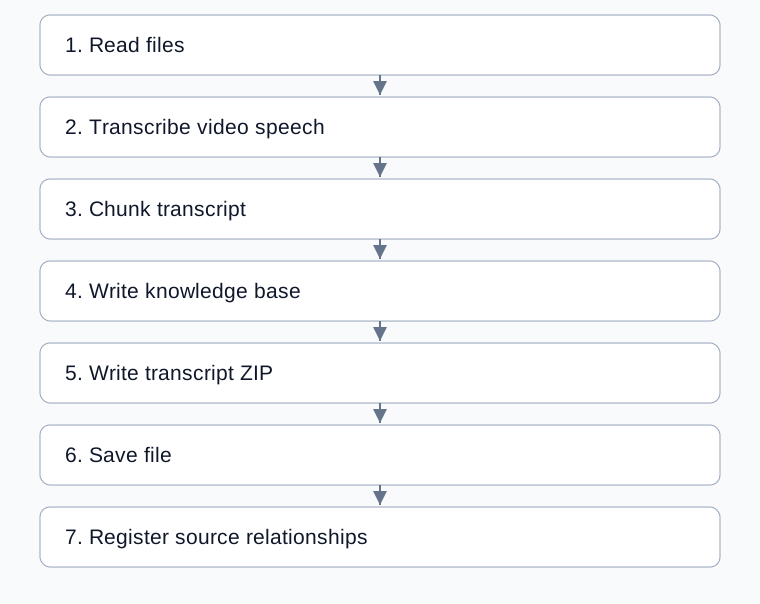
Complete processing flow
Arrows show execution order; configured bindings supply each step’s input.
Configure transcription and chunking
Setting |
Default and use |
|---|---|
Input video |
Select files or a volume and confirm scope |
Language |
|
Noise reduction |
|
Chunk size |
512 characters |
Overlap |
50; at least 0 and less than chunk size |
Three-level index |
Enabled, section size 5 |
Knowledge base and destination |
Receive indexes and transcript files respectively |
Chunk settings apply to text, not video duration. Larger chunks do not repair transcription errors; verify transcription before adjusting retrieval context.
Check transcripts, indexes, and files
Confirm selected files and counts.
Compare parser
documentsand nonemptytextwith the original, checking names, numbers, and complete statements.Inspect chunk context and source metadata.
Check index writes; three-level row counts differ from file counts.
Open the transcript ZIP at the destination and inspect records and source relationships.
Test retrieval using a question answered in the training video.
The template writes chunked transcript documents to ZIP, saves that file, and registers sources. This differs from the document knowledge base template, which saves records before chunking.
Example: organize a training video
Select a training video, keep automatic language detection and default chunking, choose destinations, and run. Compare a key passage with its transcript, then retrieve the same topic. Adjust overlap or chunk size only after confirming transcription accuracy.
Common problems
Symptom |
Check and action |
|---|---|
Names or numbers are incorrect |
Compare with speech and check language and noise |
No text is returned |
Check for recognizable speech and inspect parser output |
Retrieved context is incomplete |
Verify the transcript, then inspect chunks and overlap |
Indexing succeeds but saving fails |
Inspect later writing/saving status before repeating existing writes |
Only one file is visible for multiple sources |
Inspect all |