

Extract Information to Table
Parse material, extract fields, and write structured results to a database table. Use it to turn forms, resumes, or business documents into records.
Prepare your resources
Prepare source material, JSON Schema, a result database, table name, and output volume. Check columns and types when using an existing table. The template creates a missing table from field definitions or reuses an existing table with the same name.
This template saves one combined extraction into a table. If each resume or receipt should become one row, validate a single file first, then design batch processing.
Use the template
On the workflow creation page, start from a template, search for Extract Information to Table, and load it onto the canvas.
Complete the required fields in the parameter form.
Setting |
Purpose |
|---|---|
Source material |
Documents, forms, email, or folders to parse |
Parsing tier |
Controls parsing speed, quality, and cost |
Extraction schema |
JSON Schema defining fields to extract and write |
Result database |
Database for extracted records |
Result table name |
Reuse an existing table with this name in the selected database, or create it if absent |
Output location |
Catalog location for extraction results |
Save the parameters, then start a manual run. The system saves the current workflow before submitting execution.
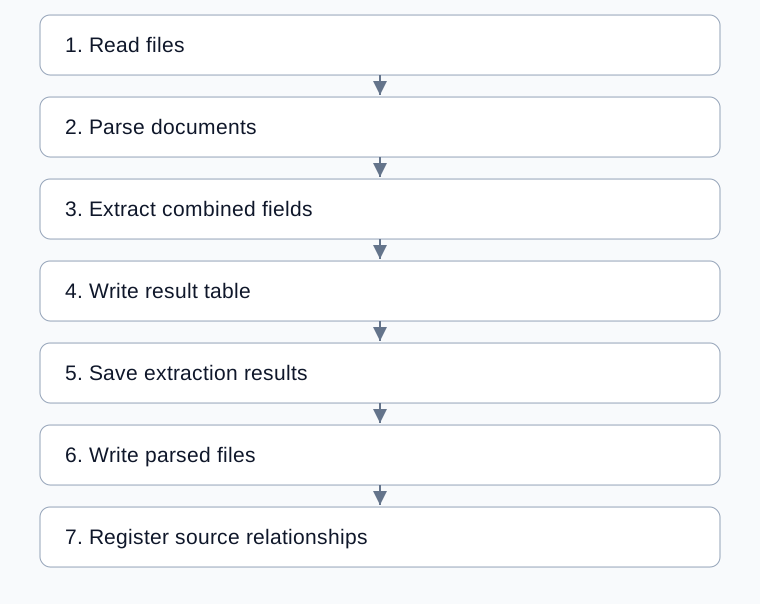
Complete processing flow
Arrows show execution order; configured bindings supply each step’s input.
Configure fields and the table
Setting |
What to check |
|---|---|
Extraction schema |
Field names and types match target columns |
Instructions |
Meanings, formats, and missing-value rules |
Layout-sensitive fields |
Names of fields whose position matters |
Result database and table |
Correct destination; avoid an incompatible existing table |
Output location |
File destination, checked separately from table records |
Extraction uses n_to_1. It combines inputs into one JSON result and binds result to the table node’s raw_json. The template has no automatic one-file-per-row loop.
Define structures for multi-value fields, such as education arrays. A schema accepting arrays does not mean any existing column can store them. Check the target and actual write result; see Save to MOI Table.
Check table and file results
Inspect parsed content using one source file.
Verify extracted fields and values.
Check
database,table_name,written_columns, andaffected_rowson the writing node.Compare records in the result table with the original.
Inspect saved results, parsed files, and final source registration.
Table writing precedes file saving and registration. If a later step fails, records may already exist; inspect them before rerunning.
Example: store one resume
Define name, education, and work experience fields, including the structure of multiple entries. Select one resume, configure a dedicated result table, and run. Check completeness, written columns, and affected rows. See Extract resume information.
Common problems
Symptom |
Check and action |
|---|---|
Extraction succeeds but writing fails |
Check the database, columns, and field types |
Several files yield one result |
Extraction combines inputs; per-file processing needs a different flow |
Nested fields cannot be written |
Check schema, column types, and accepted node inputs |
A failed run left table records |
Locate whether failure occurred after writing before repeating it |
Only files are needed |