

Memory Governance
Filter synchronized session content, extract events, facts, and subject profiles, then write memories after deduplication and conflict handling.
Prepare your resources
Confirm Memory Governance is enabled and prepare synchronized sessions for inspection. Define what to retain, such as explicitly stated preferences or past events, before configuring filters and extraction.
Sessions trigger this template. It does not use file sources, output volumes, or ordinary file-processing run parameters. The system supplies session and workspace context.
Use the template
On the workflow creation page, select Start from a template, then choose Memory extraction & governance.
After the feature is enabled, enter a name at the creation entry and configure the filtering, extraction, and writing steps. Synchronized sessions trigger this flow; the system supplies the session information it needs.
Complete processing flow
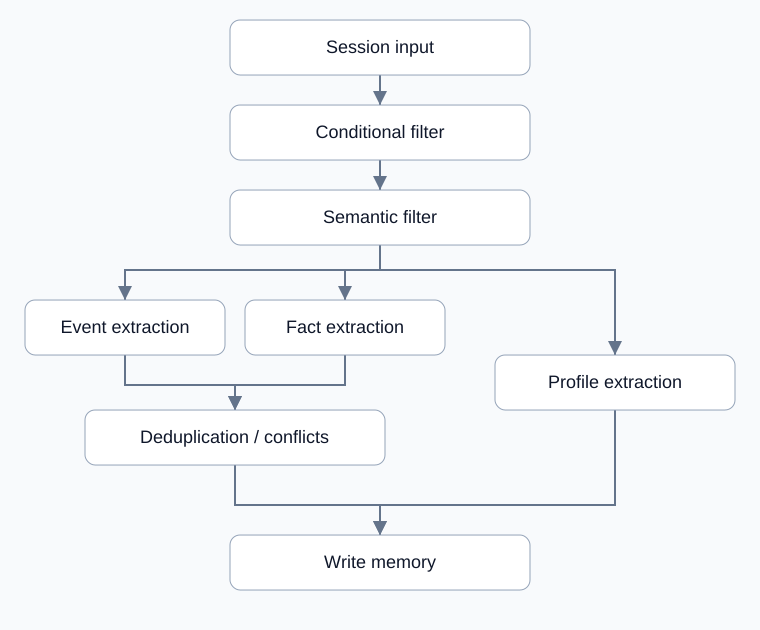
After filtering, memory and profile paths run in parallel and join for writing.
Understand filtering and extraction
Session input supplies synchronized content.
Conditional filtering determines which sessions continue.
Semantic filtering further selects relevant content.
Event and fact extraction run in parallel, then merge into deduplication and conflict handling.
Subject profile extraction runs alongside that memory-processing path.
Memory writing joins both paths and saves memories and profiles.
The diagram shows memory processing and profile processing as parallel paths. They are not mutually exclusive conditions.
Configure each stage
Stage |
What to check |
|---|---|
Conditional filtering |
Define included sessions without excluding needed content |
Semantic filtering |
Use concrete retention criteria and inspect filtered results |
Event and fact extraction |
Distinguish past events from reusable facts, grounded in the session |
Profile extraction |
Keep information associated with the correct subject |
Deduplication and conflicts |
Compare existing and new information |
Memory writing |
Keep it at the final join and verify saved results |
Use the available creation entry and name form. After editing, inspect actual session-triggered runs; saving configuration does not verify execution.
Example: retain preferences from support conversations
Use a session containing an explicit preference and a service event. Check that preferences enter the appropriate fact or profile result and that the event matches the original. Inspect deduplication and writing for duplicate or misattributed information.
Inspect and troubleshoot
Symptom |
Check and action |
|---|---|
Creation entry is absent |
Confirm the feature is enabled |
Saving produces no run |
Check for a synchronized session that triggers the flow |
Needed content is absent |
Inspect conditional and semantic filtering before extraction |
Memory differs from the session |
Check extraction and attribution, then validate revised settings |
Extraction succeeds but no memory appears |
Check deduplication, conflicts, and final writing |
The example illustrates inspection order. Check events, facts, and profiles separately, and confirm completion through saved results.