Java Basic Example
Note
The source code download address of the demo program introduced in this document is: [Java CRUD Example] (https://github.com/matrixorigin/matrixone_java_crud_example).
Configure the environment
Before you begin, make sure that the following software has been downloaded and installed.
- Create instance has been completed to create the database through the MySQL client.
mysql> create database test;
- Download and install lntelliJ IDEA(2022.2.1 or later version).
- Select the JDK 8+ version version according to your system environment for download and install.
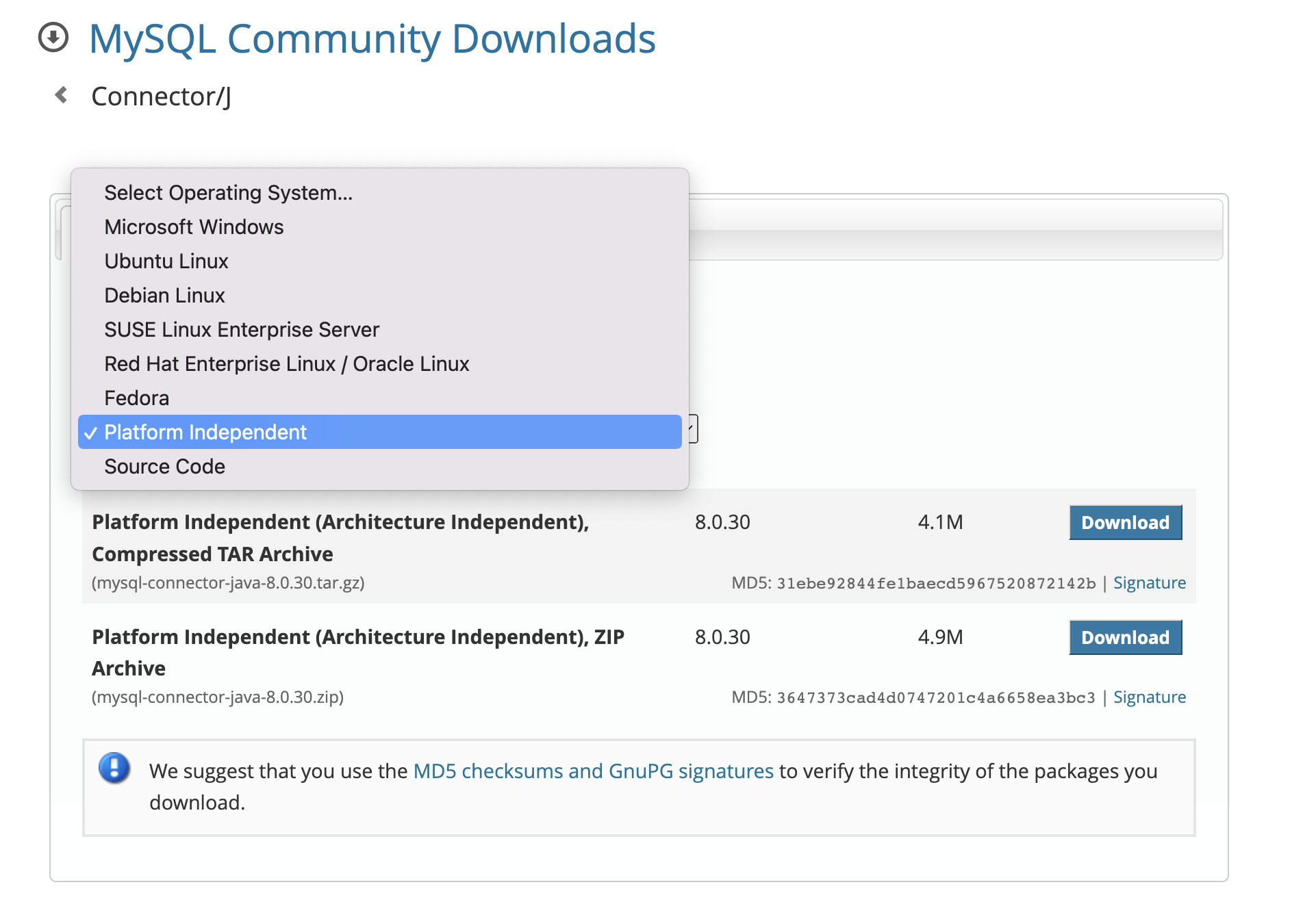
- MySQL JDBC connector 8.0+ version: It is recommended to download the platform independent version and unzip the download file.
Note
We use IDEA as an IDE sample to demonstrate this process, and you are free to choose Eclipse or other IDE tool practices.
Initialize a new Java project
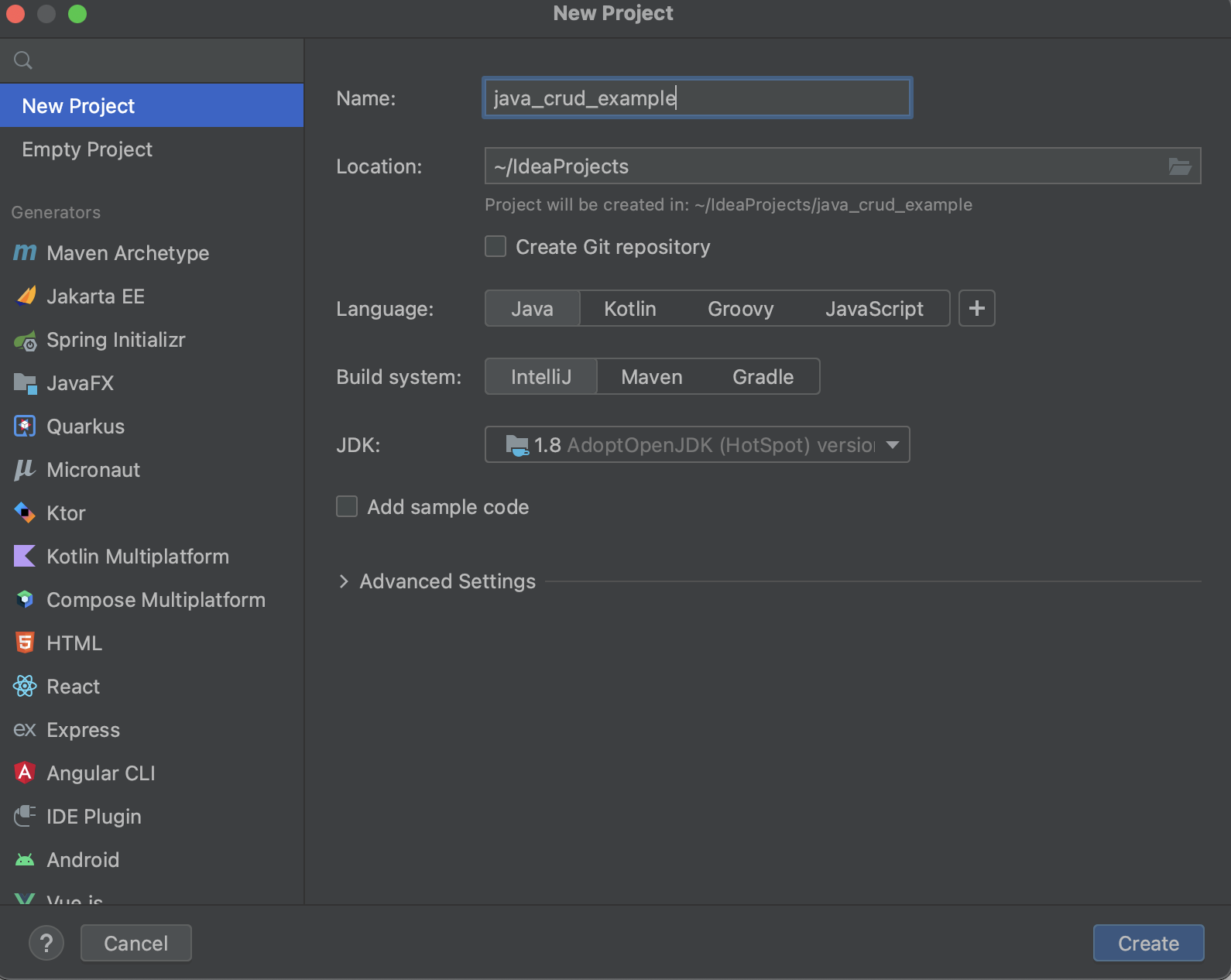
Start IDEA and create a new Java project as follows:
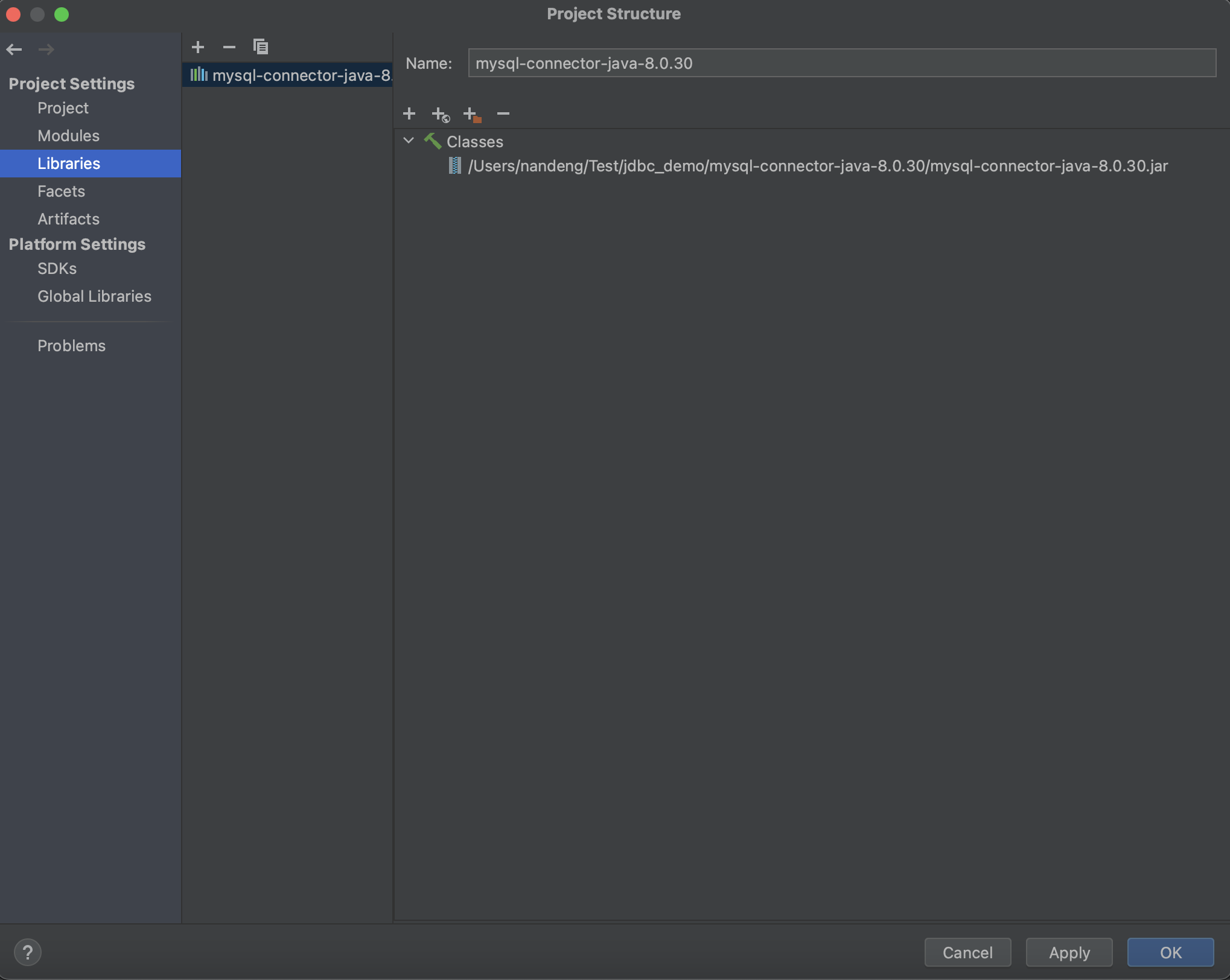
Go to the menuProject Setting > Libraries, import the mysql-connector-java-8.0.30.jar file.
Write Java code to connect to MatrixOne
First, create a Java class named JDBCUtils as a connection utility. This class will serve as a tool to connect MatrixOne and execute SQL queries.
In the src directory, create a file named JDBCUtils.java and edit the file with the following code:
import java.sql.Connection;
import java.sql.DriverManager;
import java.sql.SQLException;

public class JDBCUtils {
    // please modify host_ip_address
    private static String jdbcURL = "jdbc:mysql://freetier-01.cn-hangzhou.cluster.matrixonecloud.cn:6001/test?enabledTLSProtocols=TLSv1.2";
    // please modify tenant:user:role
    private static String jdbcUsername = "585b49fc_852b_4bd1_b6d1_d64bc1d8xxxx:admin:accountadmin";
    // please modify your_password
    private static String jdbcPassword = "your_password";

    public static Connection getConnection() {
        Connection connection = null;
        try {
            connection = DriverManager.getConnection(jdbcURL, jdbcUsername, jdbcPassword);
        } catch (SQLException e) {
            // TODO Auto-generated catch block
            e.printStackTrace();
        }
        return connection;
    }

    public static void printSQLException(SQLException ex) {
        for (Throwable e : ex) {
            if (e instanceof SQLException) {
                e.printStackTrace(System.err);
                System.err.println("SQLState: " + ((SQLException) e).getSQLState());
                System.err.println("Error Code: " + ((SQLException) e).getErrorCode());
                System.err.println("Message: " + e.getMessage());
                Throwable t = ex.getCause();
                while (t != null) {
                    System.out.println("Cause: " + t);
                    t = t.getCause();
                }
            }
        }
    }
}
Second, we use MatrixOne to write sample code for creating, inserting, updating, and deleting operations.
We need to create the corresponding java source code files in the src directory: Create.java, Insert.java, Update.java, Select.java, and place the following code in these files.
Create (Create.java)
import java.sql.Connection;
import java.sql.SQLException;
import java.sql.Statement;

public class Create {
    private static final String createTableSQL = "create table student (\r\n" + "id int primary key,\r\n" +
            " name varchar(20),\r\n" + " email varchar(20),\r\n" + " country varchar(20),\r\n" +
            " age int\r\n" + " );";

    public static void main(String[] argv) throws SQLException {
        Create createTable = new Create();
        createTable.createTable();
    }

    public void createTable() throws SQLException {

        System.out.println(createTableSQL);
        // Step 1: Establishing a Connection
        try (Connection connection = JDBCUtils.getConnection();
             // Step 2:Create a statement using connection object
             Statement statement = connection.createStatement();) {

            // Step 3: Execute the query or update query
            statement.execute(createTableSQL);
        } catch (SQLException e) {

            // print SQL exception information
            JDBCUtils.printSQLException(e);
        }

        // Step 4: try-with-resource statement will auto close the connection.
    }
}
Executing the above code will create a table in the test database, and you can then use the following code in the MySQL client to verify that the table has been created.
mysql> show create table student;
+--------------------------------------------------------------------------------------------------------------------------------------------------------------------------------------------------------------------------------------------------------------| Table   | Create Table                                                                                                                                                                                        |
+---------+-----------------------------------------------------------------------------------------------------------------------------------------------------------------------------------------------------+
| student | CREATE TABLE `student` (
`id` INT DEFAULT NULL,
`name` VARCHAR(20) DEFAULT NULL,
`email` VARCHAR(20) DEFAULT NULL,
`country` VARCHAR(20) DEFAULT NULL,
`age` INT DEFAULT NULL,
PRIMARY KEY (`id`)
) |
+---------+-----------------------------------------------------------------------------------------------------------------------------------------------------------------------------------------------------+
1 row in set (0.01 sec)
Insert(Insert.java)
import java.sql.Connection;
import java.sql.PreparedStatement;
import java.sql.SQLException;

public class Insert {
    private static final String INSERT_STUDENT_SQL = "INSERT INTO student" +
            "  (id, name, email, country, age) VALUES " +
            " (?, ?, ?, ?, ?);";

    public static void main(String[] argv) throws SQLException {
        Insert insertTable = new Insert();
        insertTable.insertRecord();
    }

    public void insertRecord() throws SQLException {
        System.out.println(INSERT_STUDENT_SQL);
        // Step 1: Establishing a Connection
        try (Connection connection = JDBCUtils.getConnection();
             // Step 2:Create a statement using connection object
             PreparedStatement preparedStatement = connection.prepareStatement(INSERT_STUDENT_SQL)) {
            preparedStatement.setInt(1, 1);
            preparedStatement.setString(2, "Tony");
            preparedStatement.setString(3, "tony@gmail.com");
            preparedStatement.setString(4, "US");
            preparedStatement.setString(5, "20");

            System.out.println(preparedStatement);
            // Step 3: Execute the query or update query
            preparedStatement.executeUpdate();
        } catch (SQLException e) {

            // print SQL exception information
            JDBCUtils.printSQLException(e);
        }

        // Step 4: try-with-resource statement will auto close the connection.
    }

}
Execution Results:
mysql> select * from student;
+------+------+----------------+---------+------+
| id   | name | email          | country | age  |
+------+------+----------------+---------+------+
|    1 | Tony | tony@gmail.com | US      |   20 |
+------+------+----------------+---------+------+
1 row in set (0.01 sec)
Update(Update.java)
import java.sql.Connection;
import java.sql.PreparedStatement;
import java.sql.SQLException;

public class Update {
    private static final String UPDATE_STUDENT_SQL = "update student set name = ? where id = ?;";

    public static void main(String[] argv) throws SQLException {
        Update updateTable = new Update();
        updateTable.updateRecord();
    }

    public void updateRecord() throws SQLException {
        System.out.println(UPDATE_STUDENT_SQL);
        // Step 1: Establishing a Connection
        try (Connection connection = JDBCUtils.getConnection();
             // Step 2:Create a statement using connection object
             PreparedStatement preparedStatement = connection.prepareStatement(UPDATE_STUDENT_SQL)) {
            preparedStatement.setString(1, "Ram");
            preparedStatement.setInt(2, 1);

            // Step 3: Execute the query or update query
            preparedStatement.executeUpdate();
        } catch (SQLException e) {

            // print SQL exception information
            JDBCUtils.printSQLException(e);
        }

        // Step 4: try-with-resource statement will auto close the connection.
    }
}
Execution Results:
mysql> select * from student;
+------+------+----------------+---------+------+
| id   | name | email          | country | age  |
+------+------+----------------+---------+------+
|    1 | Ram  | tony@gmail.com | US      |   20 |
+------+------+----------------+---------+------+
1 row in set (0.00 sec)
Select(Select.java)
import java.sql.Connection;
import java.sql.PreparedStatement;
import java.sql.ResultSet;
import java.sql.SQLException;

public class Select {
    private static final String QUERY = "select id,name,email,country,age from student where id =?";

    public static void main(String[] args) {

        // using try-with-resources to avoid closing resources (boiler plate code)

        // Step 1: Establishing a Connection
        try (Connection connection = JDBCUtils.getConnection();

             // Step 2:Create a statement using connection objectPreparedStatement preparedStatement = connection.prepareStatement(QUERY);) {
            preparedStatement.setInt(1, 1);
            System.out.println(preparedStatement);
            // Step 3: Execute the query or update query
            ResultSet rs = preparedStatement.executeQuery();

            // Step 4: Process the ResultSet object.
            while (rs.next()) {
                int id = rs.getInt("id");
                String name = rs.getString("name");
                String email = rs.getString("email");
                String country = rs.getString("country");
                String password = rs.getString("age");
                System.out.println(id + "," + name + "," + email + "," + country + "," + password);
            }
        } catch (SQLException e) {
            JDBCUtils.printSQLException(e);
        }
        // Step 4: try-with-resource statement will auto close the connection.
    }
}
Execution Results:

Delete(Delete.java)
package org.example;

import java.sql.Connection;
import java.sql.PreparedStatement;
import java.sql.SQLException;

public class Delete {
    private static final String DELETE_STUDENT_SQL = "DELETE FROM student WHERE id = ?;";

    public static void main(String[] argv) throws SQLException {
        Delete deleteRecord = new Delete();
        deleteRecord.deleteDataById(1);
    }

    public void deleteDataById(int id) throws SQLException {

        // Step 1: Establishing a Connection
        try (Connection connection = JDBCUtils.getConnection();
             // Step 2: Create a statement using connection object
             PreparedStatement preparedStatement = connection.prepareStatement(DELETE_STUDENT_SQL)) {
            preparedStatement.setInt(1, id);
            System.out.println(preparedStatement);
            // Step 3: Execute the delete query
            int rowsAffected = preparedStatement.executeUpdate();
            if (rowsAffected > 0) {
                System.out.println("Data deleted successfully.");
            } else {
                System.out.println("No data found for the given ID.");
            }

        } catch (SQLException e) {

            // print SQL exception information
            JDBCUtils.printSQLException(e);
        }

        // Step 4: try-with-resource statement will auto close the connection.
    }
}
Execution Results:
mysql> select * from student;
Empty set (0.03 sec)