SpringBoot and JPA basic examples
This document will guide you how to build a simple application usingSpringBoot,Spring Data JPA andIntellij IDEA and implement CRUD (create, read, update, delete) functions.
Before you begin
The software involved in this tutorial is as follows:
-
Spring Data JPA: JPA (Java Persistence API, Java Persistence API) is a specification that is a mapping relationship between a JDK 5.0 annotation or XML description of the object and the relational table, and persists the running entity objects into the database. Spring Data JPA is an ORM (Object-Relational Mapping) framework for Java object mapping relationship solutions, an open source framework that maps object-oriented domain models to relational databases.
-
Intellij IDEA: IntelliJ IDEA is a commercially sold Java integrated development environment (IDE) tool software. It has many plug-ins that can improve our productivity.
-
Maven: Maven is a powerful project management tool in Java, which can automatically download and import Jar files based on the configuration in the pom.xml file. This feature reduces conflicts between different versions of Jar files.
-
Spring: Spring is one of the most popular frameworks in Java, and more and more businesses use Spring frameworks to build their projects. Spring Boot is built on top of the traditional Spring framework. Therefore, it provides all the features of Spring and is easier to use than Spring.
-
Postman: Postman is an application for API testing. It is an HTTP client that uses a graphical user interface to test HTTP requests to obtain different types of responses that need to be validated.
Configure the environment
1. Install and build MatrixOne
-
Create a new database named
testin the MySQL client.
mysql> create database test;
2. Create a new Spring Boot project using IntelliJ IDEA
SelectSpring Initializer to name the project name as needed.
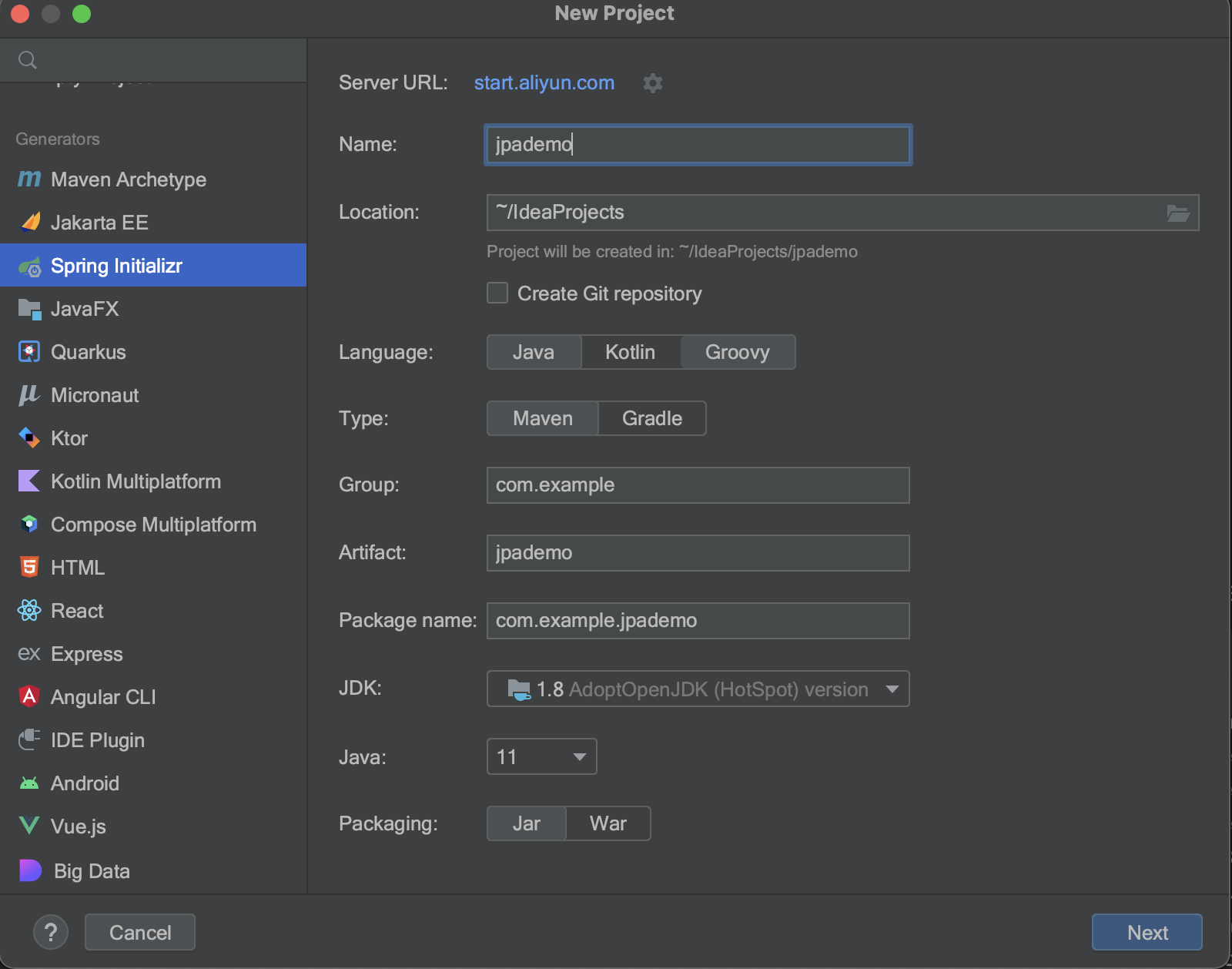
Select the following dependencies:
Spring Web* JDBC API Spring Data JPA *MySQL Driver
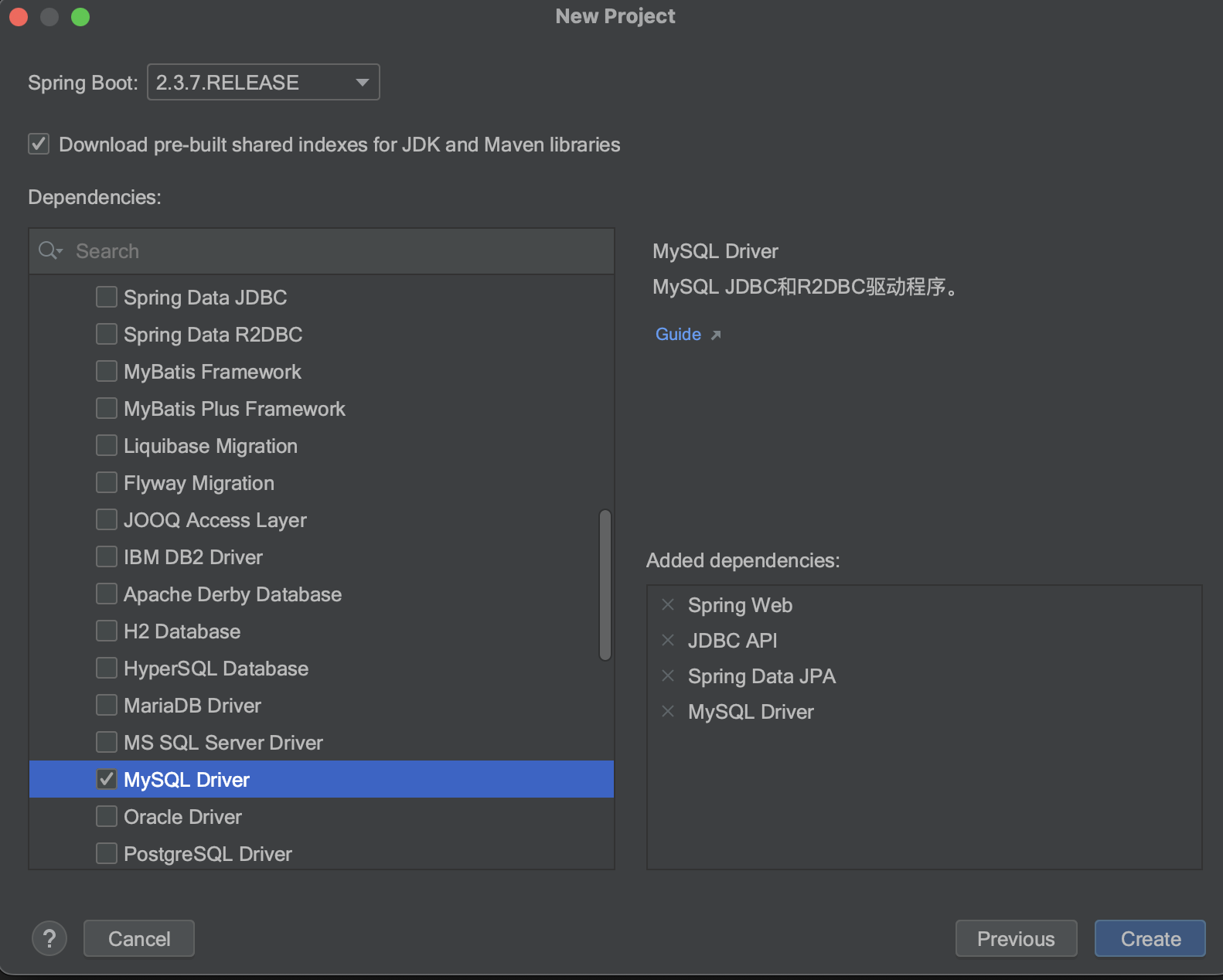
ClickCreate to create the project.
Dependencies are listed in the pom.xml file. Usually you don't need to modify anything.
<?xml version="1.0" encoding="UTF-8"?>
<project xmlns="http://maven.apache.org/POM/4.0.0" xmlns:xsi="http://www.w3.org/2001/XMLSchema-instance"
         xsi:schemaLocation="http://maven.apache.org/POM/4.0.0 https://maven.apache.org/xsd/maven-4.0.0.xsd">
    <modelVersion>4.0.0</modelVersion>
    <groupId>com.example</groupId>
    <artifactId>jpademo</artifactId>
    <version>0.0.1-SNAPSHOT</version>
    <name>jpademo</name>
    <description>jpademo</description>

    <properties>
        <java.version>1.8</java.version>
        <project.build.sourceEncoding>UTF-8</project.build.sourceEncoding>
        <project.reporting.outputEncoding>UTF-8</project.reporting.outputEncoding>
        <spring-boot.version>2.3.7.RELEASE</spring-boot.version>
    </properties>

    <dependencies>
        <dependency>
            <groupId>org.springframework.boot</groupId>
            <artifactId>spring-boot-starter-data-jpa</artifactId>
        </dependency>
        <dependency>
            <groupId>org.springframework.boot</groupId>
            <artifactId>spring-boot-starter-jdbc</artifactId>
        </dependency>
        <dependency>
            <groupId>org.springframework.boot</groupId>
            <artifactId>spring-boot-starter-web</artifactId>
        </dependency>

        <dependency>
            <groupId>mysql</groupId>
            <artifactId>mysql-connector-java</artifactId>
            <scope>runtime</scope>
        </dependency>
        <dependency>
            <groupId>org.springframework.boot</groupId>
            <artifactId>spring-boot-starter-test</artifactId>
            <scope>test</scope>
            <exclusions>
                <exclusion>
                    <groupId>org.junit.vintage</groupId>
                    <artifactId>junit-vintage-engine</artifactId>
                </exclusion>
            </exclusions>
        </dependency>
    </dependencies>

    <dependencyManagement>
        <dependencies>
            <dependency>
                <groupId>org.springframework.boot</groupId>
                <artifactId>spring-boot-dependencies</artifactId>
                <version>${spring-boot.version}</version>
                <type>pom</type>
                <scope>import</scope>
            </dependency>
        </dependencies>
    </dependencyManagement>

    <build>
        <plugins>
            <plugin>
                <groupId>org.apache.maven.plugins</groupId>
                <artifactId>maven-compiler-plugin</artifactId>
                <version>3.8.1</version>
                <configuration>
                    <source>1.8</source>
                    <target>1.8</target>
                    <encoding>UTF-8</encoding>
                </configuration>
            </plugin>
            <plugin>
                <groupId>org.springframework.boot</groupId>
                <artifactId>spring-boot-maven-plugin</artifactId>
                <version>2.3.7.RELEASE</version>
                <configuration>
                    <mainClass>com.example.jpademo.JpademoApplication</mainClass>
                </configuration>
                <executions>
                    <execution>
                        <id>repackage</id>
                        <goals>
                            <goal>repackage</goal></goals>
                    </execution>
                </executions>
            </plugin>
        </plugins>
    </build>

</project>
3. Modify the application.properties file
Go to thesrc>main>resources file directory, configure the application.properties file, and complete the MatrixOne connection.
# Application Name
spring.application.name=jpademo
# Database driver
spring.datasource.driver-class-name=com.mysql.cj.jdbc.Driver
# Data Source name
spring.datasource.name=defaultDataSource

# Database connection url, modify to MatrixOne address and port, with parameters
# please modify host_ip_address
spring.datasource.url=jdbc:mysql://freetier-01.cn-hangzhou.cluster.matrixonecloud.cn:6001/test?characterSetResults=UTF-8&continueBatchOnError=false&useServerPrepStmts=true&alwaysSendSetIsolation=false&useLocalSessionState=true&zeroDateTimeBehavior=CONVERT_TO_NULL&failoverReadOnly=false&serverTimezone=Asia/Shanghai&socketTimeout=30000&enabledTLSProtocols=TLSv1.2
# Database username and password
# please modify tenant:user:role
spring.datasource.username=585b49fc_852b_4bd1_b6d1_d64bc1d8xxxx:admin:accountadmin,
# please modify your_password
spring.datasource.password=your_password
# Web application port
server.port=8080

# Hibernate configurations
spring.jpa.properties.hibernate.dialect = org.hibernate.dialect.MySQLDialect
spring.jpa.properties.hibernate.id.new_generator_mappings = false
spring.jpa.properties.hibernate.format_sql = true
spring.jpa.hibernate.ddl-auto = validate
4. Create a new table in MatrixOne and insert data
Use MySQL client to connect to MatrixOne and execute the following SQL statements. You can save these SQL statements in book.sql under the /resource/database/ directory.
mysql> USE test;
mysql> CREATE TABLE IF NOT EXISTS `book` (
    `id` int(11) NOT NULL AUTO_INCREMENT,
    `author` varchar(255) DEFAULT NULL,
    `category` varchar(255) DEFAULT NULL,
    `name` varchar(255) DEFAULT NULL,
    `pages` int(11) DEFAULT NULL,
    `price` int(11) DEFAULT NULL,
    `publication` varchar(255) DEFAULT NULL,
    PRIMARY KEY (`id`)
    );
mysql> INSERT INTO `book` (`id`, `author`, `category`, `name`, `pages`, `price`, `publication`) VALUES
(1, 'Antoine de Saint-Exupery', 'Fantancy', 'The Little Prince', 100, 50, 'Amazon'),
(2, 'J. K. Rowling', 'Fantancy', 'Harry Potter and the Sorcerer''s Stone', 1000, 200, 'Amazon'),
(3, 'Lewis Carroll', 'Fantancy', 'Alice''s Adventures in Wonderland', 1500, 240, 'Amazon');
Write code
After completing the environment configuration, let's write code to implement a simple CRUD application.
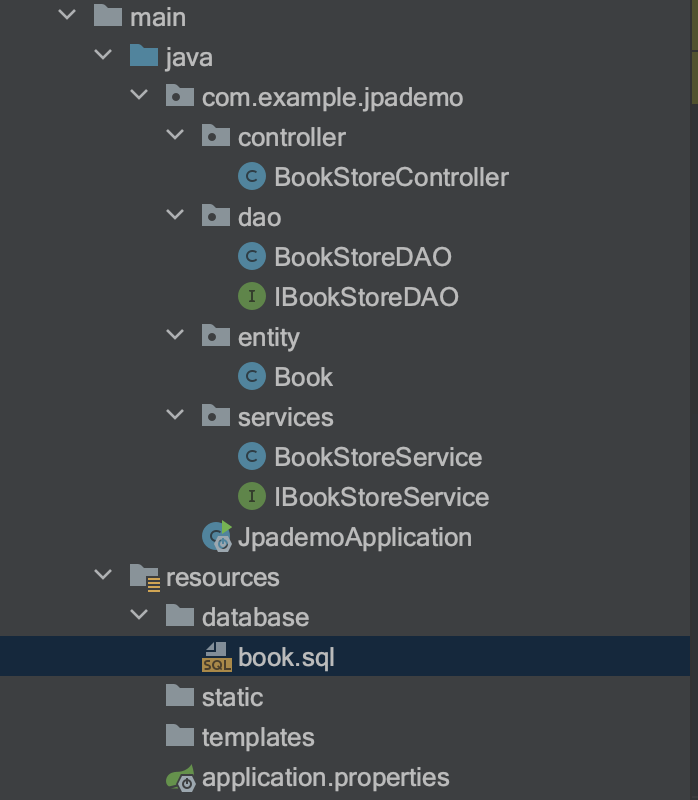
After completing writing code, you will have a project structure as shown below. You can create these packages and java classes in advance, use the following command line to create the directory structure first.
cd src/main/java/com/example/jpademo/ &&
mkdir  controller dao entity services &&
touch controller/BookStoreController.java dao/BookStoreDAO.java dao/IBookStoreDAO.java entity/Book.java services/BookStoreService.java services/IBookStoreService.java
We will write create, update, insert, delete, and select operations for this demo application.
1. controller/BookStoreController.java
package com.example.jpademo.controller;

import com.example.jpademo.entity.Book;
import com.example.jpademo.services.IBookStoreService;
import org.springframework.beans.factory.annotation.Autowired;
import org.springframework.http.HttpStatus;
import org.springframework.http.ResponseEntity;
import org.springframework.stereotype.Controller;
import org.springframework.web.bind.annotation.*;

import java.util.List;

@Controller
@RequestMapping("bookservice")
public class BookStoreController {

    @Autowired
    private IBookStoreService service;

    @GetMapping("books")
    public ResponseEntity<List<Book>> getBooks(){

        List<Book> books = service.getBooks();
        return new ResponseEntity<List<Book>>(books, HttpStatus.OK);

    }

    @GetMapping("books/{id}")
    public ResponseEntity<Book> getBook(@PathVariable("id") Integer id){
        Book book = service.getBook(id);
        return new ResponseEntity<Book>(book, HttpStatus.OK);
    }

    @PostMapping("books")
    public ResponseEntity<Book> createBook(@RequestBody Book book){
        Book b = service.createBook(book);
        return new ResponseEntity<Book>(b, HttpStatus.OK);

    }

    @PutMapping("books/{id}")
    public ResponseEntity<Book> updateBook(@PathVariable("id") int id, @RequestBody Book book){

        Book b = service.updateBook(id, book);
        return new ResponseEntity<Book>(b, HttpStatus.OK);
    }

    @DeleteMapping("books/{id}")
    public ResponseEntity<String> deleteBook(@PathVariable("id") int id){
        boolean isDeleted = service.deleteBook(id);
        if(isDeleted){
            String responseContent = "Book has been deleted successfully";
            return new ResponseEntity<String>(responseContent,HttpStatus.OK);
        }String error = "Error while deleting book from database";
        return new ResponseEntity<String>(error,HttpStatus.INTERNAL_SERVER_ERROR);
    }

}
2. dao/BooStoreDAO.java
package com.example.jpademo.dao;

import com.example.jpademo.entity.Book;
import org.springframework.stereotype.Repository;
import org.springframework.transaction.annotation.Transactional;

import javax.persistence.EntityManager;
import javax.persistence.PersistenceContext;
import javax.persistence.Query;
import java.util.List;

@Transactional
@Repository
public class BookStoreDAO implements IBookStoreDAO {

    @PersistenceContext
    private EntityManager entityManager;

    /**
     * This method is responsible to get all books available in database and return it as List<Book>
     */
    @SuppressWarnings("unchecked")
    @Override
    public List<Book> getBooks() {

        String hql = "FROM Book as atcl ORDER BY atcl.id";
        return (List<Book>) entityManager.createQuery(hql).getResultList();
    }

    /**
     * This method is responsible to get a particular Book detail by given book id
     */
    @Override
    public Book getBook(int bookId) {

        return entityManager.find(Book.class, bookId);
    }

    /**
     * This method is responsible to create new book in database
     */
    @Override
    public Book createBook(Book book) {
        entityManager.persist(book);
        Book b = getLastInsertedBook();
        return b;
    }

    /**
     * This method is responsible to update book detail in database
     */
    @Override
    public Book updateBook(int bookId, Book book) {

        //First We are taking Book detail from database by given book id and
        // then updating detail with provided book object
        Book bookFromDB = getBook(bookId);
        bookFromDB.setName(book.getName());
        bookFromDB.setAuthor(book.getAuthor());
        bookFromDB.setCategory(book.getCategory());
        bookFromDB.setPublication(book.getPublication());
        bookFromDB.setPages(book.getPages());
        bookFromDB.setPrice(book.getPrice());

        entityManager.flush();

        //again i am taking updated result of book and returning the book object
        Book updatedBook = getBook(bookId);

        return updatedBook;
    }

    /**
     * This method is responsible for deleting a particular(which id will be passed that record)
     * record from the database
     */
    @Override
    public boolean deleteBook(int bookId) {
        Book book = getBook(bookId);
        entityManager.remove(book);

        //we are checking here that whether entityManager contains earlier deleted book or not
        // if contains then book is not deleted from DB that's why returning false;
        boolean status = entityManager.contains(book);
        if(status){
            return false;
        }
        return true;
    }

    /**
     * This method will get the latest inserted record from the database and return the object of Book class
     * @return book
     */
    private Book getLastInsertedBook(){
        String hql = "from Book order by id DESC";
        Query query = entityManager.createQuery(hql);
        query.setMaxResults(1);
        Book book = (Book)query.getSingleResult();
        return book;
    }
}
3. dao/IBookStoreDAO.java
package com.example.jpademo.dao;

import com.example.jpademo.entity.Book;

import java.util.List;

public interface IBookStoreDAO {

    List<Book> getBooks();
    Book getBook(int bookId);
    Book createBook(Book book);
    Book updateBook(int bookId,Book book);
    boolean deleteBook(int bookId);
}
4. entity/Book.java
package com.example.jpademo.entity;

import javax.persistence.*;
import java.io.Serializable;

@Entity
@Table(name="book")
public class Book implements Serializable {

    private static final long serialVersionUID = 1L;
    @Id
    @GeneratedValue(strategy= GenerationType.AUTO)
    @Column(name="id")
    private int id;

    @Column(name="name")
    private String name;

    @Column(name="author")
    private String author;

    @Column(name="publication")
    private String publication;

    @Column(name="category")
    private String category;

    @Column(name="pages")
    private int pages;

    @Column(name="price")
    private int price;

    public int getId() {
        return id;
    }

    public void setId(int id) {
        this.id = id;
    }

    public String getName() {
        return name;
    }

    public void setName(String name) {
        this.name = name;
    }

    public String getAuthor() {
        return author;
    }

    public void setAuthor(String author) {
        this.author = author;
    }

    public String getPublication() {
        return publication;
    }public void setPublication(String publication) {
        this.publication = publication;
    }

    public String getCategory() {
        return category;
    }

    public void setCategory(String category) {
        this.category = category;
    }

    public int getPages() {
        return pages;
    }

    public void setPages(int pages) {
        this.pages = pages;
    }

    public int getPrice() {
        return price;
    }

    public void setPrice(int price) {
        this.price = price;
    }

}
5. services/BookStoreService.java
package com.example.jpademo.services;

import com.example.jpademo.dao.IBookStoreDAO;
import com.example.jpademo.entity.Book;
import org.springframework.beans.factory.annotation.Autowired;
import org.springframework.stereotype.Service;

import java.util.List;

@Service
public class BookStoreService implements IBookStoreService {

    @Autowired
    private IBookStoreDAO dao;

    @Override
    public List<Book> getBooks() {
        return dao.getBooks();
    }

    @Override
    public Book createBook(Book book) {
        return dao.createBook(book);
    }

    @Override
    public Book updateBook(int bookId, Book book) {
        return dao.updateBook(bookId, book);
    }

    @Override
    public Book getBook(int bookId) {
        return dao.getBook(bookId);
    }

    @Override
    public boolean deleteBook(int bookId) {
        return dao.deleteBook(bookId);
    }

}
6. services/IBookStoreService.java
package com.example.jpademo.services;

import com.example.jpademo.entity.Book;

import java.util.List;

public interface IBookStoreService {

    List<Book> getBooks();
    Book createBook(Book book);
    Book updateBook(int bookId, Book book);
    Book getBook(int bookId);
    boolean deleteBook(int bookId);

}
7. JpademoApplication
package com.example.jpademo;

import org.springframework.boot.SpringApplication;
import org.springframework.boot.autoconfigure.SpringBootApplication;

@SpringBootApplication
public class JpademoApplication {

    public static void main(String[] args) {
        SpringApplication.run(JpademoApplication.class, args);
    }

}
Test
Build and start the project.
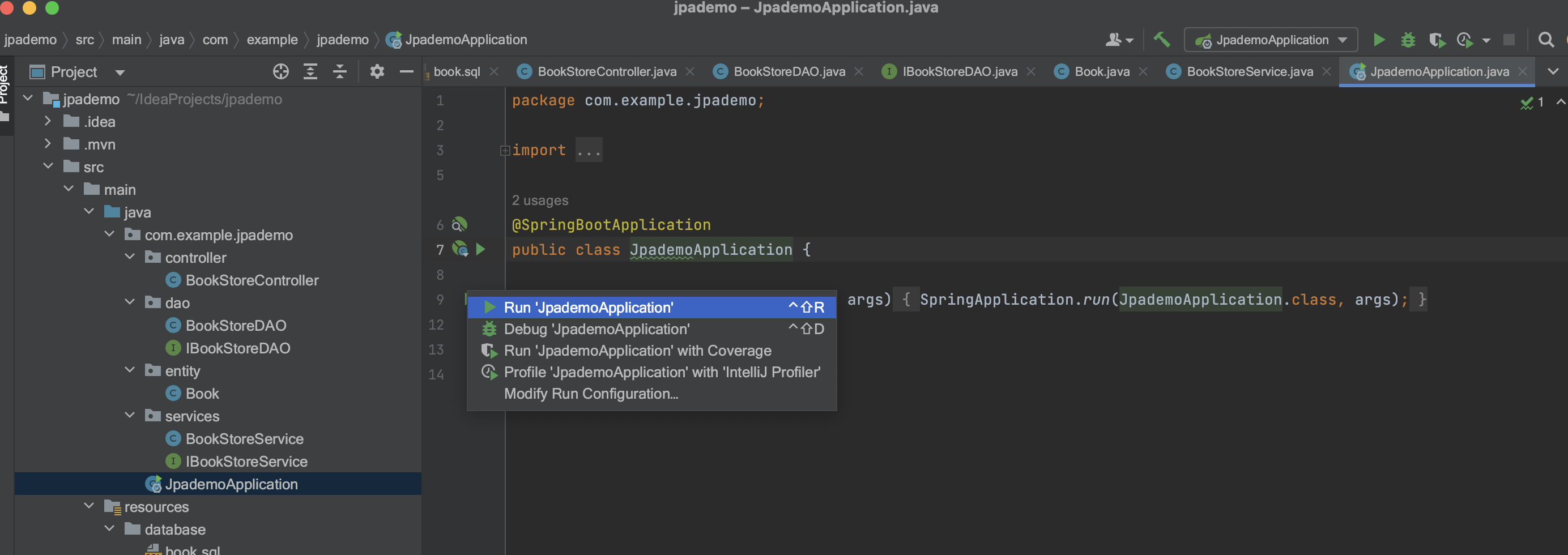
When the following message example appears, it means that the application has started normally and you can use Postman to call the REST port.
2022-10-27 11:16:16.793  INFO 93488 --- [           main] com.example.jpademo.JpademoApplication   : Starting JpademoApplication on username-macbookpro.local with PID 93488 (/Users/username/IdeaProjects/jpademo/target/classes started by username in /Users/username/IdeaProjects/jpademo)
2022-10-27 11:16:16.796  INFO 93488 --- [           main] com.example.jpademo.JpademoApplication   : No active profile set, falling back to default profiles: default
2022-10-27 11:16:18.022  INFO 93488 --- [           main] .s.d.r.c.RepositoryConfigurationDelegate : Bootstrapping Spring Data JPA repositories in DEFAULT mode.
2022-10-27 11:16:18.093  INFO 93488 --- [           main] .s.d.r.c.RepositoryConfigurationDelegate : Finished Spring Data repository scanning in 50ms. Found 0 JPA repository interfaces.
2022-10-27 11:16:18.806  INFO 93488 --- [           main] o.s.b.w.embedded.tomcat.TomcatWebServer  : Tomcat initialized with port(s): 8080 (http)
2022-10-27 11:16:18.814  INFO 93488 --- [           main] o.apache.catalina.core.StandardService   : Starting service [Tomcat]
2022-10-27 11:16:18.814  INFO 93488 --- [           main] org.apache.catalina.core.StandardEngine  : Starting Servlet engine: [Apache Tomcat/9.0.41]
2022-10-27 11:16:18.886  INFO 93488 --- [           main] o.a.c.c.C.[Tomcat].[localhost].[/]       : Initializing Spring embedded WebApplicationContext
2022-10-27 11:16:18.886  INFO 93488 --- [           main] w.s.c.ServletWebServerApplicationContext : Root WebApplicationContext: initialization completed in 2005 ms
2022-10-27 11:16:19.068  INFO 93488 --- [           main] o.hibernate.jpa.internal.util.LogHelper  : HHH000204: Processing PersistenceUnitInfo [name: default]
2022-10-27 11:16:19.119  INFO 93488 --- [           main] org.hibernate.Version                    : HHH000412: Hibernate ORM core version 5.4.25.Final
2022-10-27 11:16:19.202  INFO 93488 --- [           main] o.hibernate.annotations.common.Version   : HCANN000001: Hibernate Commons Annotations {5.1.2.Final}
2022-10-27 11:16:19.282  INFO 93488 --- [           main] com.zaxxer.hikari.HikariDataSource       : defaultDataSource - Starting...
2022-10-27 11:16:20.025  INFO 93488 --- [           main] com.zaxxer.hikari.HikariDataSource       : defaultDataSource - Start completed.2022-10-27 11:16:20.035  INFO 93488 --- [           main] org.hibernate.dialect.Dialect            : HHH000400: Using dialect: org.hibernate.dialect.MySQLDialect
2022-10-27 11:16:21.929  INFO 93488 --- [           main] o.h.e.t.j.p.i.JtaPlatformInitiator       : HHH000490: Using JtaPlatform implementation: [org.hibernate.engine.transaction.jta.platform.internal.NoJtaPlatform]
2022-10-27 11:16:21.937  INFO 93488 --- [           main] j.LocalContainerEntityManagerFactoryBean : Initialized JPA EntityManagerFactory for persistence unit 'default'
2022-10-27 11:16:22.073  WARN 93488 --- [           main] JpaBaseConfiguration$JpaWebConfiguration : spring.jpa.open-in-view is enabled by default. Therefore, database queries may be performed during view rendering. Explicitly configure spring.jpa.open-in-view to disable this warning
2022-10-27 11:16:22.221  INFO 93488 --- [           main] o.s.s.concurrent.ThreadPoolTaskExecutor  : Initializing ExecutorService 'applicationTaskExecutor'
2022-10-27 11:16:22.415  INFO 93488 --- [           main] o.s.b.w.embedded.tomcat.TomcatWebServer  : Tomcat started on port(s): 8080 (http) with context path ''
2022-10-27 11:16:22.430  INFO 93488 --- [           main] com.example.jpademo.JpademoApplication   : Started JpademoApplication in 6.079 seconds (JVM running for 8.765)
2022-10-27 11:16:40.180  INFO 93488 --- [nio-8080-exec-1] o.a.c.c.C.[Tomcat].[localhost].[/]       : Initializing Spring DispatcherServlet 'dispatcherServlet'
2022-10-27 11:16:40.183  INFO 93488 --- [nio-8080-exec-1] o.s.web.servlet.DispatcherServlet        : Initializing Servlet 'dispatcherServlet'
2022-10-27 11:16:40.249  INFO 93488 --- [nio-8080-exec-1] o.s.web.servlet.DispatcherServlet        : Completed initialization in 66 ms
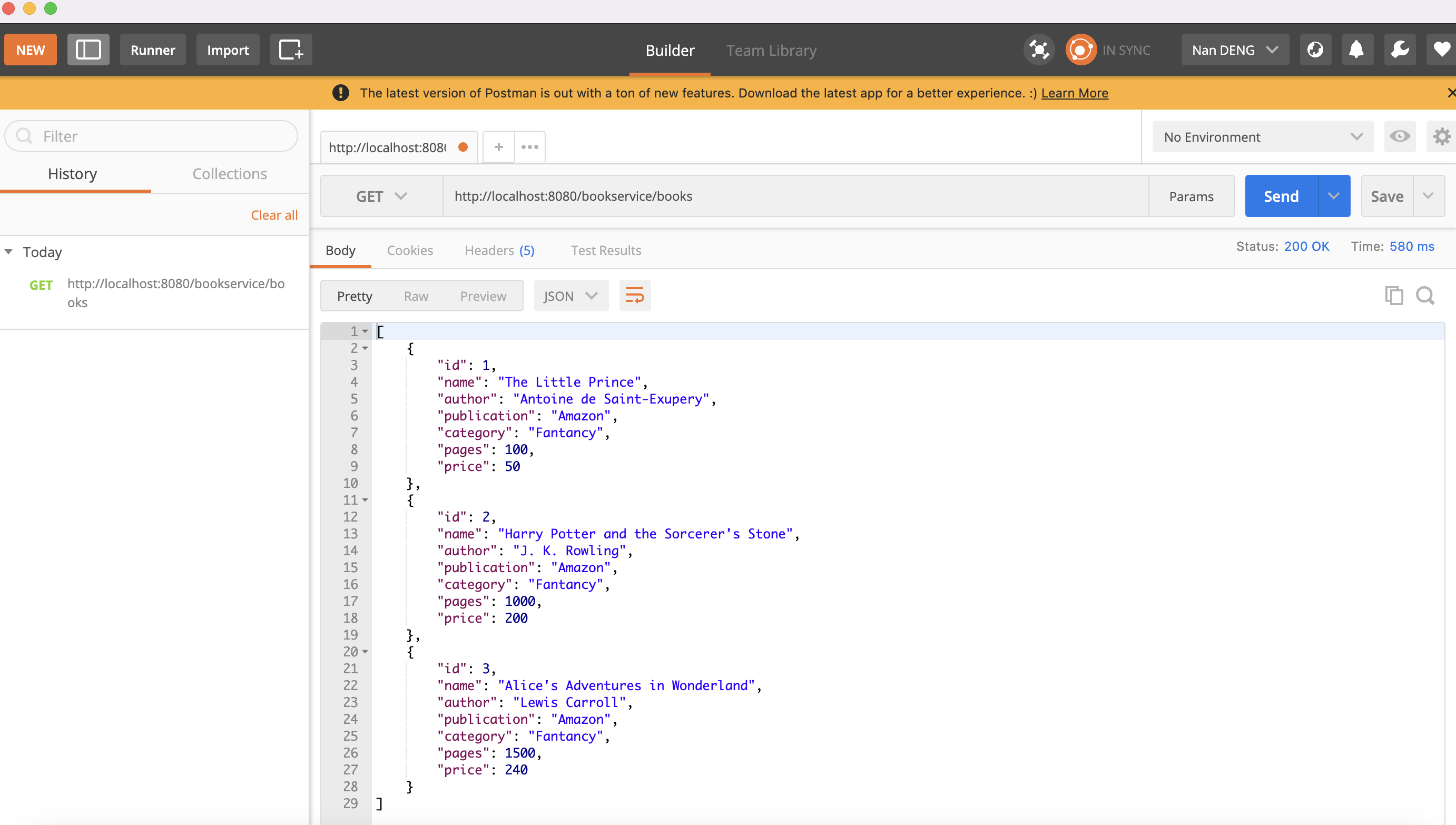
1. Get the Book list and call the following interface using a GET request
http://localhost:8080/bookservice/books
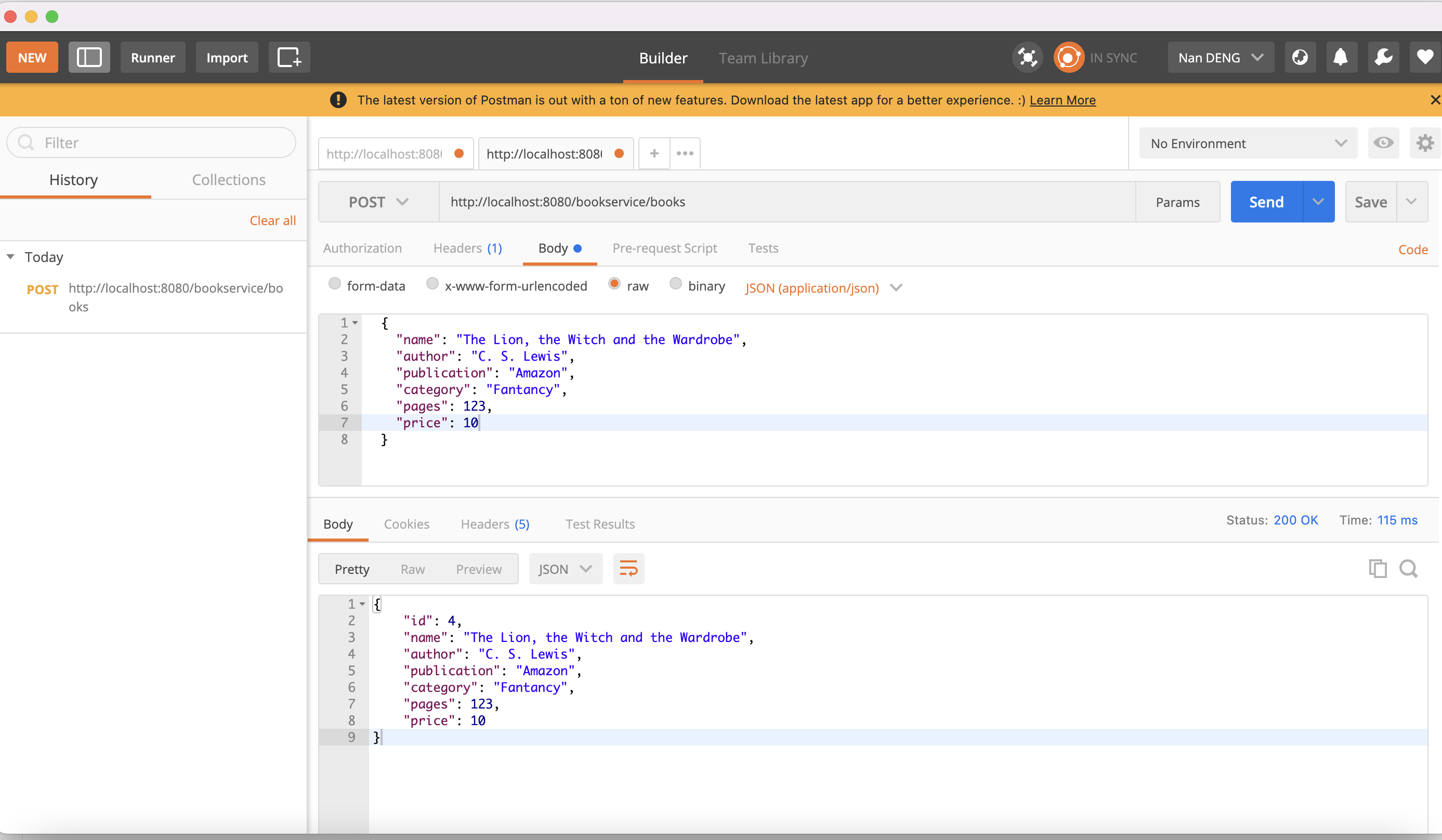
2. Create a new Book and call the following interface using a POST request
http://localhost:8080/bookservice/books
Set the content type in the Header to application/json and the Request Body to the original JSON payload.
{
"name": "The Lion, the Witch and the Wardrobe",
"author": "C. S. Lewis",
"publication": "Amazon",
"category": "Fantancy",
"pages": 123,
"price": 10
}
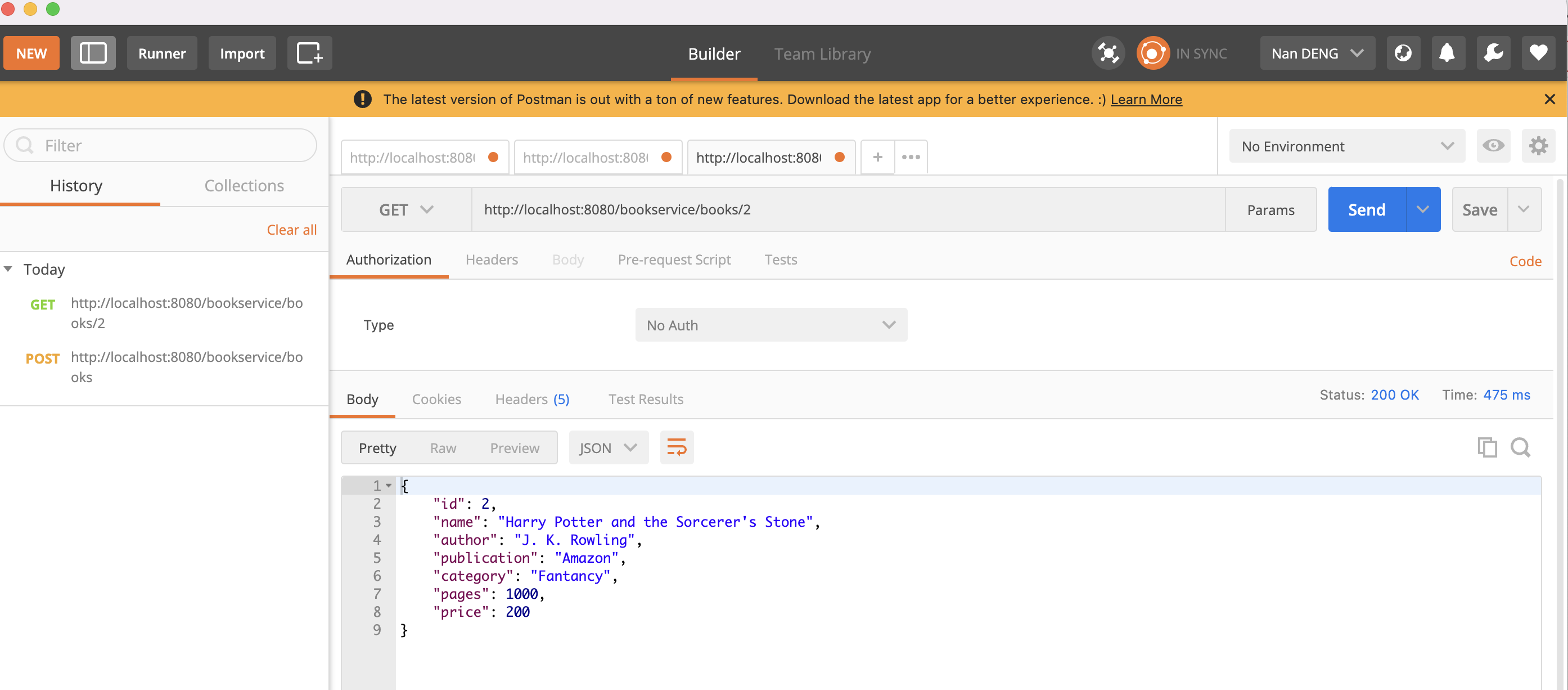
3. To obtain a specific Book, use the GET request to call the following interface
http://localhost:8080/bookservice/books/<id>
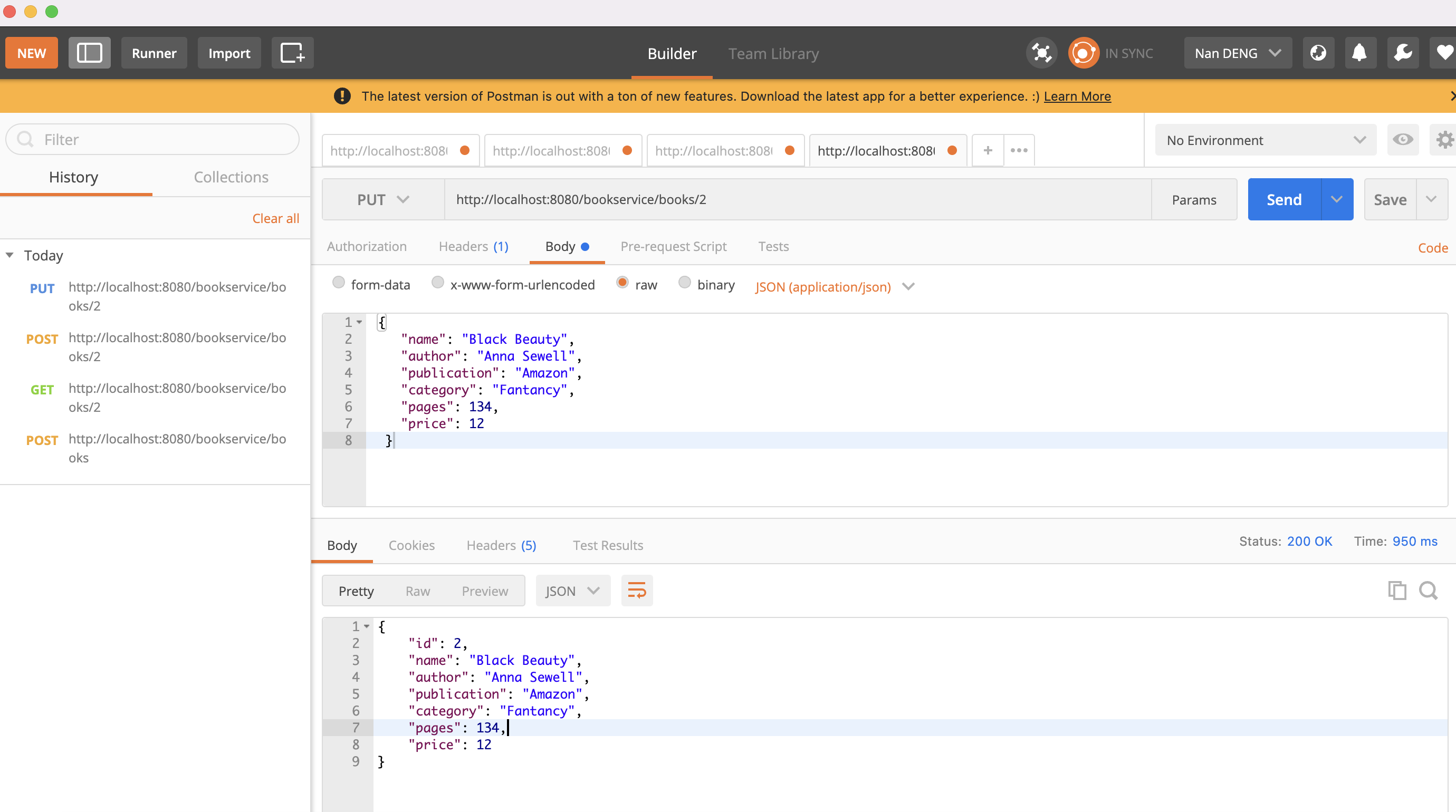
4. Upgrade Book in the database and call the following interface using a PUT request
http://localhost:8080/bookservice/books/<id>
-
Set the content type in the Header to
application/json. -
Set the Request Body to the original JSON payload
{
"name": "Black Beauty",
"author": "Anna Sewell",
"publication": "Amazon",
"category": "Fantancy",
"pages": 134,
"price": 12
}
5. To delete a specific Book from the database, use the DELETE request to call the following interface
http://localhost:8080/bookservice/books/<id>
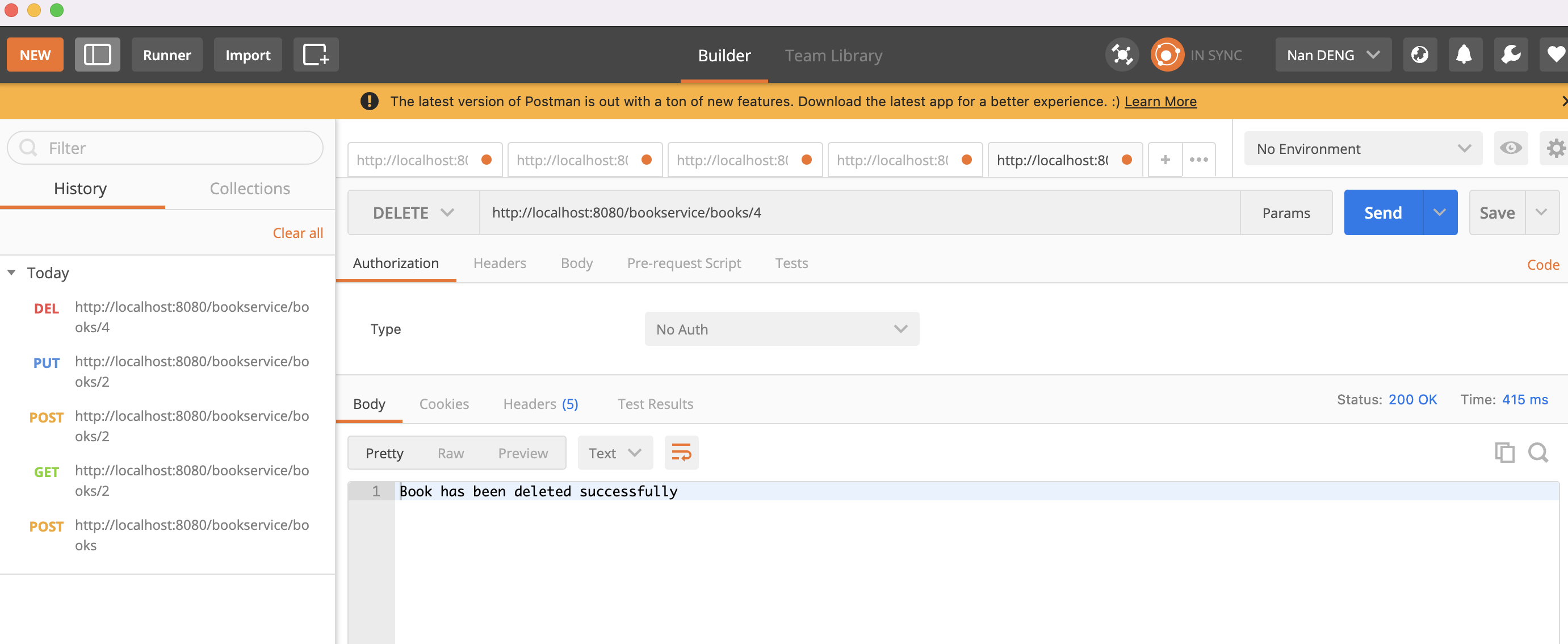
mysql> select * from book;
+----+--------------------------+----------+----------------------------------+-------+-------+-------------+
| id | author | category | name | pages | price | publication |
+----+--------------------------+----------+----------------------------------+-------+-------+-------------+
| 1 | Antoine de Saint-Exupery | Fantancy | The Little Prince | 100 | 50 | Amazon |
| 2 | Anna Sewell | Fantancy | Black Beauty | 134 | 12 | Amazon |
| 3 | Lewis Carroll | Fantancy | Alice's Adventures in Wonderland | 1500 | 240 | Amazon |
+----+--------------------------+----------+----------------------------------+-------+-------+-------------+
3 rows in set (0.02 sec)