MatrixOne Intelligence 2025 Release Notes
December 31, 2025
Features
-
API Functionality Expansion
- Workflow API now supports processing of GIF and WebP format files, enhancing multimedia file compatibility and expanding automation scenarios.
- Added a processing result download API, enabling retrieval of complete results including original files, which facilitates result verification, issue tracing, and subsequent processing.
-
Private Deployment Supports Timeout Configuration Based on Page Count
Private deployment now allows flexible configuration of processing timeout based on file page count (e.g., xx seconds per page), effectively reducing timeout risks for large files and improving task execution stability.
Bug Fixes
- Fixed an issue where file parsing was duplicated in certain scenarios.
December 18, 2025
Features
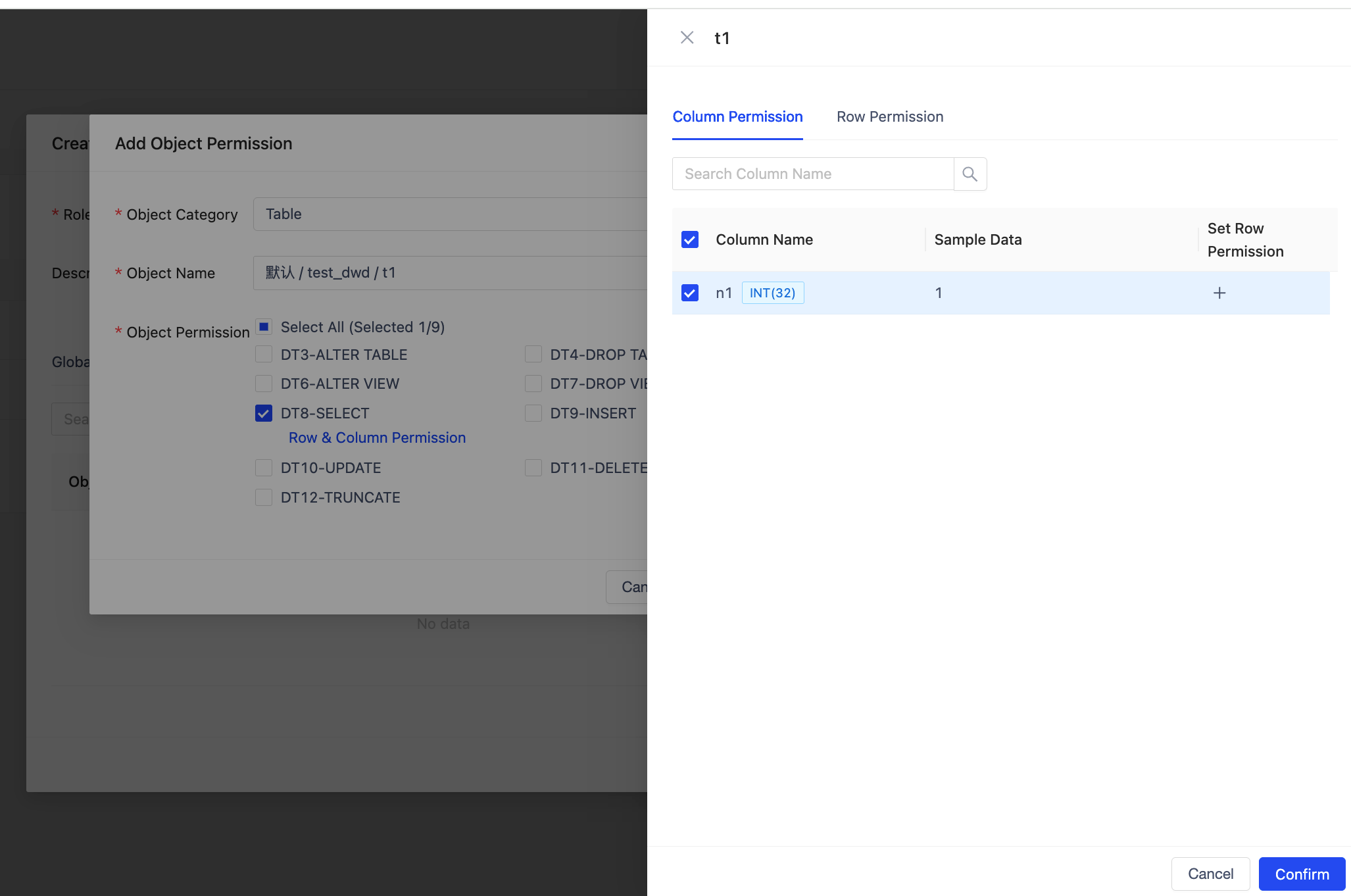
- Workspace Support for Table Permission Management
Workspaces now include Table object permission management capabilities, supporting fine‑grained access control at the table, column, and row levels. Users can flexibly restrict data visibility according to different roles and business scenarios, enabling data sharing and efficient usage within the same workspace while ensuring data security and compliance. This meets the data‑access requirements of various scenarios such as analytics, NL2SQL, and intelligent agents.
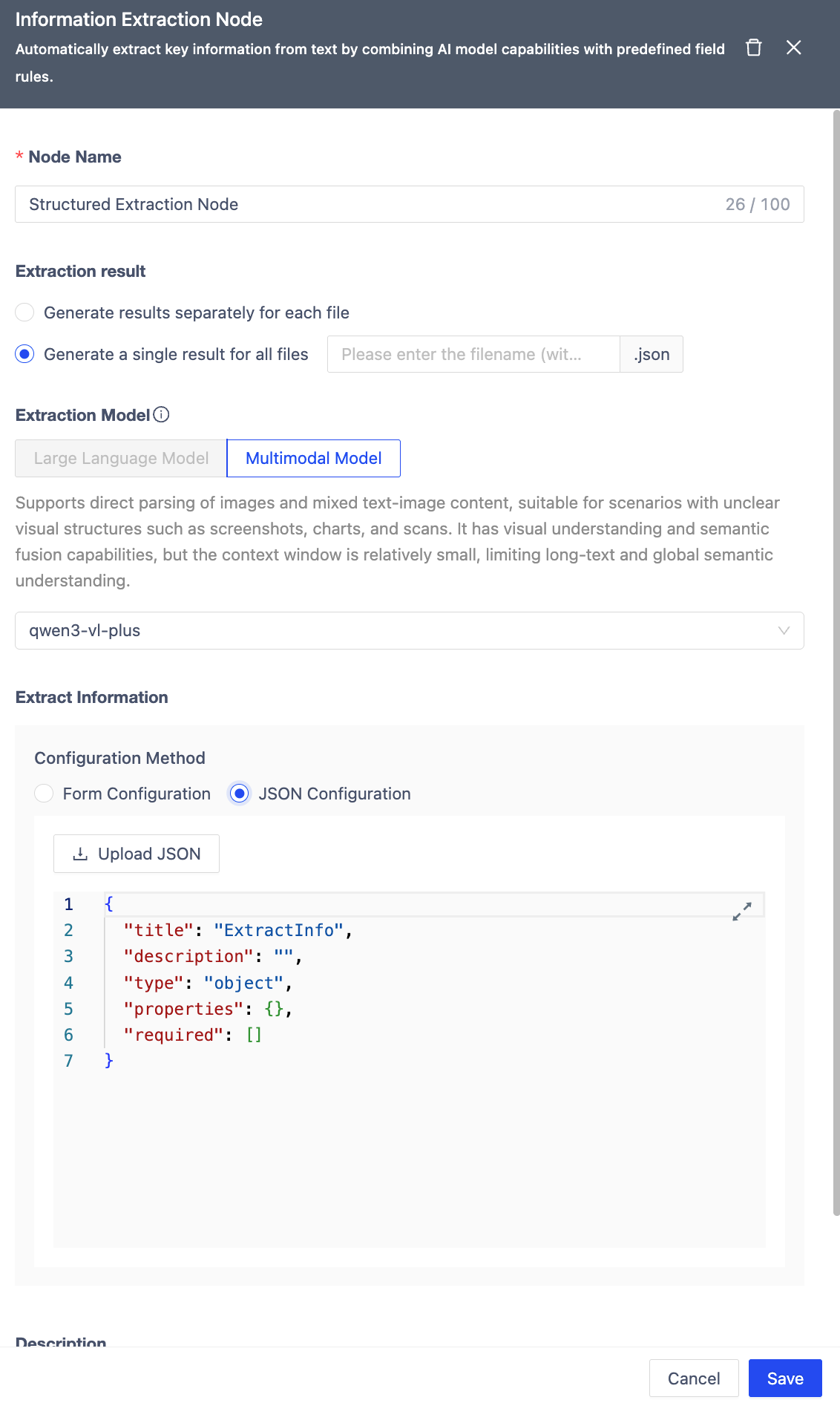
- Enhanced Information Extraction Node
This release enhances the Information Extraction node by adding multi‑file merge extraction, which allows unified extraction and consolidation of information from multiple files to meet cross‑file information aggregation and analysis needs. It also supports uploading local JSON files to automatically generate extraction schemas, significantly reducing configuration overhead in complex scenarios and improving information integration efficiency and ease of use.
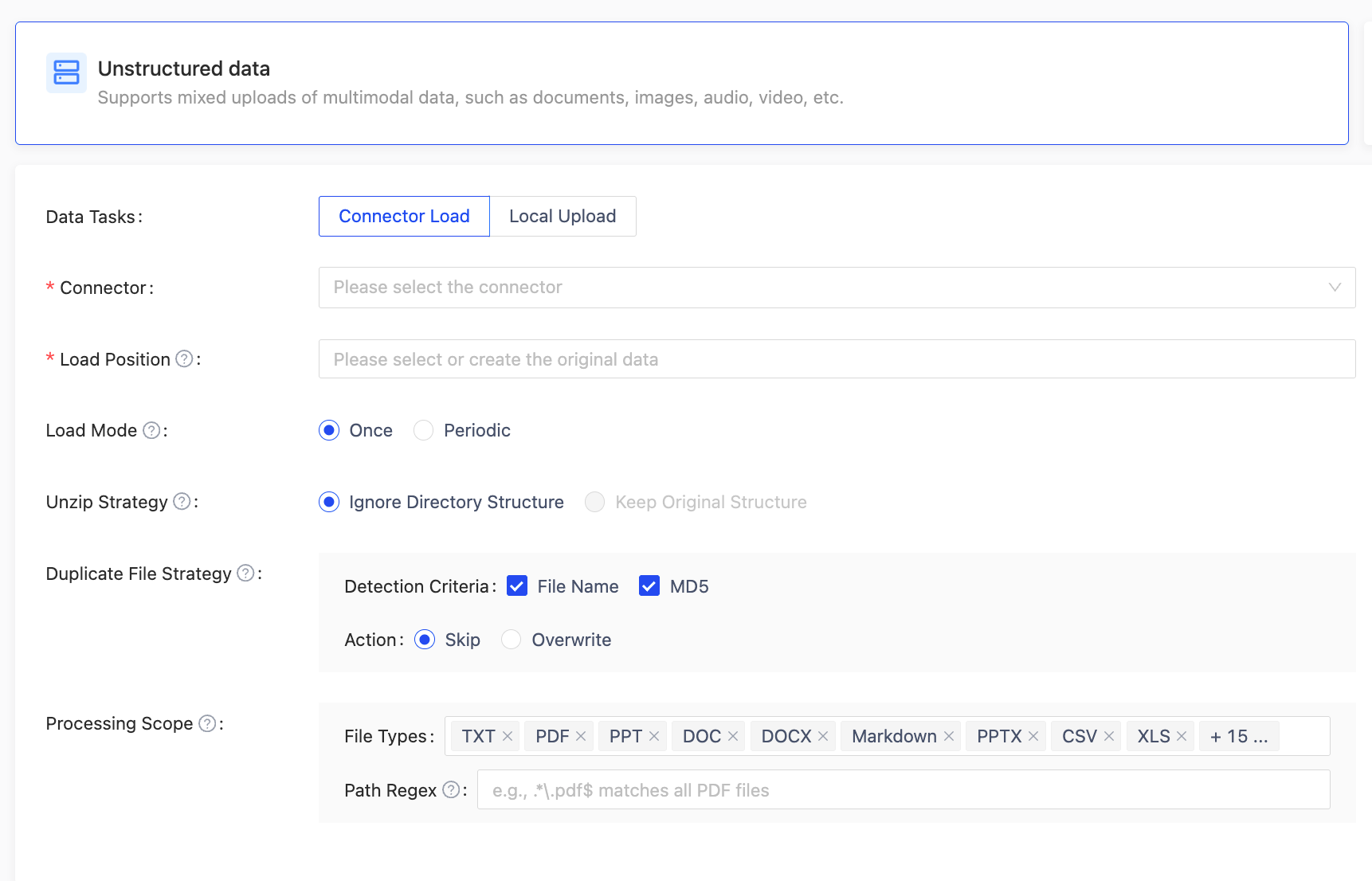
- Unstructured Data Loading Supports More Functions
Added automatic decompression support for compressed files and intelligent deduplication based on file names and MD5 during the loading process, effectively avoiding the storage and processing costs caused by duplicate data. It also supports fine‑grained filtering by file type and regular‑expression rules on file paths, helping users manage massive unstructured data more efficiently and improving data preparation efficiency and data quality.
- Support for Publishing MatrixOne Instance Data to GenAI Workspace
Added support for publishing databases and tables from a MatrixOne instance to a GenAI workspace.
GenAI workspaces can directly obtain business table data through subscription for NL2SQL scenarios, enhancing AI’s understanding and query capabilities for structured data and enabling efficient linkage between data and AI applications.
- Workspace Supports SQL‑Form API
Supports executing CREATE TABLE, INSERT, UPDATE, and other operations via an SQL‑form API. This capability allows callers to perform table‑structure management, data writing, and updates through a unified SQL API, reducing interface complexity and improving data‑operation and automation capabilities.
- Added Workspace Deletion Function
Workspaces now support deletion, allowing cleanup of workspaces that are no longer in use. This function reduces invalid resource consumption and improves the flexibility of workspace management and overall operational efficiency.
Bug Fixes
- Fixed an issue where a user could not query data when assigned different role permissions simultaneously.
- Fixed an error caused by excessively long
style_promptin data enhancement.
November 28, 2025
Features
- Structured Data Loading Support
This iteration introduces structured data loading functionality, supporting the import of tabular files such as CSV, XLSX, and XLS as table objects into the data center. These can directly participate in subsequent NL2SQL analysis and queries. This capability enhances the methods for accessing structured data, allowing business data to be incorporated into the system in a standard table structure, significantly improving the efficiency and usability of data import.
- NL2SQL Support
MOI officially launches its Natural Language to SQL (NL2SQL) capability. Users can now ask questions in everyday language directly in the "Data Exploration" interface, and the system will automatically generate and execute the corresponding SQL, eliminating the need for manual query writing. The interface also supports the simultaneous selection of data tables and multimodal files, enabling joint retrieval of structured and unstructured data. The system comes with built-in business logic rules, a domain synonym library, knowledge term explanations, and optimization examples. It can also continuously iterate based on semantic configurations, ensuring higher accuracy and usability of NL2SQL across different business scenarios.
- New MOI Atomic Capability APIs
This update adds comprehensive support for local files. The APIs can now handle both publicly accessible files from the internet and locally uploaded files, meeting diverse data access needs. Furthermore, we have decoupled and opened access to the atomic capabilities of core nodes such as segmentation, embedding, and information extraction. This improvement significantly reduces the complexity of orchestrating workflows using the APIs, helping users build workflows on MOI more efficiently and with a lower barrier to entry for processing data.
- DOC File Parsing Now Includes Headers and Footers
The system can now identify and parse both header and footer content within documents. This means that during unstructured data loading or document knowledge base construction, important information originally located in headers/footers (such as titles, page numbers, dates, document IDs, copyright notices, etc.) will be fully included in the parsing results. This increases content fidelity, ensures no document information is missed, and provides a more complete data foundation for search, Q&A, and content understanding.
Bug Fixes
- Fixed compatibility issues with old data lineage data.
- Fixed an issue where disabling the OCR and Caption configurations in the document parsing node did not take effect.
- Fixed an issue on the PPT and DOC file parsing result detail page where the image type (whether it was from OCR or Caption) was not displayed.
November 13, 2025
Features
- Data Lineage Tracing Support
This update implements complete tracking and visualization of source files through each processing node in a workflow. It clearly displays the data flow path from the source to the final result. By transparently presenting intermediate results across the entire workflow chain, users can intuitively understand the transformation process and dependencies of data at each node, significantly improving system observability and debugging efficiency.
- Intelligent Search Launched
moi now supports intelligent search directly within the platform for processed files, eliminating the need to export to Dify. The new multimodal RAG search understands content more accurately. In the future, this will be combined with NL2SQL to deliver a fused search experience for both structured and unstructured data.
- Parsing and Segmentation Method Refactored
The parsing and segmentation strategies have been refined and restructured for different file types, enhancing the data richness and adaptability for downstream applications (including RAG and Document Intelligence). By setting targeted segmentation rules, the parsing results better meet the data requirements of RAG models, further improving overall processing effectiveness and application experience.
- Mone Assistant Upgrade Launched
This upgrade utilizes MOI's own document parsing and segmentation logic and simultaneously integrates the latest product data. MOne can now understand document structure more accurately, providing more contextually relevant, higher-quality answers to help you obtain the information you need more efficiently.
- MOI Atomic Capability APIs
The MOI Atomic Capability APIs are a set of user-friendly, quick-start interfaces that encapsulate capabilities like file upload, parsing, segmentation, embedding, cleaning, and data enhancement into independently callable atomic functions, eliminating the need to create complex workflows. Currently available functions include file upload, parsing, and result download.
- Workflows Now Support CSV File Format
The workflow module has expanded its data processing capabilities to support importing and parsing CSV files, further enhancing file compatibility and automated processing power.
- Parsed Files Include More Information
This update adds missing key OCR and Caption information to the parsed Markdown (MD) files, ensuring that the MD content is generated based on complete JSON data, achieving high consistency and accuracy between the two, and improving data integrity and application effectiveness.
Bug Fixes
- Fixed an issue where data enhancement workflows sometimes failed to process files.
- Fixed an issue where the pagination function for data export was sometimes unavailable.
- Fixed an issue where downloading from workflows involving Excel files with enhancement nodes produced incorrect results.
- Fixed an issue where sensitive information was not removed after download from the data cleaning node in workflows involving Excel files.
October 31, 2025
Features
- MOI × Deerflow Integration Support
MOI now features deep integration with Deerflow, an open-source RAG application development engine, providing developers with a one-stop solution for building Retrieval-Augmented Generation (RAG) applications. Through this integration, users can flexibly create data processing workflows within the MOI platform and seamlessly connect with Deerflow, achieving a complete closed loop from data preprocessing and index building to intelligent generation.
- Workflow Support for More File Formats
The workflow module has expanded its file processing capabilities, now fully supporting Excel data files and HTML formats. With this update, users can directly import and parse various common data sources within workflows without additional conversion steps, significantly improving the flexibility and efficiency of data processing.
- Workflow Template Internationalization
Workflow templates are now internationalized. In addition to Chinese templates, English templates and sample files have been added, making it more convenient for overseas users to utilize and configure workflows.
- Retry Operation for Failed Exports to Dify
To address potential export failures to Dify caused by model rate limits or system exceptions, a retry export feature has been added. After a failed export, users can directly click "Retry" to re-initiate the export. Multiple failures can be retried repeatedly, effectively avoiding file duplication and improving export success rates.
- Workspace Supports Authorization Login
Since users are already logged into the MOI platform, they can now use workspaces without re-entering passwords. An authorization login operation has been added to facilitate quick access to workspaces.
Bug Fixes
- Fixed an issue where files in data volumes could not be deleted in certain cases;
- Fixed an issue where Agent workflows could not proceed to the next step after selecting the original data volume;
- Fixed an issue where Agent workflows still recommended workflows even when no files were detected, causing execution errors when clicked;
- Fixed an issue where connector loading automatically jumped to the parent directory after selecting files to load.
September 11, 2025
Bug Fixes
- Fixed an issue in the smart workflow creation process where the naming was incorrect and the source data appeared empty after creation.
- Fixed an issue where deleting a workflow did not remove the associated data, causing the system to still prompt that the deleted workflow was in use when attempting to delete the corresponding volume in the data center.
- Fixed an issue where the completion rate of smart conceptualization in the smart workflow creation process was very low.
- Fixed a permission error where users could not perform any operations on files in processed data volumes after joining a shared workspace.
- Fixed an error in the user role permissions page after joining a shared workspace, and an issue where newly created alert rules were not visible in the original workspace.
- Fixed an issue where the names of joined workspaces could not duplicate the names of the user's own workspaces.
- Fixed an issue where modifying loaded files after pausing data loading did not take effect.
September 09, 2025
Features
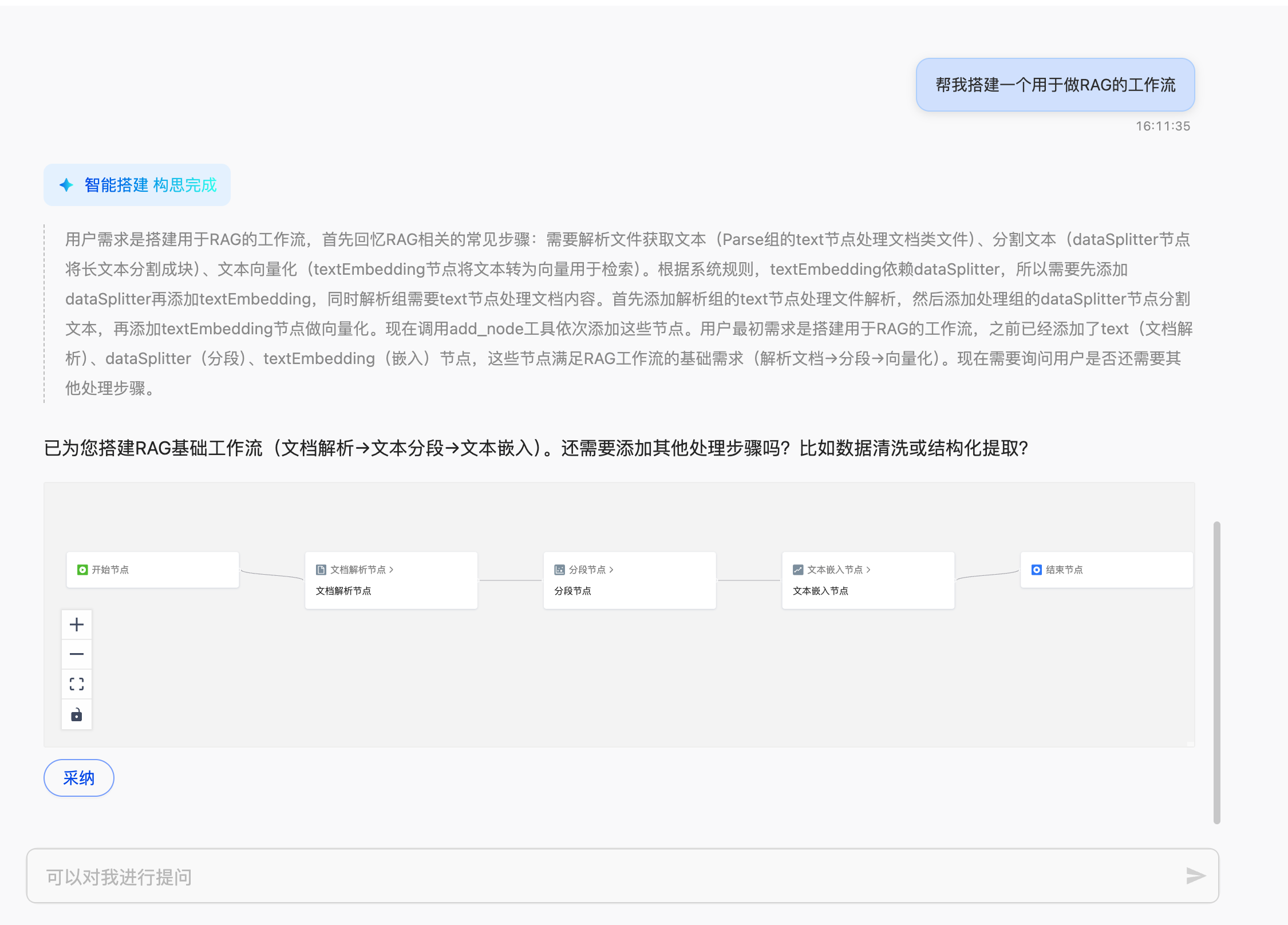
- Workflow now supports Agent Mode
Workflows now support Agent Mode, which automatically determines and executes paths based on user intent and data, significantly enhancing the intelligence and flexibility of processes. Users no longer need to manually design complex logic to build automated tasks with "perception + decision + action" capabilities, thereby reducing operational costs and improving efficiency and adaptability.
- Quick Start for Database Platform
If the database instance list is empty, this version provides step-by-step guidance to help users quickly get started with the database management platform. During the guidance process, users can create and log into instances while gaining familiarity with the platform’s core features by experiencing the TPC-H test set.
Bug Fixes
- Fixed an issue where table parsing in PDFs incorrectly reversed the order of headers and content.
- Fixed an issue in Workspace > Alerts where, after selecting an alert cycle and saving successfully, the setting still showed "Alert Once" upon revisiting.
- Fixed an issue where data loading could not be paused under certain conditions.
- Fixed a display issue in the frontend when creating a workflow with an excessively long processed filename.
September 05, 2025
Optimizations
- Optimized the UI layout of the login page.
Bug Fixes
- Fixed an issue where a volume (old volume) could still be referenced as a processing data volume by other workflows after being used as a processing volume in a workflow.
- Fixed an issue where creating a workflow using MCP resulted in workflow creation failure.
- Fixed an issue where clicking between "Terminated Instances" and "Available Instances" on the MOC had no response.
- Fixed an issue with the information extraction node where processing files using a multimodal model took an excessively long time.
- Fixed an issue where creating a workflow, selecting file processing, and choosing a single file resulted in two processed data copies in the data center processing volume.
- Fixed an issue where the final processed file for talent resumes in workflow templates was null.
- Fixed an issue with the data augmentation node (Alpaca data format) where the instruction content and output content should be set to empty; otherwise, default information could affect the augmentation results.
- Fixed an issue where filtering by type in the connector list displayed an option for "Local Data."
- Fixed an intermittent issue where clicking on a workflow name in the jobs section (after deleting the workflow) to navigate to the workflow details page resulted in a "service connection failed" error.
- Fixed an issue where switching to a newly created workspace immediately remained on the current workspace, requiring several attempts to succeed.
- Fixed an issue where MatrixOne connector creation failed under certain circumstances.
- Fixed an issue in Data Management -> Data Center where creating a database with the same name across directories failed.
- Fixed an issue where the Caption and OCR toggle switches in the document parsing node and image parsing node could not be turned off.
- Fixed an issue where creating a workflow branch would fail with an error when the branch name already existed.
August 29, 2025
Features
- HDFS Connector Now Supports Kerberos Mode The HDFS connector now supports Kerberos authentication mode. By integrating enterprise-level unified identity authentication mechanisms, it further enhances data access security and compliance while maintaining compatibility with the original simple authentication mode. It can be flexibly switched according to actual needs.
- Information Extraction Node Multimodal Model Supports More File Types In this iteration, the multimodal model of the information extraction node has expanded its support for file types. Previously supporting only PDFs, it now extends to all document and image types within the workflow, enabling the processing of more data formats.
Bug Fixes
- Fixed an issue where an interface error occurred on the parsing results page after processing by the Information Extraction Node - Document Parsing + Extraction Node;
- Fixed an issue where the placeholder text displayed incorrectly in the selection box when exporting to S3 - selecting the export connector;
- Fixed an issue where, when using the multimodal model of the Information Extraction Node to process MD files, the processed file list in the job did not include records for MD files;
- Fixed an issue where jobs were not created when creating workflows in some cases;
- Fixed an issue where, after creating and deleting a user invited to a MOI account, adding the same user again would generate duplicate workspaces under that account;
- Fixed an issue where the export task failed when exporting to MO - selecting an existing table - choosing a duplicate file overwrite strategy, if the value of the target field mapped by the file_id contained empty values;
- Fixed an issue where, when exporting to MO - selecting the skip duplicate data strategy - files would be skipped regardless of whether the file_id was duplicated or not;
- Fixed an issue in the Data Center - where an error was reported on the file parsing results page for workflows containing an Information Extraction Node (upstream connected to a parsing node);
- Fixed an issue where, for an Information Extraction Node - with an upstream parsing node, downloading the parsing results only yielded chunked JSON files, and the chunks were empty;
- Fixed an issue where old accounts did not display the phone number entered during registration;
- Fixed an issue where if "Workspaces I Joined" were disabled, they could still be switched to, and were not marked as disabled in the list of my workspaces;
- Fixed an issue where error messages for workspace password verification errors were always: "local service login error:
"; - Fixed an issue where, if the original data volume selected for a workflow contained multiple files, the file list in the job details page showed duplicate files when paginating;
- Fixed an error when editing a successfully created HDFS Kerberos connector:
(r || []).forEach is not a function.
August 22, 2025
Bug Fixes
- Fixed an issue where clicking on target locations in the job list for redirection did not navigate to the specified position.
- Fixed an issue where the content of notification emails for the GenAI workspace was incorrect.
- Fixed an issue where audio parsing results were not sorted by time.
- Fixed an issue in Workspace - Role Management: When a user had no viewing permissions, the user information in the upper right corner of the interface was also not visible.
- Fixed an issue where the title merging text was incorrect when exporting to Dify.
- Fixed an issue in the segmentation node where setting an overlap caused some text chunks to appear twice (duplicated content).
- Fixed an issue where export tasks to Dify remained stuck in the "exporting" state.
- Fixed an issue where loading parsing results for large files was too slow.
- Fixed an issue where data exports were continuously displayed as "in progress."
- Fixed an issue when exporting to MO (Multiple Output): Exporting multiple files simultaneously resulted in many failed exports, and the task details page reported an error after task creation.
- Fixed an issue where the original video file could not be played when viewing it.
- Fixed an issue where the data volume path was displayed incorrectly.
- Fixed an issue where the content displayed during file preview did not match the actual file.
- Fixed an issue where no warning message was displayed on the frontend when export tasks to object storage had duplicate names.
- Fixed an issue where, after each login, the most recently created workspace was used by default instead of the last used workspace.
- Fixed an issue where clicking on the breadcrumb in the data volume resulted in a "Not Found" page error.
- Fixed an issue where binding an email in the account management page reported an error.
- Fixed an issue where selecting "no compression" failed when exporting to object storage.
- Fixed an issue where the instance details page reported a "not found" error.
- Fixed an issue where the upper limit restriction on the number of workspaces was not enforced.
- Fixed an issue where deleting a paused workflow reported an error.
- Fixed an issue where clicking on hierarchical directories in the data center reported a "not found" error.
- Fixed an issue in export task details: The last file on each page of the exported file list was identical.
- Fixed an issue where when creating a workflow, if the selected type did not match the topology diagram, files processed by unsupported types in the topology resulted in empty output with a "processing successful" status.
- Fixed an issue in the data center where previewing original files displayed them in reverse order.
- Fixed an issue where when previewing processed files, the original file could not be displayed and reported a "file id not exist" error.
- Fixed the issue where data volumes that were already in use could still be selected for new workflow instances.
- Fixed the issue where locally uploaded files did not trigger workflows in "Load Trigger" mode.
August 15, 2025
Features
Feature 1: SaaS User Experience Optimization
To enhance user experience, the platform has implemented the following improvements:
- Account System Upgrade: Supports registration/login via phone or email, unifying accounts across the official website and MOI for single sign-on access to multiple platforms.
- Product Workspace Separation: Independent workspaces for MatrixOne and GenAI, clarifying product boundaries while enabling seamless switching.
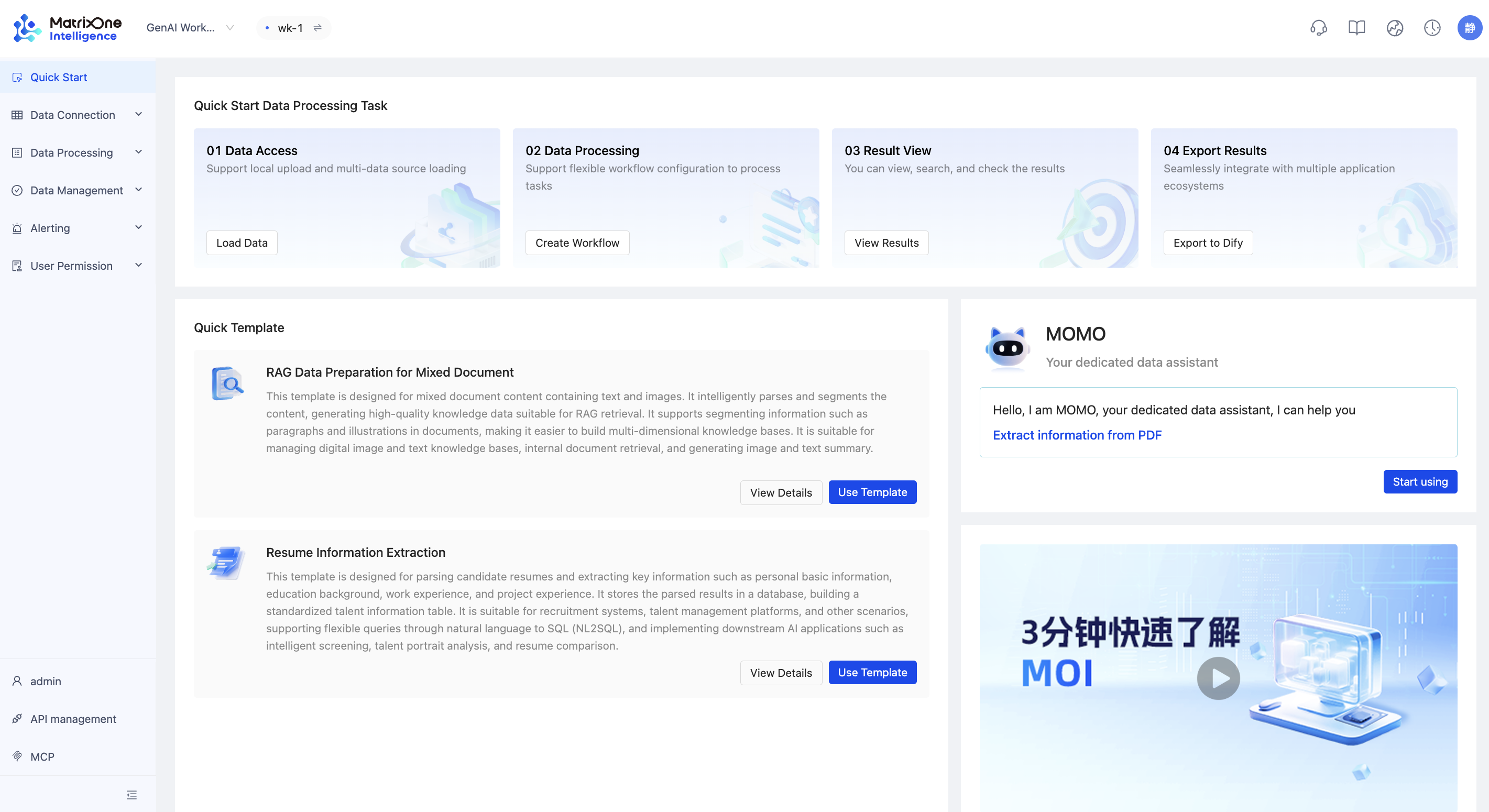
- Quick Start Module: Introduces a "Quick Start" feature, consolidating core workflows and functionalities to help users familiarize themselves with the product quickly.
- Process Assistance Optimization: Added operational guidance and help prompts in data processing and workflows for smoother, more intuitive usage.
Feature 2: Multi-Layer Data Center Structure
To improve multi-modal data organization and management, the platform now supports a three-tier structure: Directory → Database → Volume, enabling flexible data isolation and granular control.
- Directory: The top-level governance unit, typically representing a data isolation zone or lifecycle stage (e.g., Production, Development, Sensitive Data). Facilitates permission tiering and compliance.
- Database: Subordinate to directories, categorizing structured/unstructured data by business type, data attributes, or processing stage.
- Volume: A sub-level of databases, acting as logical containers for unstructured files (e.g., multi-modal content storage).
This enhancement boosts flexibility and security in data isolation, access control, and multi-modal management.
Feature 3: New Workflow Templates
Added practical workflow templates for diverse scenarios (e.g., text parsing, data extraction, content generation), reducing configuration effort and accelerating deployment. Each template includes sample data for ease of use.
Supported templates:
- Mixed-Format Document RAG Prep: Processes text + image documents for multi-modal retrieval-augmented generation.
- Resume Field Extraction: Automatically extracts key fields for structured talent data management.
- Legal QA Pair Generation: Generates high-quality Q&A pairs from legal texts for domain-specific fine-tuning.
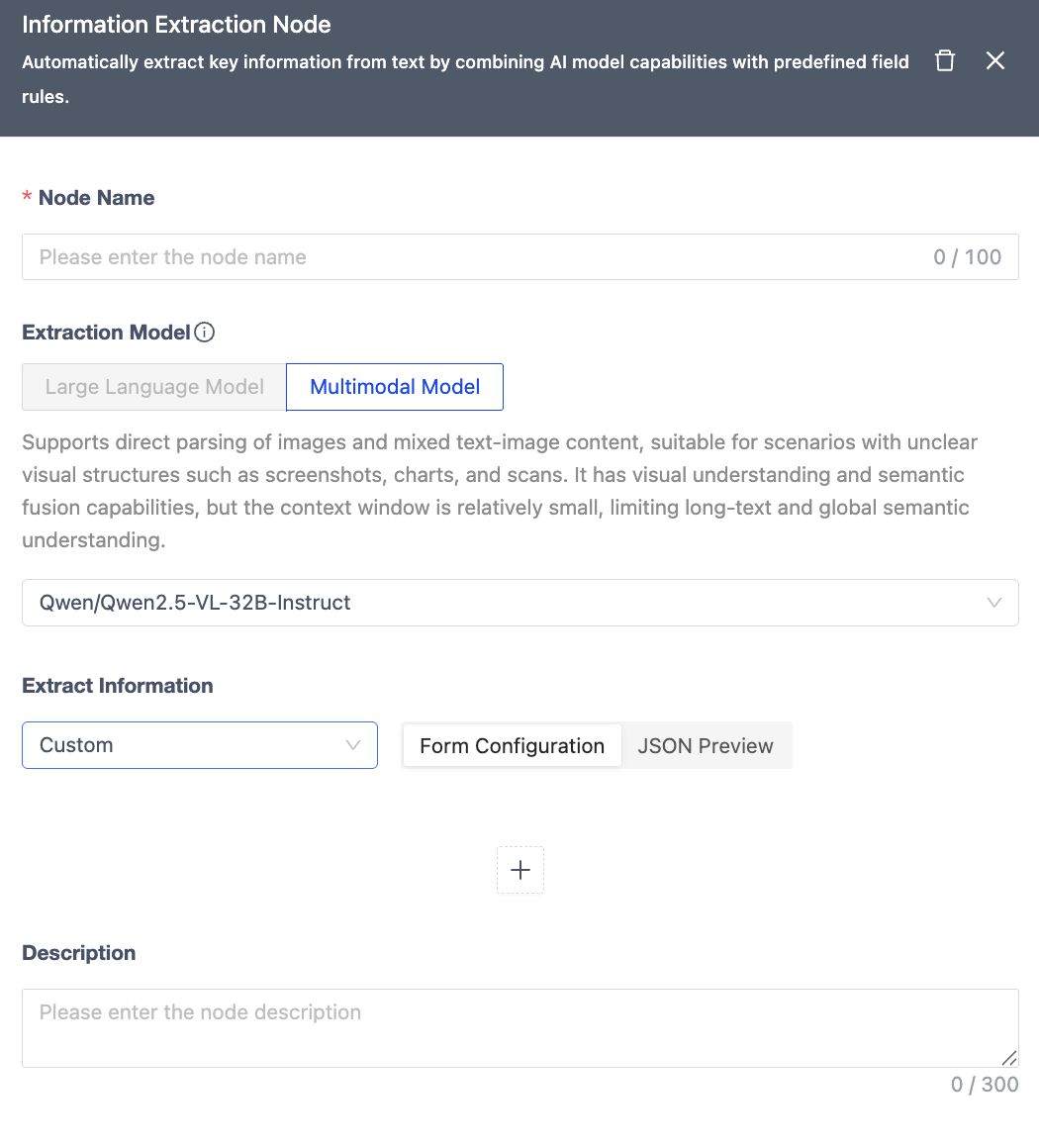
Feature 4: Enhanced Information Extraction Node
New built-in templates for financial reports, invoices, resumes, etc., eliminate manual schema definition. Introduced Qwen2.5-VL-32B-Instruct, a multi-modal model for direct extraction without parsing nodes, improving accuracy for tables, images, and text.
Feature 5: Multi-Platform Data Export
Added support for exporting results to MatrixOne, Standard S3, and Alibaba Cloud OSS, strengthening data integration across storage systems.
Feature 6: File Selection in Single-Run Workflows
Granular file selection (previously limited to file types) for finer control in one-time processing mode.
Feature 7: Table Parsing Support
Added table structure recognition and extraction for complex documents.
Optimizations
- Data cleaning nodes now require at least one active rule.
- Improved workflow node dependency constraints.
Bug Fixes
- Fixed timezone mismatch in exported Dify task file timestamps.
- Resolved local file upload failures in specific cases.
- Addressed text loss in PDF table parsing.
- Corrected branch name display errors in workflows.
- Fixed incomplete file exports to Dify.
- Enabled preview for MD files in Data Center.
- Fixed MD file filtering in Data Volumes.
- Linked execution details filtering with success status in job logs.
- Excluded low-confidence OCR text from embeddings.
- Fixed deleted workflow redirection to "No Data" in Data Center.
- Eliminated duplicate images in downloaded Word/Image folders.
- Resolved MD file processing failures in workflows.
July 31, 2025
Features
- Workflow now supports segmented nodes
The document parsing node's segmentation functionality has been split into an independent node, improving modularity and flexibility in parsing workflows. Users can now freely combine segmentation capabilities based on actual needs for more flexible workflow design.
Optimizations
- Enhanced workflow branch comparison functionality, supporting more node types for more comprehensive branch comparison capabilities.
Bug Fixes
- Fixed an issue where processing 1000-page PDFs would fail.
- Corrected some frontend text errors.
- Resolved an issue where the image description language in workflows couldn't be changed to English.
July 24, 2025
Optimizations
- Improved text segmentation logic: now splits content based on the entire document rather than parsing blocks.
Bug Fixes
- Fixed missing "Data Development" role in newly created workspaces.
- Resolved timeout issues with the connector list API.
- Fixed a security issue where users could continue operating in a workspace after being deleted or disabled by an administrator.
July 17, 2025
Features
- Added HDFS Data Loading Support
To enhance enterprise users' data integration and analysis capabilities in big data scenarios, the GenAI Workspace now officially supports data loading from HDFS. Users can efficiently import large-scale datasets directly from distributed file systems, providing a solid data foundation for complex queries and intelligent analysis tasks.
Optimizations
- Renamed the "Text Parsing Node" to "Document Parsing Node" to better reflect its processing scope.
- Improved the UI of the official website demo.
Bug Fixes
- Fixed an issue where PDF document parsing resulted in preview errors.
- Corrected mistranslations in the English version of the platform.
- Resolved slow export connector speeds and loading timeouts.
- Fixed inconsistencies in block order when exporting to Dify compared to the platform.
- Addressed duplicate file chunks after exporting to Dify.
- Fixed the issue where DOC/PPT files displayed "Document conversion to Markdown has been disabled" in the downloaded
full.mdfile. - Reduced parsing time for large files to prevent timeout failures.
- Fixed an issue where workflow parsing nodes connected only to an image parsing node (without a text parsing node) produced empty results.
July 10, 2025
Features
- Added "Merge Title into Content" Option for Dify Exports
To avoid short titles being split into separate chunks (which may degrade retrieval performance), this option merges title content with adjacent text, improving RAG result completeness and relevance.
Bug Fixes
- Fixed inconsistencies between OCR and image description counts after PDF parsing.
- Resolved missing files when selecting directories during data loading.
- Fixed an issue where all files remained in a "pending load" state when creating certain loading tasks.
- Addressed a bug where selecting PDF as the file type and image parsing as the workflow step caused all data in the volume to be processed.
- Fixed a permissions issue where pre-upgrade workspace administrators lacked export-related privileges.
July 5, 2025
Features
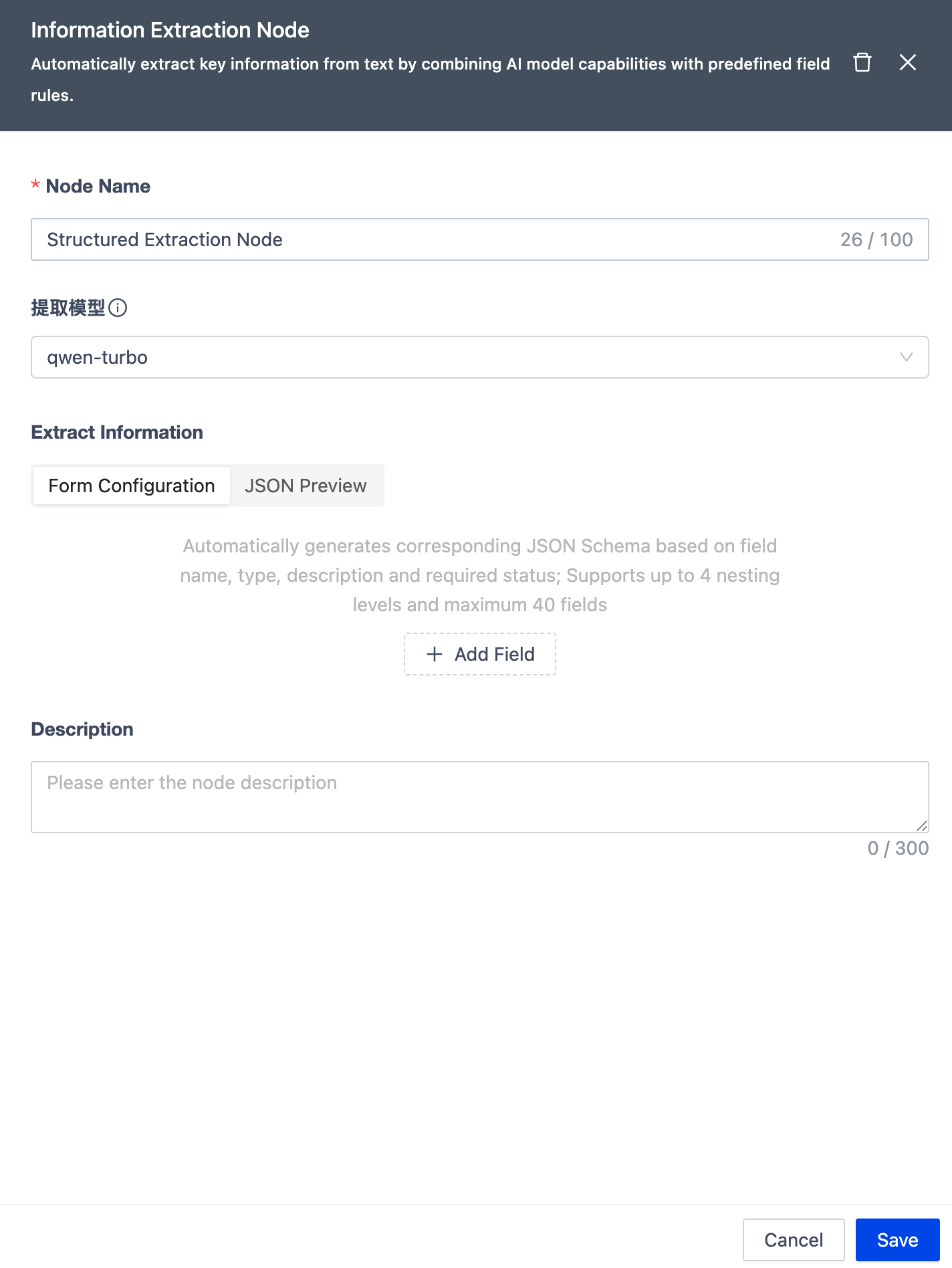
- Structured Extraction Node for Workflow
Added a structured extraction node that combines JSON Schema standards with AI model capabilities to intelligently identify and extract fields from text content generated by parsing nodes, automatically producing structured data that complies with specifications. This feature significantly improves the efficiency of processing unstructured documents, enabling seamless conversion from raw text to structured data for subsequent storage, analysis, and knowledge building.
Additionally, to help users quickly get started and integrate the feature, we have introduced a Quick Start API for structured extraction, modularizing and encapsulating core functionalities for easy invocation and flexible integration, accelerating the implementation of structured data extraction.
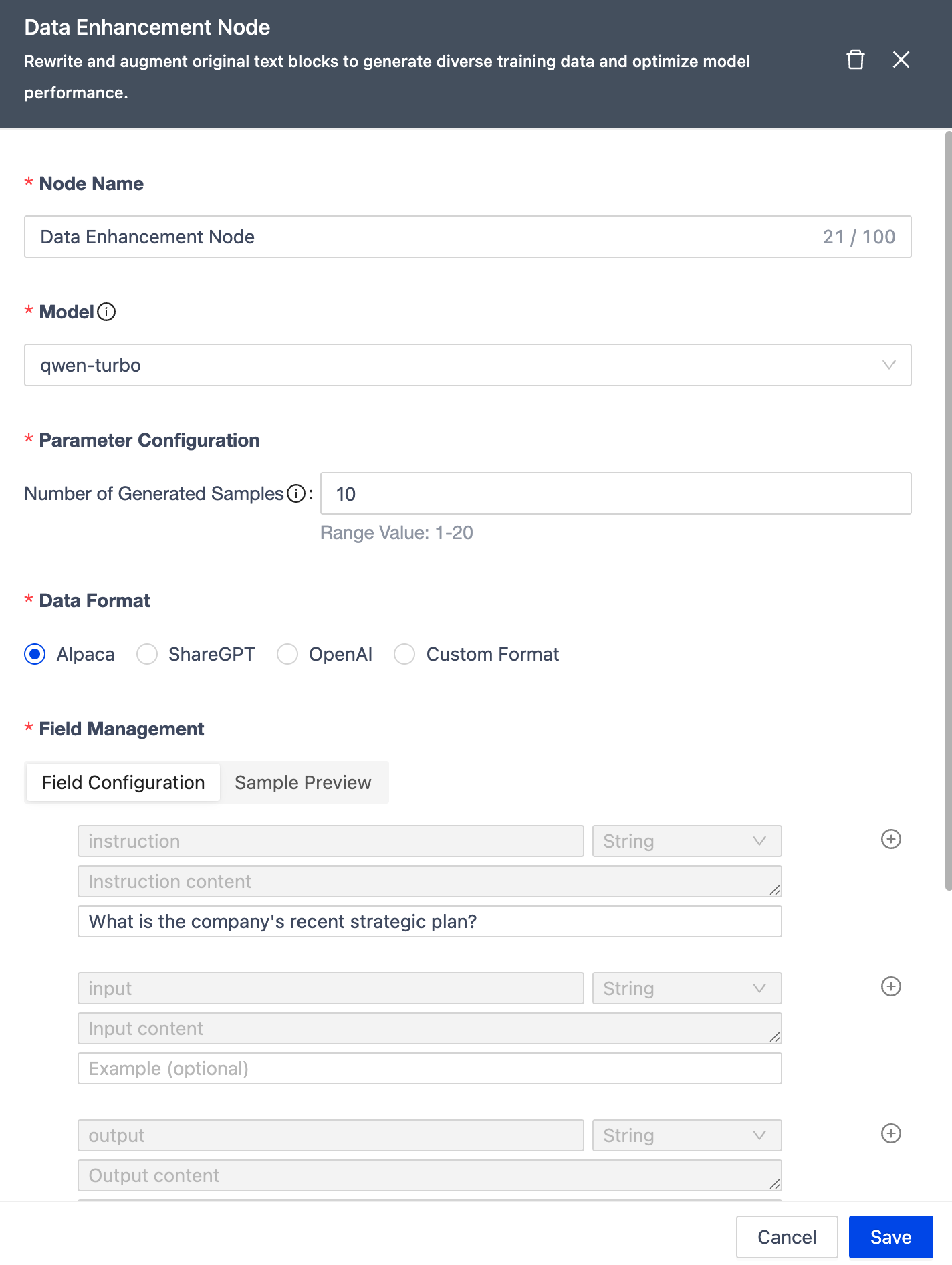
- Data Augmentation Node Supports More Formats
The data augmentation node now supports three additional output formats: ShareGPT Format, OpenAI Format, and custom formats. Through a visual configuration interface, users can flexibly combine fields and adjust output parameters to generate data formats tailored to different application scenarios, significantly enhancing the flexibility and adaptability of data processing.
- GenAI Workspace Supports MCP Protocol
The GenAI workspace now fully supports the MCP protocol, enabling models to call platform APIs in a standardized manner for multi-tool collaboration and automated task planning. Using the MCP protocol, models can intelligently decompose user inputs, autonomously plan task paths, and invoke multi-step tools, further lowering the barrier to entry and enhancing the platform's intelligence and automation capabilities.
- Support for Parsing Results vs. Original Text Comparison
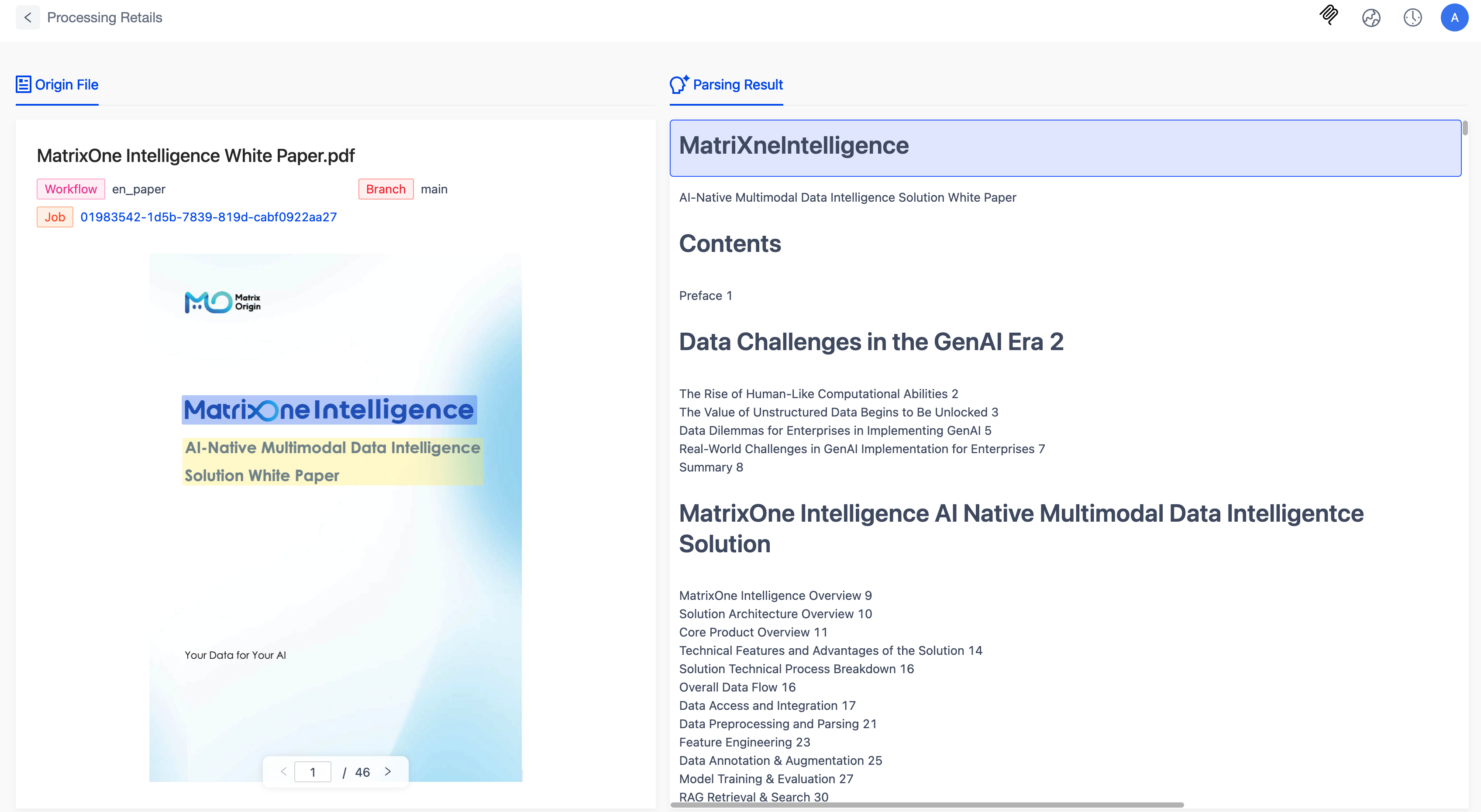
A new highlight display feature for parsing results has been introduced, allowing users to locate and highlight corresponding parsed fields in the original PDF file based on page layout. Users can intuitively compare extraction results with the original structure, quickly evaluating parsing accuracy and model performance. Currently, this feature supports only PDF files, with more formats to be added later.
- Official Website Experience Center Launched
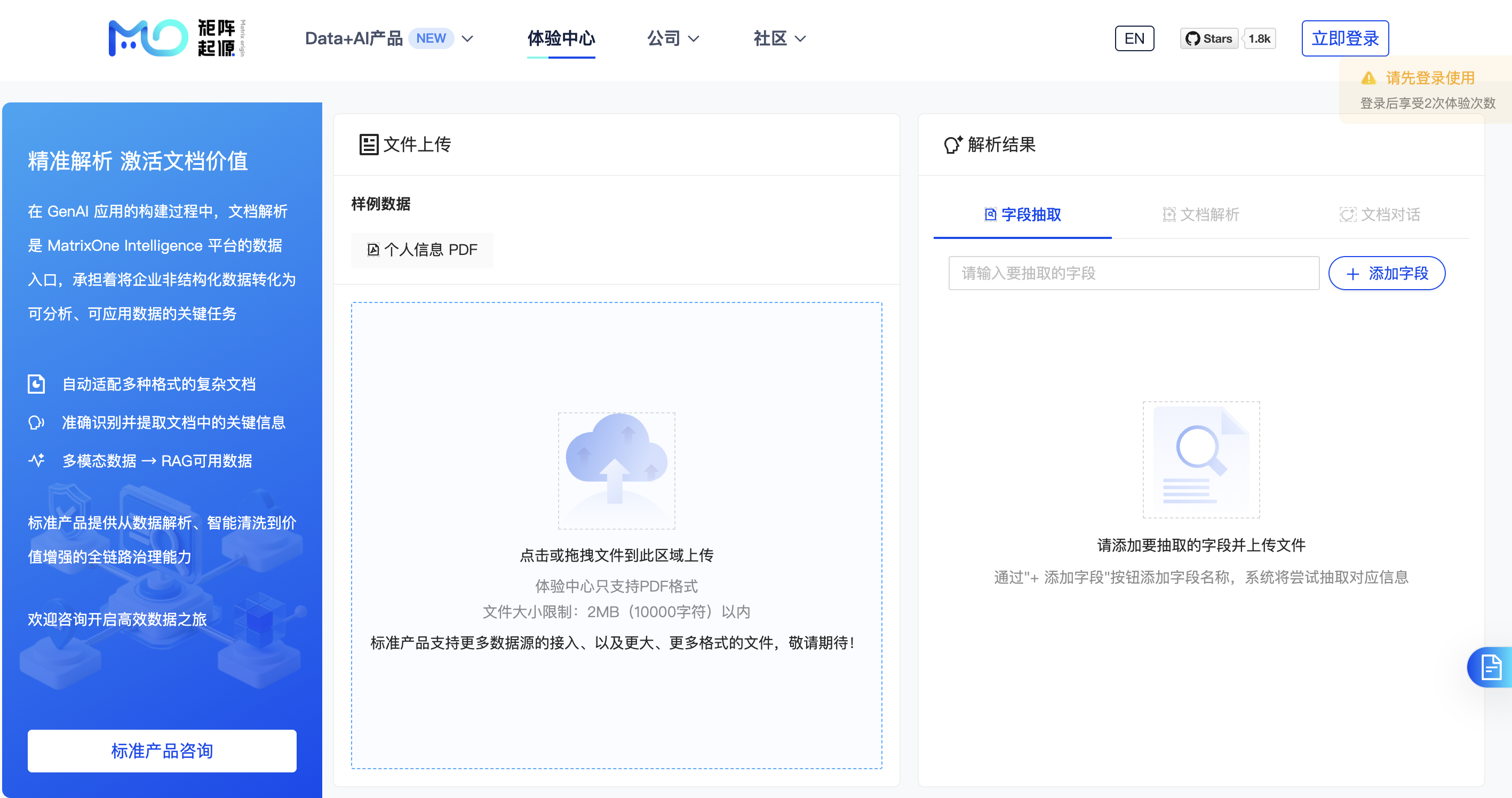
The first demo of the official website experience center is now live, designed to help users quickly understand MOI's comprehensive capabilities in document parsing. The demo integrates three core functionalities: structured extraction, document parsing, and document-based dialogue. Users can experience how the system accurately extracts key fields, converts unstructured text into structured data, deeply parses document content, and supports multi-format and complex layouts. Additionally, the demo showcases intelligent dialogue for natural language Q&A based on parsing results, demonstrating MOI's technical prowess and application value in document understanding and intelligent interaction.
Users can experience the demo with sample data without logging in, while logging in is required for using their own data. To enhance the user experience, the website has added quick registration and login via mobile number for easy access and onboarding.
- Processed Data Can Be Exported to Dify
A new data export connector feature has been added, currently supporting direct export of processed data to the Dify knowledge base, enabling users to quickly build and update knowledge base content and improve data utilization efficiency.
- Workflow Supports Text Embedding Node
The text embedding functionality, previously part of the text parsing and image parsing nodes, has been separated into an independent text embedding node. This enhances the modularity and flexibility of the parsing process, allowing users to flexibly combine and invoke related capabilities based on actual needs.
- File and Image Parsing Nodes Support OCR, Image Description, and Language Toggle
Added toggle configurations for OCR and image description in the file parsing and image parsing nodes. Users can enable or disable these features as needed, improving control and adaptability in the parsing process. The image description feature now supports language selection (Chinese or English) to meet output requirements in different scenarios.
- New Quick Start API for Structured Extraction
To help users quickly get started and experience our product, we have developed a set of Quick Start APIs to modularize core functionalities. This release introduces a Quick Start API for structured extraction, enabling users to quickly integrate and efficiently invoke structured data extraction capabilities.
- Support for More Text Segmentation Methods
The text segmentation node now supports segmentation by single markers, multiple markers, and custom markers, further enhancing the flexibility and adaptability of text processing. Users can set segmentation rules based on actual business needs for more precise and efficient text splitting.
- Support for Parsing Document Titles
Parsing results now support fine-grained identification of text titles, including primary titles and, in some scenarios, secondary and tertiary subcategories, improving document structure understanding. This capability helps more accurately reconstruct the hierarchical structure of the original text, supporting finer content extraction and knowledge building.
Improvements
- Optimized the workflow interface for an improved overall user experience.
- Enhanced validation logic when creating workflows for better standardization and stability.
- Improved the local file upload interface for a more intuitive and convenient process.
- Optimized the display of
typeandlevelin segmentation. - Streamlined the API usage process from the user's perspective, adding APIs related to alerts.
Bug Fixes
- Fixed the issue of duplicate output in image descriptions.
- Fixed the issue where the sample count in the data augmentation node did not take effect.
- Fixed cases where images had only descriptions but no OCR results.
- Fixed cases where BMP files had only OCR results but no image descriptions after parsing.
- Fixed incomplete display of alert records in some cases.
- Fixed the issue where modifying workflow node names was ineffective.
- Fixed cases where QA pairs were not generated after data augmentation for some files.
- Fixed abnormal workflow execution status in some scenarios.
- Fixed cases where some prompts in the English version of the platform remained in Chinese.
- Fixed the "Read timed out" error in some file parsing tasks.
- Fixed incorrect display of alert thresholds in the workspace.
- Fixed the issue where the "Alert Only Once" rule in the workspace did not work.
- Fixed the issue where temporary disabling of alerts in the workspace was ineffective.
- Fixed the issue where filtering by
blocktype in the data volume file details was ineffective. - Fixed cases where processing PPT files failed in some scenarios.
- Fixed cases where PDF files lost data after workflow processing in some scenarios.
- Fixed the issue where newly loaded files in the associated workflow did not trigger job execution intermittently.
- Fixed the error when changing user passwords in the workspace.
- Fixed the issue where deleting text blocks in the data volume failed in some cases.
June 6, 2025
Bug Fixes
- Fixed the issue where the original data volume images were displayed incorrectly.
- Fixed the 500 error when filtering workflow statuses.
- Fixed the issue where parsed audio in file processing details was displayed as text.
- Fixed the issue where editing the topology diagram triggered the workflow, but the edited diagram did not take effect.
- Fixed the issue where modifying any switches or parameters in the data cleaning node did not take effect.
- Fixed the issue where the workflow displayed in the job details did not match the created workflow.
- Fixed the issue where workflows with only start and end nodes should not actually run.
- Fixed the issue where file types were not displayed in workflow details when creating a workflow with image types.
- Fixed the issue where unchecking document types in the workflow caused the entire workflow diagram to disappear.
- Fixed the issue where the file type filter in the workflow - basic file information displayed primary types in English.
- Fixed the issue where modifying the parameters of workflow branch nodes showed success but did not take effect.
- Fixed the issue where newly created workflows in the associated processing workflow did not trigger job execution.
- Fixed the issue where stopped files in jobs should not appear in the catalog.
- Fixed the issue where super administrators were displayed incorrectly in English.
- Fixed the 500 error in the data volume file list interface.
- Fixed the issue where tables in DOC files were incorrectly formatted when converted to MD.
- Fixed the issue where modifying workflow basic information did not filter out used data volumes when selecting target data volumes.
- Fixed the issue where node names in the workflow node details page were displayed in English format.
- Fixed the issue where the processing node details in workflow branch comparisons were displayed incorrectly.
- Fixed the issue where the dataset format explanation in the enhancement node was incorrect.
- Fixed the issue where node names had no default values when creating or editing branches.
- Fixed the issue where some parameters in the data cleaning node had no default values.
- Fixed the issue where workflow nodes could not be deleted.
- Fixed the issue where the preview button in the data volume processing did not work.
- Fixed the issue where periodic processing workflows failed to be created.
- Fixed the issue where associated processing workflows failed to execute.
- Fixed the issue where the database management platform could not be logged into.
- Fixed the issue where QA pairs generated by the data enhancement node did not match the original content.
- Fixed the issue where some files did not generate QA pairs after enhancement.
- Fixed the issue where some file types were not displayed when loading files.
- Fixed the issue where modifying file types in workflow editing did not take effect.
- Fixed the issue where some pages in the pagination of enhanced QA pairs had no data.
- Fixed the issue where file processing failed after setting cleaning functions in the data cleaning node.
- Fixed the issue where switching the main branch when creating workflow branches did not take effect.
- Fixed the issue where MP4 file processing results were empty.
- Fixed the issue where parsed audio and video content was garbled.
May 29, 2025
Features
[Feature 1] Comprehensive Upgrade of Workflow Data Processing Capabilities
The workflow module has been significantly enhanced to handle multi-source heterogeneous data, improving the efficiency and quality of data preprocessing for large model applications, providing strong support for building efficient RAG systems and instruction fine-tuning solutions.
- Multi-modal Content Parsing: Supports parsing operators for text, images, audio, video, and other file types, automatically extracting structured information to bridge the gap between unstructured data and knowledge base construction.
- Data Cleaning Operators: Built-in cleaning strategies, including format standardization, deduplication, and desensitization, ensuring data accuracy and usability.
- Data Enhancement Operators: Supports automatic generation of datasets in Alpaca format, suitable for instruction fine-tuning, dialogue training, intent recognition, and other scenarios.
[Feature 2] GenAI Workspace API Key Management
To support secure and unified API calls by third-party applications, automation scripts, and internal services, the GenAI workspace now features API key management. This includes:
- Initial key generation with masked display for security.
- One-click copying for easy integration.
- Key refresh mechanisms for unified permission management and risk control.
[Feature 3] Support for More Alert Rules
This update expands alert rule configuration capabilities:
- Data Loading: Added thresholds for single-load task success rates.
- Data Processing: Added thresholds for single-file segment counts and file processing success rates per job.
[Feature 4] Support for Exporting Full Unsegmented Content in More File Types
Added support for exporting full unsegmented Markdown (full.md) files for DOC/DOCX, PPT/PPTX, and TXT formats, facilitating overall review and archiving.
Bug Fixes
- Fixed the issue where workflow priorities could not be filtered.
- Fixed the issue where alerts were not triggered in some cases.
- Fixed the issue where overly long workflow branch names were not displayed with line breaks.
May 22, 2025
Features
[Feature 1] GenAI Workspace Introduces Role-Based Access Control (RBAC)
To achieve more secure, flexible, and scalable permission management, the GenAI workspace has fully adopted the RBAC model. This model uses a "User - Role - Permission" hierarchy for unified permission allocation and centralized management:
- Super Administrator: Full permissions for all workspace resources and operations (cannot be modified, disabled, or deleted).
- Data Developer: Full permissions but customizable to fit specific needs.
[Feature 2] Support for Associating Workflows with Periodic Data Loading Tasks
Workflows can now be automatically triggered based on the completion of periodic data loading tasks, enhancing automation and data-driven workflows.
[Feature 3] Expanded Alert Rules
This update enriches the alert rule system with:
- Data Loading: Thresholds for file counts and average loading times.
- Data Processing: Thresholds for file counts and processing durations per job.
Bug Fixes
- Fixed the issue where periodic data loading tasks did not trigger file loading in some cases.
- Fixed the issue where multiple images referenced in the same table chunk were displayed out of order.
- Fixed the issue where some symbols were parsed incorrectly.
- Fixed the issue where clicking workflow names in the job list displayed incorrect error messages after workflow deletion.
- Fixed the issue where workflow priorities could not be edited after creation.
May 08, 2025
Features
【Feature 1】Workspace Alerting Support
To further ensure the stability, security, and performance controllability of workspace services, we have officially launched the alert management feature, enabling users to achieve more efficient and refined operation and maintenance monitoring.
- Flexible alert rule configuration: Supports creating personalized alert rules covering data loading and processing workflows. Users can set specific thresholds based on actual business needs to precisely detect potential anomalies and enable automated risk alerts and management.
- Multi-channel alert notification: Provides centralized alert contact management, allowing users to flexibly add, edit, disable, or delete notification recipients. Supports multiple notification channels, including email, phone, SMS, and enterprise WeChat, ensuring critical alerts are delivered quickly and accurately to relevant stakeholders.
- Alert log retention and query: The system automatically saves all alert event records, forming a complete alert log system. Users can query historical alerts from the past month via the interface, supporting retrospective analysis and issue resolution to help technical teams efficiently handle and review incidents.
【Feature 2】Workflow "Processing Priority" Support
To improve scheduling efficiency in multi-task scenarios, the platform now supports setting "processing priority" for workflows. Users can specify priority levels ("Low," "Medium," or "High") when creating or editing workflows, with "Medium" as the default. Once set, new workflow jobs will immediately follow the priority. When multiple workflows execute concurrently, the platform schedules them in descending order of priority to ensure critical tasks are processed first.
【Feature 3】Workspace Parsing Result Export Enhancements
- When exporting processing results to PDF, in addition to the original segmented JSON format, full Markdown content files are now supported.
- For image-type blocks in JSON files, a new
levelfield is added to indicate image processing levels:1for OCR results and2for caption results.
【Feature 4】Private Deployment Supports Configurable File Size Limits
To meet large-file processing needs in various business scenarios, we enhanced file processing capabilities for private deployments. The platform now supports flexible configuration of the maximum file size for loading and processing, with a configurable upper limit of 10,000MB.
Bug Fixes
- Fixed an issue where deleted branch data in processing volumes (with subdirectories retained) could still be used in new workflows.
- Fixed pagination errors in the execution details page of job details.
- Fixed missing OCR content in file parsing results.
April 24, 2025
Improvements
- Workflow segmentation components now support custom segment overlap settings.
- Optimized the download format for parsed data: Changed from a single JSON file to a folder containing a JSON file for text parsing information and an image folder. The JSON file now includes file metadata, segment types, segment page locations, and additional original image information.
Bug Fixes
- Resolved an issue where images were lost after file processing in certain cases.
April 10, 2025
Features
- Workflow Branch Management
This update introduces workflow branch management, helping data engineers efficiently manage similar data processing workflows, improving development efficiency, and reducing maintenance costs.
Users can create multiple branch versions of the same workflow, where branches share common configurations (e.g., source data volumes, file types) but can independently configure their processing pipelines. Execution results are stored in subdirectories of the target data volume by branch name, ensuring clear isolation for management and tracking. Key use cases include:
- Reduced management overhead: Avoids creating highly similar workflows repeatedly, enabling unified maintenance.
- Optimized resource usage: Shared processing steps are executed once, with results reused to minimize compute and storage costs.
-
Simplified comparison: Easily compare configurations and results across branches for evaluation and tuning.
-
GenAI Workspace User Permission Management
This iteration introduces RBAC (Role-Based Access Control) for GenAI Workspace, enabling fine-grained control over platform access and operations. The model maps "user-role-permission" relationships to ensure flexibility and security.
The default "Data Developer" role has full operational permissions except user management. Future versions will expand roles to meet diverse user needs in data processing and model applications.
- Workflow Support for Additional Document Types
Workflows now support more document types, enhancing multi-modal data adaptability. Users can select formats like txt/md, doc/docx, and ppt/pptx, with the system recommending matching processing components to simplify configuration.
- Raw Data Volume File Preview
Supports online preview of raw files in data volumes, enabling quick content review before processing for improved usability.
- Lightweight Python Script Dependency Addition
Private deployments now support lightweight offline addition of Python script dependencies, enhancing flexibility for custom nodes. Users can package and integrate third-party dependencies without public network access, ideal for isolated environments.
Improvements
- Optimized data loading tasks.
- Enhanced retrieval and association of parsed file content: Supports precise searches by block ID and names images by their corresponding block IDs for better traceability.
Bug Fixes
- Fixed an issue where data loading tasks remained "Running" indefinitely in some scenarios.
- Fixed a bug where deleting a connector during a running data loading task left the task stuck in "Running" state.
- Resolved an issue where failed files in paused workflows remained in "Stopped" state after retry.
- Fixed a 500 error when clicking "Rerun" on stopped periodic data loading tasks.
- Fixed missing files for stopped workflows.
- Fixed a 500 error when entering query details immediately after SQL editor execution.
- Fixed password change errors for GenAI Workspace usernames containing "-".
- Resolved creation failures for GenAI Workspaces with special characters in usernames.
- Fixed SQL editor connection issues where WebSocket failed to establish in some cases.
March 14, 2025
MatrixOne Kernel Update
Upgraded from v24.2.0.1 to v25.2.0.3. For details, refer to 《MatrixOne v25.2.0.3 Release Notes》.
February 21, 2025
Features
- GenAI Workspace Officially Launched
GenAI Workspace is now available to all users. Register and try it out!
- New Resume Smart Search
The AI App Market introduces Resume Smart Search—an intelligent solution optimized for resume screening in recruitment and HR management. It enables multi-dimensional queries, keyword matching, and advanced filtering to quickly identify top candidates from large pools, improving hiring efficiency and decision accuracy.
Bug Fixes
- Fixed errors when deleting text blocks.
- Resolved an issue where file loading tasks did not end after successful completion.
- Fixed delayed file status updates after stopping jobs.
February 17, 2025
Features
GenAI Workspace
This iteration introduces GenAI Workspace, a smart entry point for multi-modal data, integrating data ingestion, processing, and exploration. It provides efficient data management capabilities to streamline cleaning and transformation, unlocking data potential for business growth.
Note
Currently available to select users. Contact technical support for access.
- Data Ingestion: Supports creating Alibaba Cloud OSS or standard S3 connectors to import data into GenAI Workspace, stored in raw data volumes.
- Data Processing: Offers visual workflows to define and execute complex tasks, with execution records retained as jobs for traceability.
- Data Exploration: The Catalog component manages raw data volumes (unstructured data) and processed data volumes (parsed files).