Vector Types
What is a Vector?
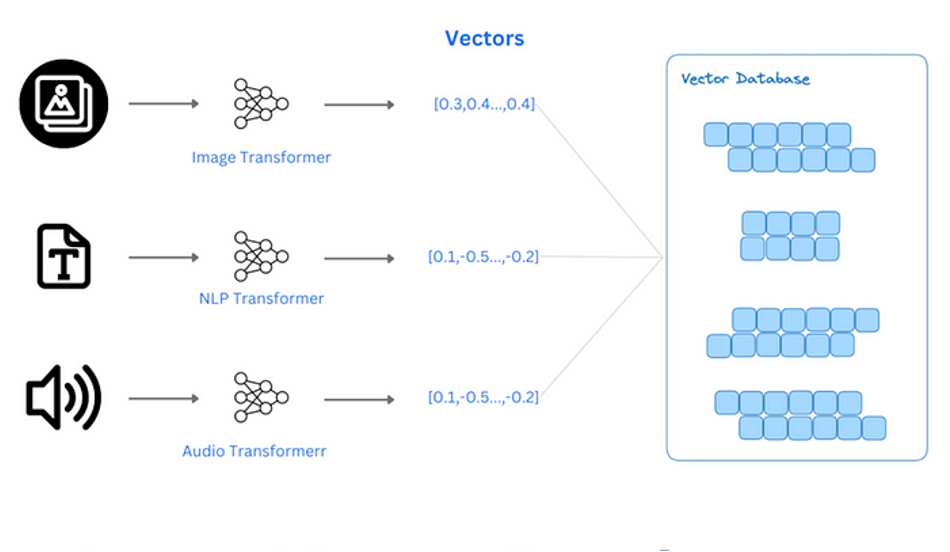
In a database, avector is typically a set of numbers arranged in a specific way to represent a type of data or feature. These vectors can be one-dimensional arrays, multi-dimensional arrays, or data structures with higher dimensions. In machine learning and data analysis, vectors are used to represent data points, features, or model parameters. They are commonly used to process unstructured data, such as images, audio, and text, by converting them intoembedding vectors via machine learning models for subsequent analysis.
What is Vector Retrieval?
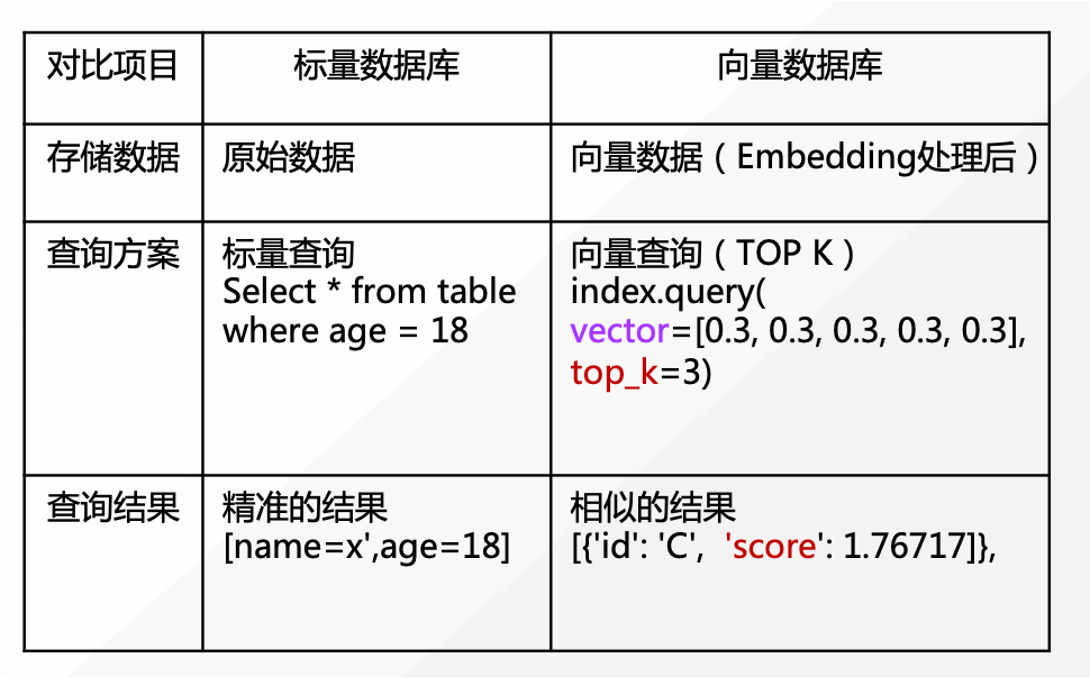
Vector retrieval, also known as Approximate Nearest Neighbor Search (ANNS), is a technique for finding vectors similar to a given query vector within large-scale, high-dimensional vector data. Vector retrieval has wide applications in many AI fields, such as image retrieval, text retrieval, speech recognition, and recommendation systems. Vector retrieval differs significantly from traditional database retrieval. Traditional scalar search in databases primarily performs exact data queries on structured data, whereas vector search focuses onsimilarity retrieval for vectorized unstructured data, providing only approximate best-matching results.
Application Scenarios for Vector Retrieval
A database with vector capabilities means the database system can store, query, and analyze vector data. These vectors are often related to complex data analysis, machine learning, and data mining tasks. Here are some application scenarios when a database has vector processing capabilities:
Generative AI Applications*: These databases can serve as the backend for generative AI applications, allowing them to retrieve nearest neighbor results based on user queries, thereby improving output quality and relevance. Advanced Object Recognition: They are invaluable for developing advanced object recognition platforms that identify similarities between different datasets. This has practical applications in areas like plagiarism detection, facial recognition, and DNA matching. Personalized Recommendation Systems: Vector databases can enhance recommendation systems by integrating user preferences and choices. This leads to more accurate and targeted recommendations, improving user experience and engagement. *Anomaly Detection: Vector databases can store feature vectors that represent normal behavior. Anomalies can then be detected by comparing input vectors with the stored vectors. This is useful in cybersecurity and industrial quality control.
MatrixOne's Vector Data Types
In MatrixOne, vectors are designed as a specific data type, similar to arrays in programming languages (though MatrixOne does not yet support general array types). Currently, MatrixOne's vector types are one-dimensional arrays and only support float32 and float64 elements, namedvecf32 andvecf64 respectively. String and integer vector types are not supported.
When creating a vector column, you can specify its dimension, such as vecf32(3). This dimension represents the length of the vector array, with a maximum supported dimension of 65,536.
How to Use Vector Types in SQL
Using vectors follows the same syntax as conventional table creation, data insertion, and data querying:
Creating Vector Columns
You can create two vector columns, one of type Float32 and one of type Float64, both with a dimension of 3, using the following SQL statement:
CREATE TABLE t1(a INT, b VECF32(3), c VECF64(3));
Currently, vector types cannot be used as primary keys or unique keys.
Inserting Vectors
MatrixOne supports inserting vectors in two formats:
*Text Format
```sql
INSERT INTO t1 VALUES(1, "[1,2,3]", "[4,5,6]");
```
*Binary Format
If you want to use Python NumPy arrays, you can directly insert them into MatrixOne by hexadecimal encoding the array instead of converting it to a comma-separated text format. This method is faster when inserting higher-dimensional vectors.

```sql
INSERT INTO t1 (a, b) VALUES
(2, DECODE("7e98b23e9e10383b2f41133f", "hex"));
```

  * `"7e98b23e9e10383b2f41133f"` represents the little-endian hexadecimal encoding of `[]float32{0.34881967, 0.0028086076, 0.5752134}`.
  * `"hex"` specifies hexadecimal encoding.
Querying Vectors
Vector columns can also be read in two formats:
*Text Format
```sql
mysql> SELECT a, b FROM t1;
+------+---------------------------------------+
| a    | b                                     |
+------+---------------------------------------+
|    1 | [1, 2, 3]                             |
|    2 | [0.34881967, 0.0028086076, 0.5752134] |
+------+---------------------------------------+
2 rows in set (0.00 sec)
```
*Binary Format
The binary format is useful if you need to read vector result sets directly into NumPy arrays with minimal conversion cost.

```sql
mysql> SELECT ENCODE(b, "hex") FROM t1;
+--------------------------+
| ENCODE(b, hex)           |
+--------------------------+
| 0000803f0000004000004040 |
| 7e98b23e9e10383b2f41133f |
+--------------------------+
2 rows in set (0.00 sec)
```
Supported Operators and Functions
Basic Binary Operators*: +, -, *, /.
Comparison Operators: =, !=, >, >=, <, <=.
Unary Functions: sqrt, abs, cast.
Automatic Type Conversion:
vecf32 + vecf64 = vecf64.
* vecf32 + varchar = vecf32.
Vector Unary Functions:
* Summation function summation, L1 norm function l1_norm, L2 norm function l2_norm, dimension function vector_dims.
Vector Binary Functions:
* Inner product function inner_product, cosine similarity function cosine_similarity.
*Aggregate Function: count.
Example - Top K Query
ATop K query is a database operation used to retrieve the top K data items or records from a database. Top K queries can be applied in various scenarios, including recommendation systems, search engines, data analysis, and sorting.
First, let's create a table named t1 with vector data b and insert some example data. Then, we'll perform Top K queries based on l1_distance, l2_distance, cosine similarity, and cosine distance, limiting the results to the top 5 matches.
-- Example table 't1' containing vector data 'b'
CREATE TABLE t1 (
    id INT,
    b VECF64(3)
);

-- Insert some example data
INSERT INTO t1 (id, b) VALUES (1, '[1,2,3]'), (2, '[4,5,6]'), (3, '[2,1,1]'), (4, '[7,8,9]'), (5, '[0,0,0]'), (6, '[3,1,2]');

-- Top K Query using l1_distance
SELECT * FROM t1 ORDER BY l1_norm(b - '[3,1,2]') LIMIT 5;
mysql> SELECT * FROM t1 ORDER BY l1_norm(b - '[3,1,2]') LIMIT 5;
+------+-----------+
| id   | b         |
+------+-----------+
| NULL | [3, 1, 2] |
| NULL | [2, 1, 1] |
| NULL | [1, 2, 3] |
| NULL | [0, 0, 0] |
| NULL | [4, 5, 6] |
+------+-----------+
5 rows in set (0.00 sec)
-- Top K Query using l2_distance
SELECT * FROM t1 ORDER BY l2_norm(b - '[3,1,2]') LIMIT 5;
mysql> SELECT * FROM t1 ORDER BY l2_norm(b - '[3,1,2]') LIMIT 5;
+------+-----------+
| id   | b         |
+------+-----------+
| NULL | [3, 1, 2] |
| NULL | [2, 1, 1] |
| NULL | [1, 2, 3] |
| NULL | [0, 0, 0] |
| NULL | [4, 5, 6] |
+------+-----------+
5 rows in set (0.00 sec)
-- Top K Query using cosine similarity
SELECT * FROM t1 ORDER BY cosine_similarity(b, '[3,1,2]') LIMIT 5;
mysql> SELECT * FROM t1 ORDER BY cosine_similarity(b, '[3,1,2]') LIMIT 5;
+------+-----------+
| id   | b         |
+------+-----------+
| NULL | [1, 2, 3] |
| NULL | [0, 0, 0] |
| NULL | [4, 5, 6] |
| NULL | [7, 8, 9] |
| NULL | [2, 1, 1] |
+------+-----------+
5 rows in set (0.00 sec)
-- Top K Query using cosine distance
SELECT * FROM t1 ORDER BY 1 - cosine_similarity(b, '[3,1,2]') LIMIT 5;
mysql> SELECT * FROM t1 ORDER BY 1 - cosine_similarity(b, '[3,1,2]') LIMIT 5;
+------+-----------+
| id   | b         |
+------+-----------+
| NULL | [3, 1, 2] |
| NULL | [0, 0, 0] |
| NULL | [2, 1, 1] |
| NULL | [7, 8, 9] |
| NULL | [4, 5, 6] |
+------+-----------+
5 rows in set (0.00 sec)
These queries demonstrate how to use different distance and similarity measures to retrieve the top 5 vectors most similar to the given vector [3,1,2]. Through these queries, you can find the data that best matches your target vector based on various metrics.
Best Practices
*Vector Type Conversion: When converting vectors from one type to another, it's recommended to specify the dimension simultaneously. For example:
```sql
SELECT b + CAST("[1,2,3]" AS VECF32(3)) FROM t1;
```

This practice ensures the accuracy and consistency of vector type conversions.
*Using Binary Format: To improve overall insertion performance, consider using the binary format instead of the text format. Before converting to hexadecimal encoding, ensure the array is in little-endian format. Here's example Python code:
```python
import binascii
import numpy as np

# 'value' is a NumPy object
def to_binary(value):
    if value is None:
        return value

    # Little-endian float array
    value = np.asarray(value, dtype='<f')

    if value.ndim != 1:
        raise ValueError('Expected ndim to be 1')

    return binascii.b2a_hex(value)
```

This method can significantly improve data insertion efficiency.