Importing Files from Object Storage
Overview
S3 (Simple Storage Service) object storage refers to Amazon's simple storage service. You can also use S3-compatible object storage to store almost any type and size of data, including data lakes, cloud-native applications, and mobile applications. If you are new to S3 object services, you can find a basic introduction in AWS.
AWS S3 has been highly successful for over a decade, making it the standard for object storage. As a result, almost all major public cloud vendors offer S3-compatible object storage services.
MatrixOne Intelligence supports loading files from S3-compatible object storage services into the database. MatrixOne Intelligence supports AWS and mainstream domestic cloud vendors (Alibaba Cloud, Tencent Cloud, etc.).
In MatrixOne Intelligence, there are two ways to import data from S3-compatible object storage:
- Use
Load datawiths3optionto load files into MatrixOne Intelligence. This method will load the data into MatrixOne Intelligence, and all subsequent queries will be performed within MatrixOne Intelligence. - Create an "external table" with
s3optionmapped to S3 files and query this external table directly. This method allows data access through the S3-compatible object storage service; network latency for each query will be calculated.
Method 1: LOAD DATA
Syntax Structure
LOAD DATA
    | URL s3options {"endpoint"='<string>', "access_key_id"='<string>', "secret_access_key"='<string>', "bucket"='<string>', "role_arn"='xxxx', "external_id"='yyy', "filepath"='<string>', "region"='<string>', "compression"='<string>'}
    INTO TABLE tbl_name
    [{FIELDS | COLUMNS}
        [TERMINATED BY 'string']
        [[OPTIONALLY] ENCLOSED BY 'char']
        [ESCAPED BY 'char']
    ]
    [IGNORE number {LINES | ROWS}]
    [PARALLEL {'TRUE' | 'FALSE'}]
Parameter Description
| Parameter | Description |
|---|---|
| endpoint | The URL to connect to the object storage service. For example: s3.us-west-2.amazonaws.com |
| access_key_id | Access key ID |
| secret_access_key | Secret access key |
| bucket | The S3 bucket to access |
| role_arn | |
| external_id | |
| filepath | Relative file path. Supports regular expressions like /files/*.csv. |
| region | Object storage service region |
| compression | Compression format of the S3 file. If empty or "none", it indicates an uncompressed file. Supported fields or compression formats are "auto", "none", "gzip", "bz2", and "lz4". |
Other parameters are the same as general LOAD DATA parameters. For more information, refer to [移除了无效网址].
Syntax Examples:
# LOAD a csv file from AWS S3 us-east-1 region, test-load-mo bucket, without compression
LOAD DATA URL s3option{"endpoint"='s3.us-east-1.amazonaws.com', "access_key_id"='XXXXXX', "secret_access_key"='XXXXXX', "bucket"='test-load-mo', "filepath"='test.csv', "region"='us-east-1', "compression"='none'} INTO TABLE t1 FIELDS TERMINATED BY ',' ENCLOSED BY '\"' LINES TERMINATED BY '\n';

# LOAD all csv files from Alibaba Cloud OSS Shanghai region, test-load-data bucket, without compression
LOAD DATA URL s3option{"endpoint"='oss-cn-shanghai.aliyuncs.com', "access_key_id"='XXXXXX', "secret_access_key"='XXXXXX', "bucket"='test-load-data', "filepath"='/test/*.csv', "region"='oss-cn-shanghai', "compression"='none'} INTO TABLE t1 FIELDS TERMINATED BY ',' ENCLOSED BY '\"' LINES TERMINATED BY '\n';

# LOAD a csv file from Tencent Cloud COS Shanghai region, test-1252279971 bucket, with bz2 compression
LOAD DATA URL s3option{"endpoint"='cos.ap-shanghai.myqcloud.com', "access_key_id"='XXXXXX', "secret_access_key"='XXXXXX', "bucket"='test-1252279971', "filepath"='test.csv.bz2', "region"='ap-shanghai', "compression"='bz2'} INTO TABLE t1 FIELDS TERMINATED BY ',' ENCLOSED BY '\"' LINES TERMINATED BY '\n';
!!! note
MatrixOne Intelligence provides security assurance for S3 authentication information. Sensitive information such as access_key_id and secret_access_key will be hidden in system table records (statement_info) to ensure your account security.
Tutorial: Loading Files from AWS S3
This tutorial will guide you through the process of loading a.csv file from AWS S3.
If you already have an AWS account and have prepared your data files in your S3 service, please continue reading this tutorial section.
If you have not yet prepared your data files, please register and upload your data files first; you can also check the AWS S3 official tutorial. If you want to upload your data files to Alibaba Cloud OSS or Tencent Cloud COS, the operation process is similar to AWS S3.
!!! note
Due to account privacy, this code example does not display account information such as access_key_id and secret_access_key.
You can read this document to understand the main steps; specific data and account information will not be displayed.
-
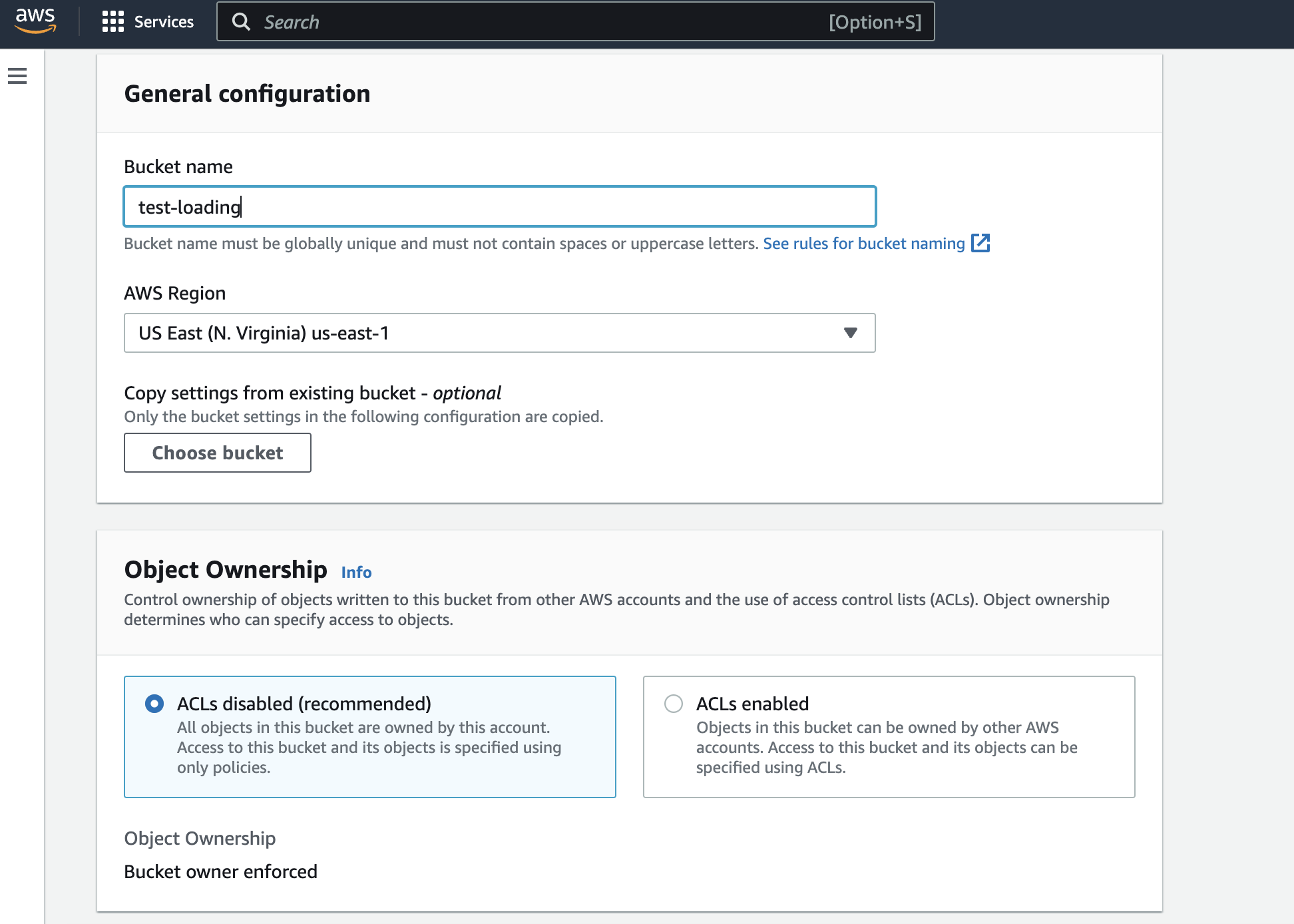
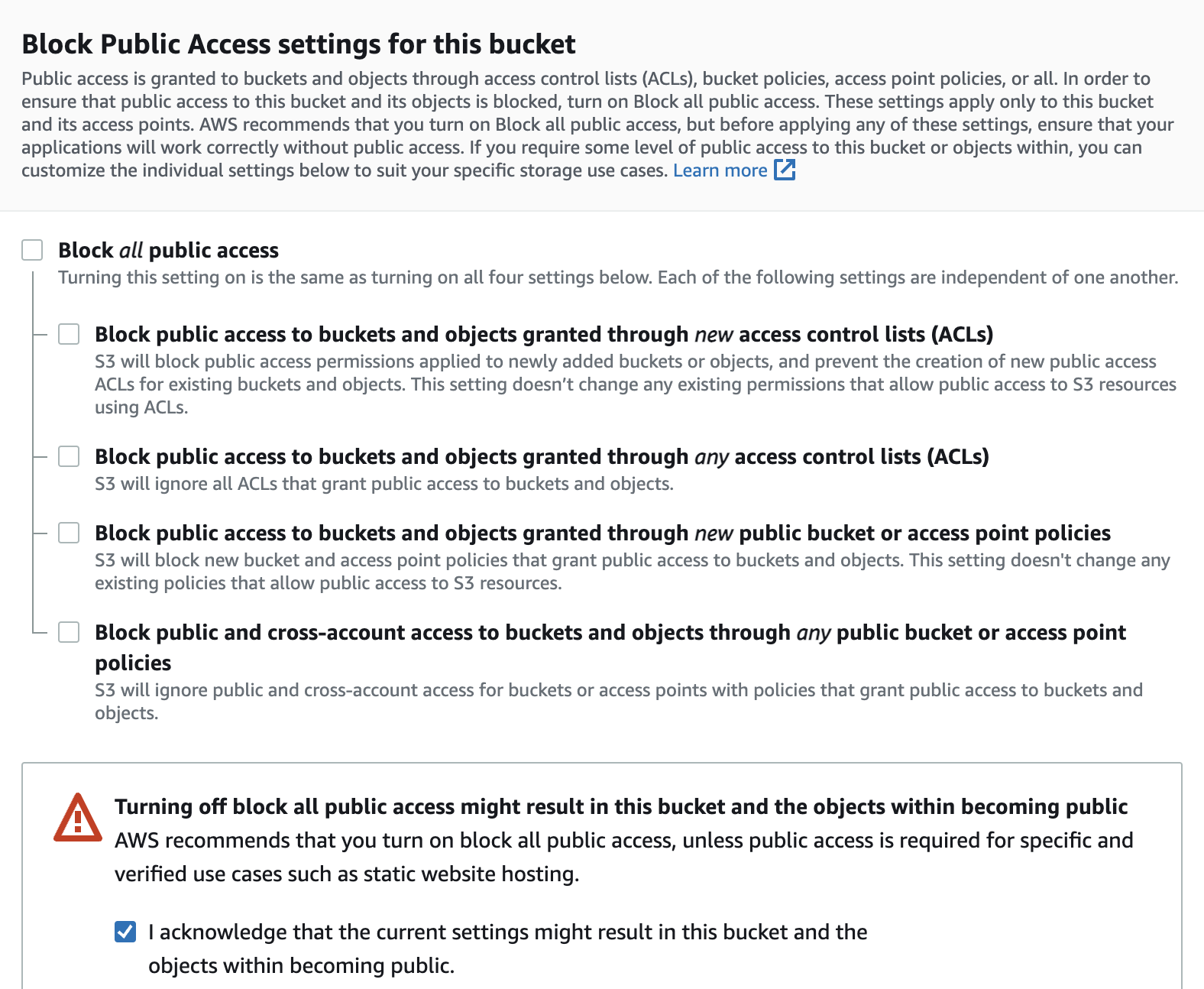
Download the data file. Go toAWS S3 > buckets, create a bucket namedtest-loading with public access, and upload the file char_varchar_1.csv.
-
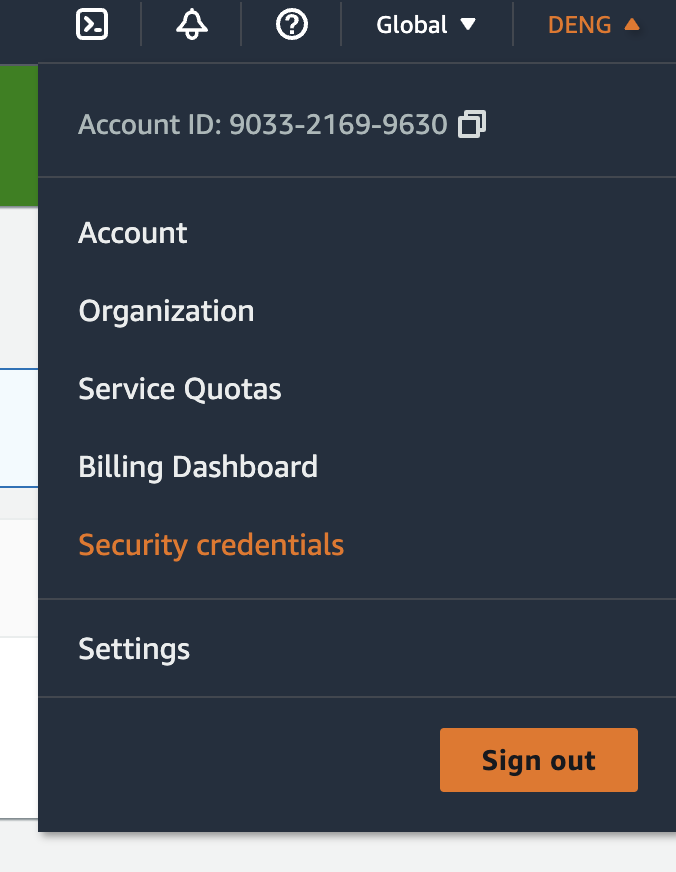
Get or create your AWS Access key. Go toYour Account Name > Security Credentials, and retrieve your existing access keys or create a new one.

You can obtain the
Access keyandSecret access keyfrom the downloaded credentials or this webpage.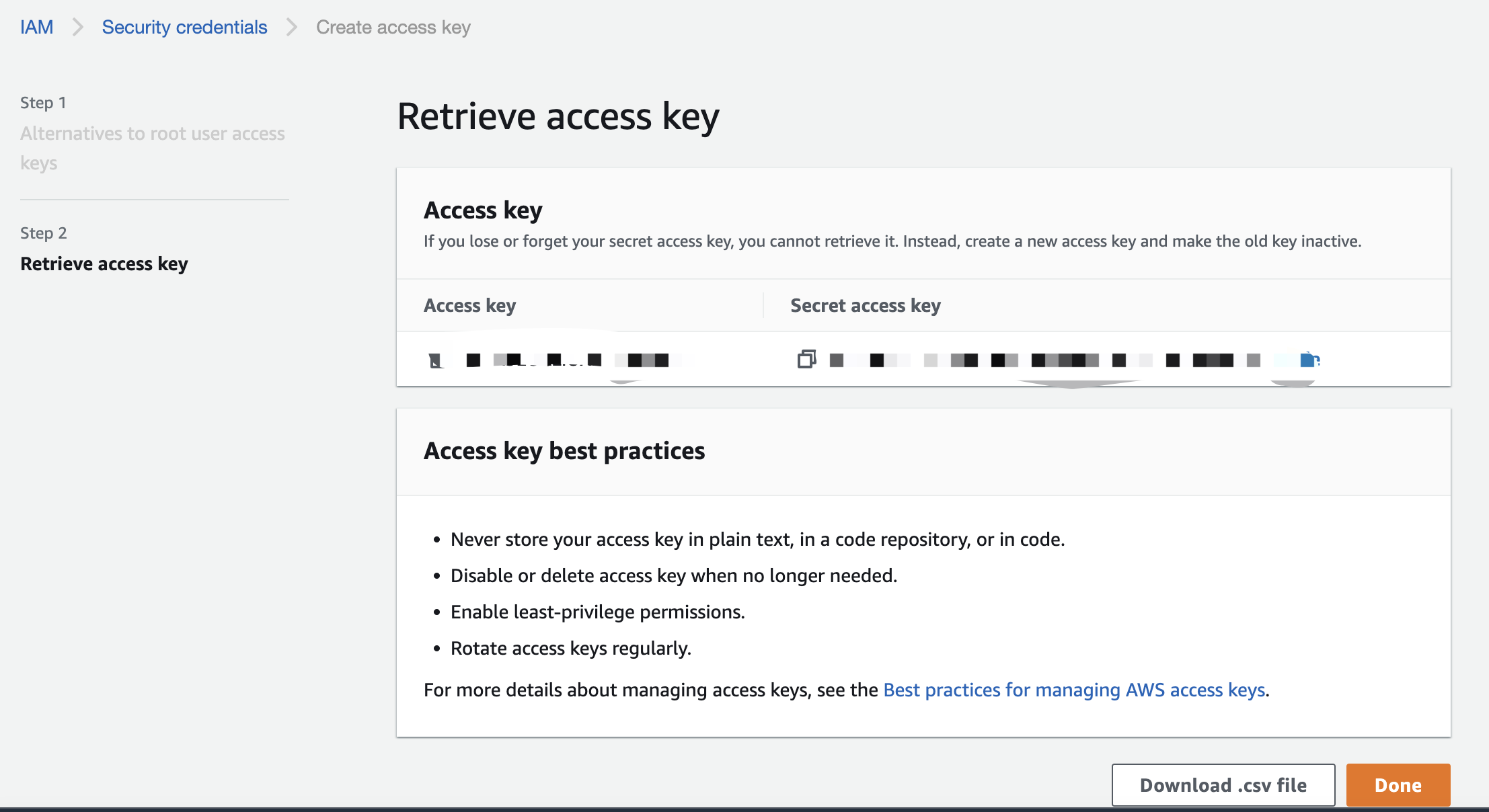 3. Create a table in MatrixOne Intelligence. An SQL example is as follows:
create database db; use db; drop table if exists t1; create table t1(col1 char(225), col2 varchar(225), col3 text, col4 varchar(225)); -
Import the file into MatrixOne Intelligence:
LOAD DATA URL s3option{"endpoint"='s3.us-east-1.amazonaws.com', "access_key_id"='XXXXXX', "secret_access_key"='XXXXXX', "bucket"='test-loading', "filepath"='char_varchar_1.csv', "region"='us-east-1', "compression"='none'} INTO TABLE t1; -
After the import is complete, you can run the SQL statement to check if the file import was successful:
mysql> select * from t1;
+-----------+-----------+-----------+-----------+
| col1      | col2      | col3      | col4      |
+-----------+-----------+-----------+-----------+
| a         | b         | c         | d         |
| a         | b         | c         | d         |
| 'a'       | 'b'       | 'c'       | 'd'       |
| 'a'       | 'b'       | 'c'       | 'd'       |
| aa,aa     | bb,bb     | cc,cc     | dd,dd     |
| aa,       | bb,       | cc,       | dd,       |
| aa,,,aa   | bb,,,bb   | cc,,,cc   | dd,,,dd   |
| aa',',,aa | bb',',,bb | cc',',,cc | dd',',,dd |
| aa"aa     | bb"bb     | cc"cc     | dd"dd     |
| aa"aa     | bb"bb     | cc"cc     | dd"dd     |
| aa"aa     | bb"bb     | cc"cc     | dd"dd     |
| aa""aa    | bb""bb    | cc""cc    | dd""dd    |
| aa""aa    | bb""bb    | cc""cc    | dd""dd    |
| aa",aa    | bb",bb    | cc",cc    | dd",dd    |
| aa"",aa   | bb"",bb   | cc"",cc   | dd"",dd   |
|           |           |           |           |
|           |           |           |           |
| NULL      | NULL      | NULL      | NULL      |
|           |           |           |           |
| "         | "         | "         | "         |
| ""        | ""        | ""        | ""        |
+-----------+-----------+-----------+-----------+
21 rows in set (0.03 sec)
Method 2: Specify S3 Files to External Tables
Syntax Structure
create external table t(...) URL s3option{"endpoint"='<string>', "access_key_id"='<string>', "secret_access_key"='<string>', "bucket"='<string>', "filepath"='<string>', "region"='<string>', "compression"='<string>'}
[{FIELDS | COLUMNS}
        [TERMINATED BY 'string']
        [[OPTIONALLY] ENCLOSED BY 'char']
        [ESCAPED BY 'char']
]
[IGNORE number {LINES | ROWS}];
!!! note
MatrixOne Intelligence currently only supports select operations on external tables and does not support delete, insert, or update at this time.
Parameter Description
| Parameter | Description |
|---|---|
| endpoint | The URL to connect to the object storage service. For example: s3.us-west-2.amazonaws.com |
| access_key_id | Access key ID |
| secret_access_key | Secret access key |
| bucket | The S3 bucket to access |
| filepath | Relative file path. Supports regular expressions like /files/*.csv. |
| region | Object storage service region |
| compression | Compression format of the S3 file. If empty or "none", it indicates an uncompressed file. Supported fields or compression formats are "auto", "none", "gzip", "bz2", and "lz4". |
Other parameters are the same as general LOAD DATA parameters. For more information, refer to [移除了无效网址].
For more information about external tables, refer to [移除了无效网址].
Syntax Examples:
## Create an external table for a .csv file from AWS S3
create external table t1(col1 char(225)) url s3option{"endpoint"='s3.us-east-1.amazonaws.com', "access_key_id"='XXXXXX', "secret_access_key"='XXXXXX', "bucket"='test-loading', "filepath"='test.csv', "region"='us-east-1', "compression"='none'} fields terminated by ',' enclosed by '\"' lines terminated by '\n';

## Create an external table for a .csv file compressed with BZIP2 from Tencent Cloud
create external table t1(col1 char(225)) url s3option{"endpoint"='cos.ap-shanghai.myqcloud.com', "access_key_id"='XXXXXX', "secret_access_key"='XXXXXX', "bucket"='test-1252279971', "filepath"='test.csv.bz2', "region"='ap-shanghai', "compression"='bz2'} fields terminated by ',' enclosed by '\"' lines terminated by '\n' ignore 1 lines;
Tutorial: Creating External Tables with S3 Files
This tutorial will guide you through the entire process of creating an external table using a.csv file from AWS S3.
!!! note
Due to account privacy, this code example does not display account information such as access_key_id and secret_access_key.
You can read this document to understand the main steps; specific data and account information will not be displayed.
-
Download the data file. Go toAWS S3 > buckets, create a bucket namedtest-loading with public access, and upload the file char_varchar_1.csv.
2. Get or create your AWS Access key. Go toYour Account Name > Security Credentials, and retrieve your existing access keys or create a new one.
You can obtain the Access keyandSecret access keyfrom the downloaded credentials or this webpage.
3. In MatrixOne Intelligence, specify the S3 file to the external table:create database db; use db; drop table if exists t1; create external table t1(col1 char(225), col2 varchar(225), col3 text, col4 varchar(225)) url s3option{"endpoint"='s3.us-east-1.amazonaws.com', "access_key_id"='XXXXXX', "secret_access_key"='XXXXXX', "bucket"='test-loading', "filepath"='char_varchar_1.csv', "region"='us-east-1', "compression"='none'} fields terminated by ',' enclosed by '\"' lines terminated by '\n'; -
After successful import, you can run the following SQL statement to view the import results. You will notice that the query speed is significantly slower than querying from a local table.
select * from t1; +-----------+-----------+-----------+-----------+ | col1 | col2 | col3 | col4 | +-----------+-----------+-----------+-----------+ | a | b | c | d | | a | b | c | d | | 'a' | 'b' | 'c' | 'd' | | 'a' | 'b' | 'c' | 'd' | | aa,aa | bb,bb | cc,cc | dd,dd | | aa, | bb, | cc, | dd, | | aa,,,aa | bb,,,bb | cc,,,cc | dd,,,dd | | aa',',,aa | bb',',,bb | cc',',,cc | dd',',,dd | | aa"aa | bb"bb | cc"cc | dd"dd | | aa"aa | bb"bb | cc"cc | dd"dd | | aa"aa | bb"bb | cc"cc | dd"dd | | aa""aa | bb""bb | cc""cc | dd""dd | | aa""aa | bb""bb | cc""cc | dd""dd | | aa",aa | bb",bb | cc",cc | dd",dd | | aa"",aa | bb"",bb | cc"",cc | dd"",dd | | | | | | | | | | | | NULL | NULL | NULL | NULL | | | | | | | " | " | " | " | | "" | "" | "" | "" | +-----------+-----------+-----------+-----------+ 21 rows in set (1.32 sec) -
(Optional) If you need to import external table data into a data table in MatrixOne Intelligence, use the following SQL statement:
Create a new table
t2in MatrixOne Intelligence:create table t2(col1 char(225), col2 varchar(225), col3 text, col4 varchar(225));Import external table
t1intot2:insert into t2 select * from t1;